Question

Excel writer - overcome maximum row limit

  • November 8, 2016
  • 6 replies
  • 203 views

Forum|alt.badge.img

Hi, I have hit the maximum row limit for an excel spreadsheet with the excel output writer (1,048,576 rows).

Is there an easy option to overflow the rows into another spreadsheet?

Should I use a row counter and tester to overflow the data to another spreadsheet?

This post is closed to further activity.
It may be an old question, an answered question, an implemented idea, or a notification-only post.
Please check post dates before relying on any information in a question or answer.
For follow-up or related questions, please post a new question or idea.
If there is a genuine update to be made, please contact us and request that the post is reopened.

6 replies

takashi
Celebrity
  • November 9, 2016

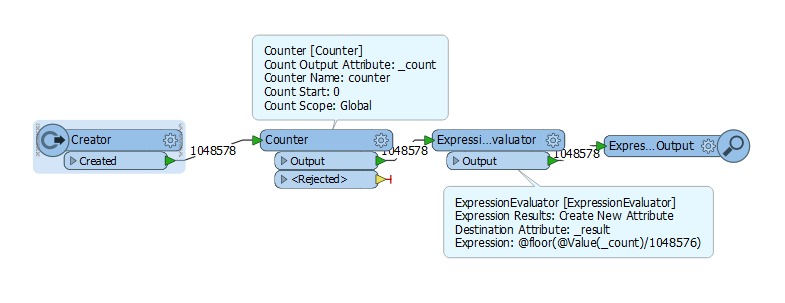
Hi @thiru, assuming that an attribute named "_count" contains the feature count number (0-based sequential number), this math expression returns 0-based index for each group of 1048576 rows.

@int(@Value(_count)/1048576)

I think you can configure destination feature type name (i.e. Excel sheet name) based on this value.


itay
Supporter
Forum|alt.badge.img+18
  • Supporter
  • November 9, 2016

Hi @thiru you can also do the following grouping:

Hope this helps.

groupfeatures.fmw


Forum|alt.badge.img
  • October 30, 2017

Hi @thiru you can also do the following grouping:

Hope this helps.

groupfeatures.fmw

Might need to divide "_count" with 1048575 to keep row limit under 1048576


  • September 19, 2019

Hi @thiru, assuming that an attribute named "_count" contains the feature count number (0-based sequential number), this math expression returns 0-based index for each group of 1048576 rows.

@int(@Value(_count)/1048576)

I think you can configure destination feature type name (i.e. Excel sheet name) based on this value.

How does it work exactly?

I have the same problem, and I'm not sure I understand where I'm supposed to plug this "groupfeatures".

I have 3 different writers, do I have to plug 3 "groupfeatures"?

How do I configure the writer to split into a new spreadsheet every 1 048 576 row?


Thanks


andreaatsafe
Safer
Forum|alt.badge.img+15
  • Safer
  • September 24, 2019

How does it work exactly?

I have the same problem, and I'm not sure I understand where I'm supposed to plug this "groupfeatures".

I have 3 different writers, do I have to plug 3 "groupfeatures"?

How do I configure the writer to split into a new spreadsheet every 1 048 576 row?


Thanks

Hi @thomas2,

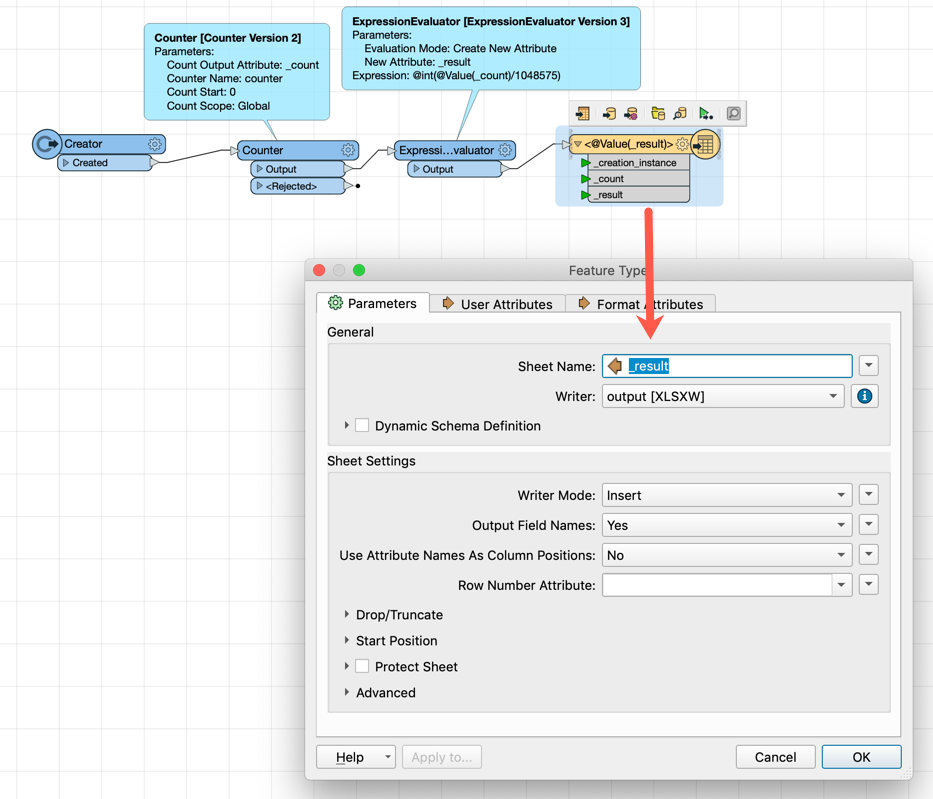
The idea is that you would use the attribute that is created from the ExpressionEvaluator (eg _result) and use this in a feature type fanout for the Excel Spreadsheet name. This is how you would split the writer to split into an ew spreadsheet every 1 048 576 rows .

If you are writing out field names each time, you will want to divide by 1048575 to ensure the limit is not reached when writing the field names.


See the attached workspace which is a modified workspace for the one that @itay shared above. It includes the writer showing the fanout.

- Andrea

5516-groupfeatures.fmw


  • September 24, 2019

Hi @thomas2,

The idea is that you would use the attribute that is created from the ExpressionEvaluator (eg _result) and use this in a feature type fanout for the Excel Spreadsheet name. This is how you would split the writer to split into an ew spreadsheet every 1 048 576 rows .

If you are writing out field names each time, you will want to divide by 1048575 to ensure the limit is not reached when writing the field names.


See the attached workspace which is a modified workspace for the one that @itay shared above. It includes the writer showing the fanout.

- Andrea

5516-groupfeatures.fmw

I think I understand how it works... thank you.

For the moment my FME is running with inspectors instead of writer just to check the validity of the final result.

I'll try your explanation on the next run.