Question

Excel Writer output name dynamic define

  • March 6, 2017
  • 3 replies
  • 168 views

Forum|alt.badge.img

Hello, is it possible to write date to Excel dynamically (as it happends with Shape-file)? Without writing the Name of the output at the begin? I wonder if there is any Workaround to do it?

In my case i Need to write Information in different Excel-Files with the Name of variable (depends on class of the data).


This post is closed to further activity.
It may be an old question, an answered question, an implemented idea, or a notification-only post.
Please check post dates before relying on any information in a question or answer.
For follow-up or related questions, please post a new question or idea.
If there is a genuine update to be made, please contact us and request that the post is reopened.

3 replies

jdh
Contributor
Forum|alt.badge.img+40
  • Contributor
  • March 6, 2017
You can dynamically create excel files. It is not quite the same as with shapefiles as they are a folder based format whereas excel is a file based format. See https://knowledge.safe.com/articles/565/fanout-1.html


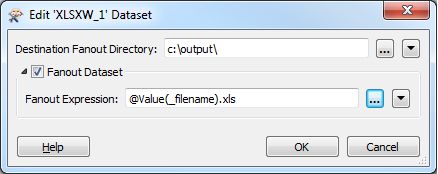
What you need to do is create a dataset fanout on your writer, not your feature type.


jdh
Contributor
Forum|alt.badge.img+40
  • Contributor
  • March 6, 2017
You can dynamically create excel files. It is not quite the same as with shapefiles as they are a folder based format whereas excel is a file based format. See https://knowledge.safe.com/articles/565/fanout-1.html


What you need to do is create a dataset fanout on your writer, not your feature type.


Forum|alt.badge.img
  • Author
  • March 31, 2017

Thank you jdh!