
Question

DWG to ESRI SHP - Unkown Units/CRS

  • October 9, 2018
  • 1 reply
  • 134 views

Hi,

I'm simply trying to convert a DWG to ESRI shapefile but the DWG has no spatial reference. I'm aware of the ability to add DWGs in ArcMap, however, the scale on the DWG file is exaggerated.

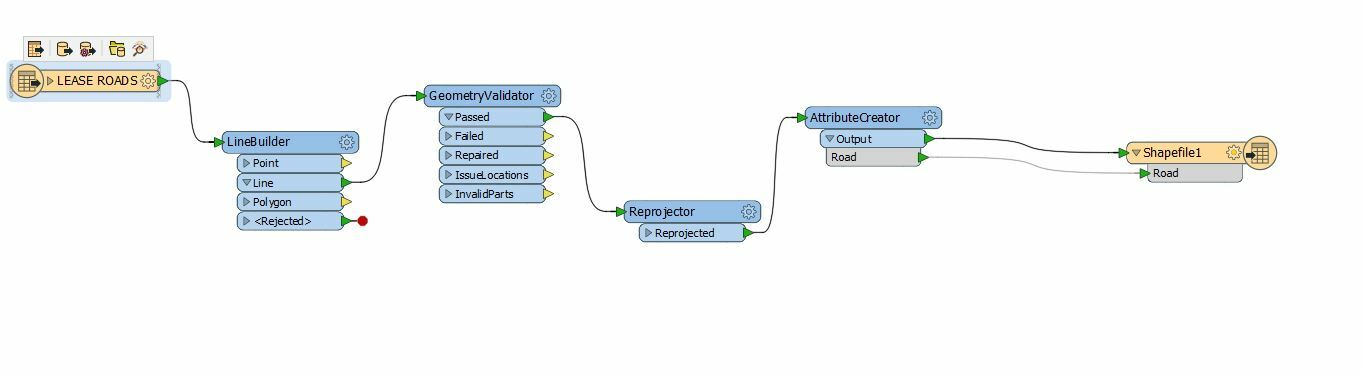
Below is my FME tool that I setup per FME tutorial and still get the same results. The layer is spatially wrong size and location. When I run the inspector the CRS and units are unknown. What am I missing? Thanks!

This post is closed to further activity.
It may be an old question, an answered question, an implemented idea, or a notification-only post.
Please check post dates before relying on any information in a question or answer.
For follow-up or related questions, please post a new question or idea.
If there is a genuine update to be made, please contact us and request that the post is reopened.

1 reply

mark2atsafe
Safer
Forum|alt.badge.img+59
  • Safer
  • October 10, 2018

Well the problem is that your AutoCAD file doesn't have coordinate system information (a spatial reference) in it. The coordinates are in the range of 194353.13836208583, 582792.5072144509, so specifying they are LL84 in a Reprojector won't work, because they are obviously not in lat/long.

Is the feature "WORKING POINT" part of the data, or did you add it? To me that looks like the zero origin for the data. So either this is an official coordinate system that just happens to have a feature to mark the zero origin, or it's a temporary coordinate system that maybe a surveyor or CAD person has created.

Either way, I don't know that there is a lot I can do except suggest you ask the person who generated the data. They will know either the official coordinate system used (put it in the Reprojector instead of LL84) or they will have information about a temporary coordinate system (you could move the data into position using the Offsetter and Scaler transformers, for example).

Failing that, where is the data meant to be? To me it sort of looks like the shape of Mexico, but I tried MEX-VERA and it didn't give a good result. But if you know where it is meant to be you can use a coordinate system for that area as the source and it might help.

Also - I do wonder if you mean to use the LineBuilder transformer. Perhaps the LineCombiner is better? Otherwise you get a mess of lines, which is what confused me about the output for a long time.


