Question

dwg coordinate system not being recognized 2019.2

  • April 21, 2020
  • 7 replies
  • 86 views

Forum|alt.badge.img

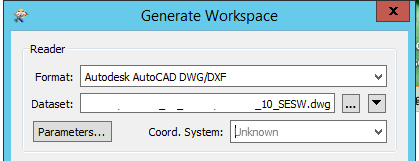
when I view the drawing in map3d the cs is listed. When i view the dwg with arccatalog i can see the same CS. however when i add it to workbench it is not being recognized.

I am trying to set up a dynamic workbench to re project coordinates dependent upon the cs of the reader being used. Is there a way to get the autocad cs and set that to a published parameter?

This post is closed to further activity.
It may be an old question, an answered question, an implemented idea, or a notification-only post.
Please check post dates before relying on any information in a question or answer.
For follow-up or related questions, please post a new question or idea.
If there is a genuine update to be made, please contact us and request that the post is reopened.

7 replies

ronmak
Contributor
Forum|alt.badge.img+5
  • Contributor
  • April 24, 2020

i have a similar problem. I have a shp file data set that is defined in LL84. It comes into Autocad Map fine (2019 and 2020) with the coordinate system set to UTM. But the shp file created by FME which translated the coordinates to UTM comes into Autocad Map and displays in Lat/Long, even though the defined coordinate system is UTM. I am going to get some sleep and see what I did wrong in the am.


ronmak
Contributor
Forum|alt.badge.img+5
  • Contributor
  • April 24, 2020

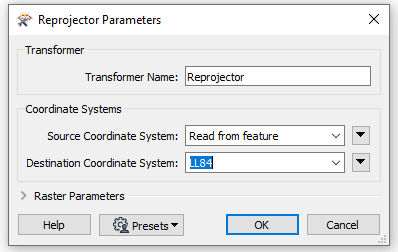
Not sure if this helps, but it is likely more relevant than what i posted last night. (I am still a rookie at FME) The Reprojector will read the CS of the source, so you can leave it as unknown at the reader stage.




virtualcitymatt
Celebrity
Forum|alt.badge.img+47

Try the Autodesk AutoCAD Map 3D Object Data reader rather than the ACAD reader. ACAD is the valnilla autocad reader which doesn't support coordinate systems.

You might have better luck with the Map 3d reader


Forum|alt.badge.img

Try the Autodesk AutoCAD Map 3D Object Data reader rather than the ACAD reader. ACAD is the valnilla autocad reader which doesn't support coordinate systems.

You might have better luck with the Map 3d reader

thanks, I am using map3d OD reader. still doesn't show up.


Forum|alt.badge.img

Not sure if this helps, but it is likely more relevant than what i posted last night. (I am still a rookie at FME) The Reprojector will read the CS of the source, so you can leave it as unknown at the reader stage.

Thanks ronmak,

I need it on the reader.

I have an od table that takes one route through my wksp that is no spatially enabled.and then i perform 3 reprojections to 3 other CS. also i don't get the option of read from feature on AttributeReprojector.


virtualcitymatt
Celebrity
Forum|alt.badge.img+47

thanks, I am using map3d OD reader. still doesn't show up.

Oh, well in that case you should share the file with Safe in support. If ESRI can do it then FME should too


ronmak
Contributor
Forum|alt.badge.img+5
  • Contributor
  • April 27, 2020

Try the Autodesk AutoCAD Map 3D Object Data reader rather than the ACAD reader. ACAD is the valnilla autocad reader which doesn't support coordinate systems.

You might have better luck with the Map 3d reader

i have been experimenting and attached a DWG with OD that reads into FME properly without pre-defining the CS. Try this and see if it works for you.ontario.dwg