Question

draw polyline/ set global width value in polyline

  • March 17, 2017
  • 3 replies
  • 46 views

Hi All,

I want to draw a polyline that is defined in a layer of my template file. but dwgstyler has only got lines as options.

How do I draw a polyline using 'DWGstyler' or any other transformer?

Thanks in advance.

This post is closed to further activity.
It may be an old question, an answered question, an implemented idea, or a notification-only post.
Please check post dates before relying on any information in a question or answer.
For follow-up or related questions, please post a new question or idea.
If there is a genuine update to be made, please contact us and request that the post is reopened.

3 replies

  • Author
  • March 17, 2017

Hi,

I have drawn polyline from dwgstyler. However, the polyline drawn has a global width value of '0' whereas it is required to be '1.8'.

How can I set this value?

Thanks


taojunabc
Participant
Forum|alt.badge.img+6
  • Participant
  • March 17, 2017

The DWGStyler, like its name, just defines the style, Line Style is different from Line Geometry, it is not only applicable to Line, but also for Polyline.


taojunabc
Participant
Forum|alt.badge.img+6
  • Participant
  • March 17, 2017

Hi,

I have drawn polyline from dwgstyler. However, the polyline drawn has a global width value of '0' whereas it is required to be '1.8'.

How can I set this value?

Thanks

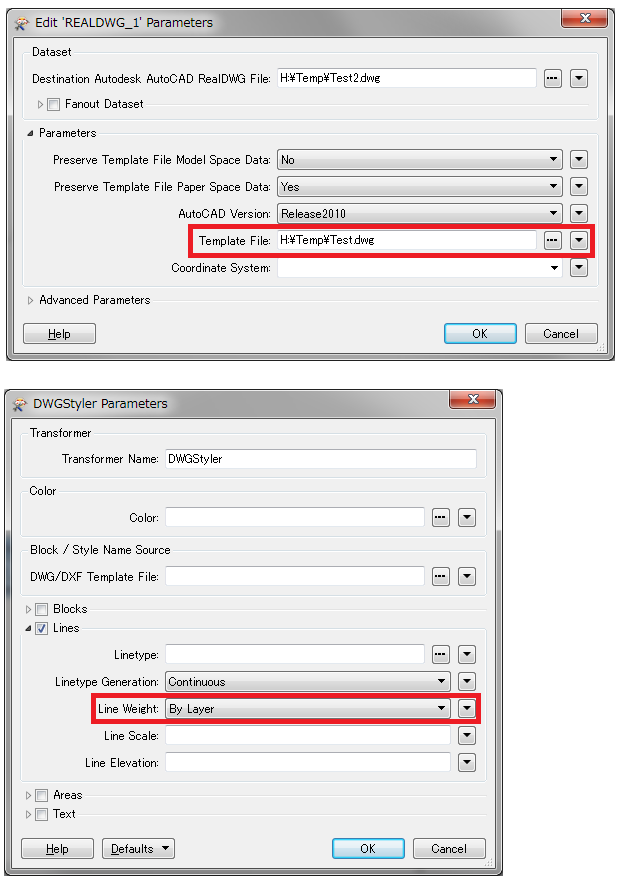
If you use a template file, you can set the line width in the template file, and then specify the template file in the DWG writer, and set the DWGStyle Line Weight to "By Layer".