

Hello all,
Does anyone know how to determine if a layer in an autocad file is frozen in a viewport?
I need to determine if model_space features are visible in a particular viewport. I have done this by reprojecting the viewport's geometry to model space and then testing if it contains the feature. This works well, however in autocad you can freeze a layer in a viewport, in which case that layer is not drawn in that viewport and I need to account for this. I can see the features have an "autocad_layer_frozen" attribute, however this seems to define if the layer as whole is frozen not if it is frozen in a particular viewport.
The viewport's extended_data_list list include's the frozen layer's name:
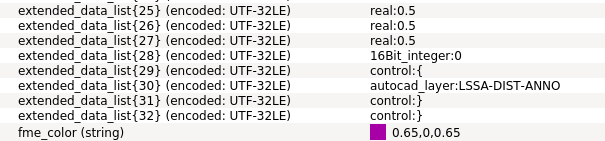
In this case "LSSA-DIST_ANNO". However I don't know how to parse the extended_data_list.
I could just search the entire extended_data_list for the layer's name, however I am worried that there may be cases where the layer's name appears in the extended_data_list for reasons other than being frozen in that viewport.
Does anyone know how to parse the extended_data_list or some other way to determine if a layer is frozen in a particular viewport?
Apologies if I have used incorrect terminology, I don't have much experience with Autocad.
Thanks for your time.
Michael Pascoe
cc: @deanhowell