


Question

Database Connection - Config for Secondary - Readonly Database - SQL SERVER

  • March 15, 2017
  • 7 replies
  • 97 views

rudy_v
Contributor
Forum|alt.badge.img+6

We are using SQL Server 2014 deployed as 3 node cluster with 1 primary and 2 secondary. We need to connect to the READONLY secondary. To do that you the set the Application Intent=readonly

But i cannot find the parameter setting in the database connection for SQL Server.

This post is closed to further activity.
It may be an old question, an answered question, an implemented idea, or a notification-only post.
Please check post dates before relying on any information in a question or answer.
For follow-up or related questions, please post a new question or idea.
If there is a genuine update to be made, please contact us and request that the post is reopened.

7 replies

rob_datavision
Contributor
Forum|alt.badge.img+1

Has anyone solved this problem? That is, how do you set the parameter?


nampreetatsafe
Safer
Forum|alt.badge.img+13

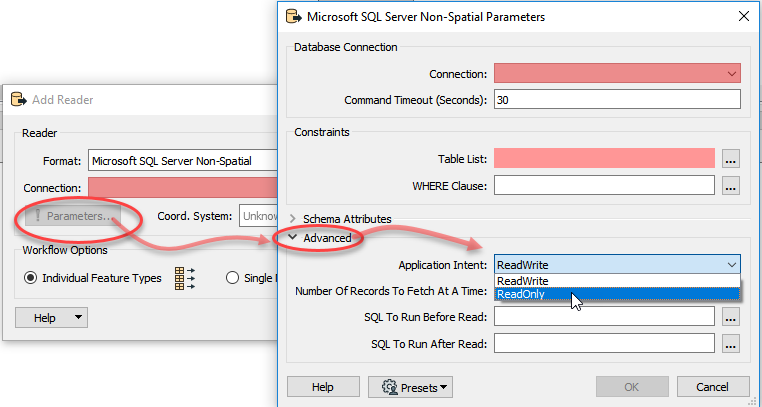
Hi @rob_datavision and @rudy_v! As of FME 2018, the Application Intent property is available under the Writer Parameters, under the Advanced section:

I hope this helps!


rob_datavision
Contributor
Forum|alt.badge.img+1

Hi @rob_datavision and @rudy_v! As of FME 2018, the Application Intent property is available under the Writer Parameters, under the Advanced section:

I hope this helps!

Thanks nampreetatsafe for your suggestion. I finally upgraded and got around to trying this but it did not work.

It seems to me that the application intent needs to be set at the database connection stage. When you establish the connection in FME, there is no option for setting the application intent to read only. Hence it is not possible to get a list of tables. In the dialog in FME (in your diagram) the application intent is set after you have selected a database connection and a table. Even if I set it to Read Only before selecting the table, I still cannot select the table. I get errors telling me to set the application intent.

Am I missing something? Is there a way of setting the application intent to Read Only when the connection is made? This is how it is done in Microsoft SQL server management studio as per this link.

https://www.mssqltips.com/sqlservertip/4511/connect-to-sql-server-availability-group-replica-with-ssms-when-readable-secondary-is-readintent-only/

Any help would be very much appreciated.


Rob


nampreetatsafe
Safer
Forum|alt.badge.img+13

Thanks nampreetatsafe for your suggestion. I finally upgraded and got around to trying this but it did not work.

It seems to me that the application intent needs to be set at the database connection stage. When you establish the connection in FME, there is no option for setting the application intent to read only. Hence it is not possible to get a list of tables. In the dialog in FME (in your diagram) the application intent is set after you have selected a database connection and a table. Even if I set it to Read Only before selecting the table, I still cannot select the table. I get errors telling me to set the application intent.

Am I missing something? Is there a way of setting the application intent to Read Only when the connection is made? This is how it is done in Microsoft SQL server management studio as per this link.

https://www.mssqltips.com/sqlservertip/4511/connect-to-sql-server-availability-group-replica-with-ssms-when-readable-secondary-is-readintent-only/

Any help would be very much appreciated.


Rob

Hi @rob_datavision! Sorry to hear that the database connection didn't recognized the Application Intent parameter. I've opened up a ticket for our team to investigate this (internal reference: FMEENGINE-61929) and will provide any updates on this thread.

@rudy_v, I'm curious to know if you've had any success?


nampreetatsafe
Safer
Forum|alt.badge.img+13

Thanks nampreetatsafe for your suggestion. I finally upgraded and got around to trying this but it did not work.

It seems to me that the application intent needs to be set at the database connection stage. When you establish the connection in FME, there is no option for setting the application intent to read only. Hence it is not possible to get a list of tables. In the dialog in FME (in your diagram) the application intent is set after you have selected a database connection and a table. Even if I set it to Read Only before selecting the table, I still cannot select the table. I get errors telling me to set the application intent.

Am I missing something? Is there a way of setting the application intent to Read Only when the connection is made? This is how it is done in Microsoft SQL server management studio as per this link.

https://www.mssqltips.com/sqlservertip/4511/connect-to-sql-server-availability-group-replica-with-ssms-when-readable-secondary-is-readintent-only/

Any help would be very much appreciated.


Rob

Hi @rudy_v and @rob_datavision! The fix for the issue reported by @rob_datavision is now available in the latest FME 2020 Beta. Let us know if you encounter any further issues with this. Thanks again for reporting this and helping make FME even better!


rudy_v
Contributor
Forum|alt.badge.img+6
  • Author
  • Contributor
  • August 1, 2022

Hi @nampreetatsafe​ 


Yes that is fine to set it on reader level - but I want it on Database Connection settings - then all my work benches will use READONLY. We have Database Connection for Readers and some connections as writers for SQL Server.


rudy_v
Contributor
Forum|alt.badge.img+6
  • Author
  • Contributor
  • August 3, 2022

Hi @nampreetatsafe​ ,

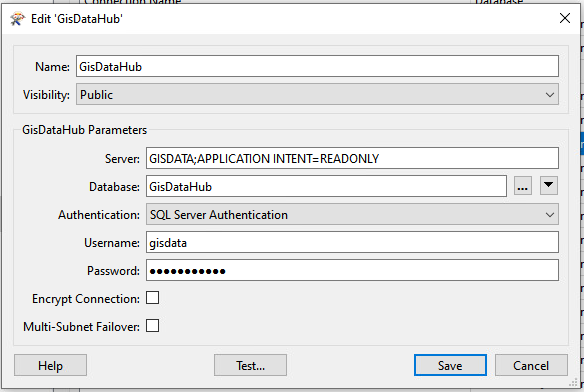
I have got it to work like this on database connection. APPLICATION INTENT with a space. This works well in a SqlExecutor


readonly node