Question

Convert a .txt to excel and strip out some columns

  • July 8, 2020
  • 2 replies
  • 78 views

Forum|alt.badge.img

I am complete novice to FME.

I have a .txt file which I wish to convert to excel. But I only want some of the information to be brought into the excel spreadsheet. I'm not sure how to begin.

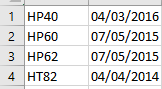
All I want in the excel spreadsheet (bottom image) is the name e.g HP40 but without the .tif extension and the date e.g 04/03/2016 without the time.

I am not sure what connectors to use or how to strip out the unwanted info from the .txt file.

This post is closed to further activity.
It may be an old question, an answered question, an implemented idea, or a notification-only post.
Please check post dates before relying on any information in a question or answer.
For follow-up or related questions, please post a new question or idea.
If there is a genuine update to be made, please contact us and request that the post is reopened.

2 replies

jdh
Contributor
Forum|alt.badge.img+40
  • Contributor
  • July 8, 2020

You can read in the text file as a CSV or CAT depending on whether the columns are separated by tabs/spaces or are a specific width.


The FilenamePartExtractor will give you the root filename, and the DateTimeFormatter can give you the date, though it may be simpler to just use an attribute splitter.

Forum|alt.badge.img+2

@mitburger SubstrngExtractor will let you extract the file name. Or StringSearcher if you're comfortable with regular expressions