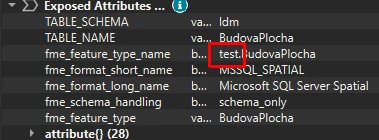
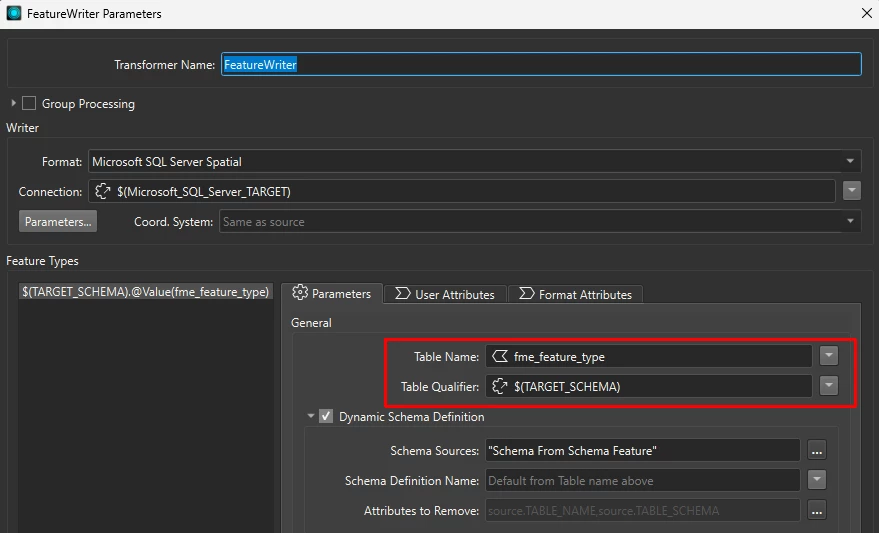
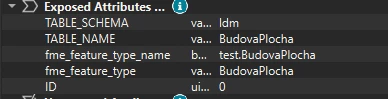
I’m struggling with dynamic worflow when i want to change the target MS SQL DB schema (table qualifier). When i want to migrate data between databases with the same DB schema, it’s fine. But when i want to change the schema i’m running into errors. So far I could manage to migrate data from custom schema (e.g. “ldm”) to default “dbo” schema manipulating “fme_feature_type” and fme_feature_type_name” (also not sure about the differnce of these 2 attributes) in Attribute Manager assigning just Table name and omitting the schema qualifier.
When i want to use another target schema than “dbo” (e.g. “test”) i always run into error:Microsoft SQL Server Spatial Writer: A feature has arrived with 'fme_feature_type' of test.OPSiteEK, but the feature type is not recognized. Halting translation
1) Does anyone know how to reliably change the target schema for dynamic worflow?
2) I have also noticed that if I want drop and recreate tables with no data, i have to send at least 1 data feature, because if i sent just Schema features, the target tables are not recreated at all and stay with the old data.
Thanks, Jan

Question
Change destination DB schema in dynamic workflow


 +7
+7- Supporter