Question

Cannot write data to SDE (postgres)

  • October 13, 2020
  • 5 replies
  • 201 views

francescodb
Forum|alt.badge.img

I am trying to write a table to a postgres geodatabase and I am using an SDE writer. I am using FME 2020.0.1.0. I get the following error:


An error occurred while attempting to create the table 'test2'. The error number from ArcObjects is: '-2147220655'. The error message from ArcObjects is: {DBMS table not found [ERROR: relation "gisowner.i23" does not existLINE 1: INSERT INTO gisowner.i23 (id_type, base_id, num_ids, last_id...

^::SQLSTATE=42P01] [dbtest.gisowner.test2]}

A fatal error has occurred. Check the logfile above for details

A fatal error has occurred. Check the logfile above for details


There seem to be nothing wrong with the database, I can insert and create objects from ArcGIS Pro.


This post is closed to further activity.
It may be an old question, an answered question, an implemented idea, or a notification-only post.
Please check post dates before relying on any information in a question or answer.
For follow-up or related questions, please post a new question or idea.
If there is a genuine update to be made, please contact us and request that the post is reopened.

5 replies

nielsgerrits
VIP
Forum|alt.badge.img+64

What is the ArcGIS Pro version?

Do you use the same connectionfile when working from Pro and FME?

Versioned database?


francescodb
Forum|alt.badge.img
  • Author
  • October 13, 2020

What is the ArcGIS Pro version?

Do you use the same connectionfile when working from Pro and FME?

Versioned database?

I am on 2.6.1 and yes I am using exactly the same connection file


nielsgerrits
VIP
Forum|alt.badge.img+64

I am on 2.6.1 and yes I am using exactly the same connection file

Not sure if this has anything to do with it, but in the next article, the correct combination should be ArcGIS Pro 2.6 / FME 2020.1.2 or higher 64 bit only.

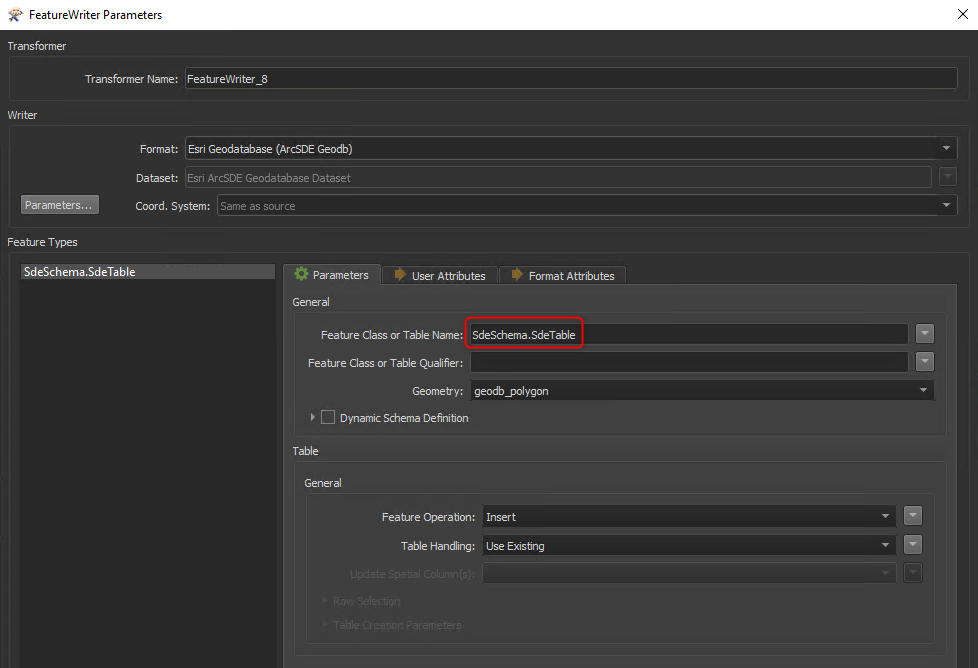
I've also had issues with the Feature Class Qualifier. The way I write currently is <SchemaName.TableName> in the Feature Class Name field. Worth a try.

2020-10-13_12h27_42


francescodb
Forum|alt.badge.img
  • Author
  • October 13, 2020

I am on 2.6.1 and yes I am using exactly the same connection file

Thanks I will give it a try but I have also ArcGIS 10.5 installed on the same machine and I can see from the log file that FME is checking out a 10.5 license:


FME has checked out an Esri license. The product checked out is 'Advanced'Installed ArcGIS version is '10.5'

Connection made to server 'xxxxxxxxxxxxxx' for dataset 'dbtest' (transactional version 'sde.DEFAULT') using instance 'sde:postgresql:xxxxxxxxxxx' and user ID 'gisowner'

ArcSDE release: '10.0'. Underlying database: 'SQL Server'


And then I wonder why it says 'SQL Server' on the last line...


francescodb
Forum|alt.badge.img
  • Author
  • October 13, 2020

I am on 2.6.1 and yes I am using exactly the same connection file

I have tried upgrading FME to the newest version with no luck. I have tried to insert rows to an existing table (and truncate as well) from FME and it worked so it looks like FME is not able to create the table.