Question

Calculate Attributes from Shape file

  • August 7, 2019
  • 9 replies
  • 36 views

Dear All ,

I have a roofs & footprint of each building, from this how i will create all the below mentioned attributes in Shape file (.shp).Please help and suggest.

1,Unique Feature ID

2,Reference Name – China

3,Building Area (m)

4,Building height Values (m): Max, Min, Mean, 75th and 25th percentile

5,Building Height will be orthometric (Mean Sea Level) and Above Ground Elevation (AGL)

6,Building attributes will be MSL_Ground, MSL_Min, MSL_Per25, MSL_Mean, MSL_Per75, MSL_Max, AGL_Min, AGL_Per25, AGL_Mean, AGL_Per75, AGL_Max, Shape_Length and Shape_Area


This post is closed to further activity.
It may be an old question, an answered question, an implemented idea, or a notification-only post.
Please check post dates before relying on any information in a question or answer.
For follow-up or related questions, please post a new question or idea.
If there is a genuine update to be made, please contact us and request that the post is reopened.

9 replies

sigtill
Supporter
Forum|alt.badge.img+25
  • Supporter
  • August 7, 2019

Hi @bino - Can you upload a small sample shp-file for one building? This will make it easier to create a workspace.


  • Author
  • August 7, 2019

07-08-2019.zip

uploaded roofs


redgeographics
Celebrity
Forum|alt.badge.img+62

07-08-2019.zip

uploaded roofs

It looks like a lot of those attributes are already in the file, what exactly are you looking to calculate?

I'm assuming the elevations to be in relation to Mean Sea Level, in order to get the AGL ones as well you'll need to know what the ground level per building is. Depending on how your data is set up you could take the minimum elevation, otherwise you'll have to look for a source for the terrain.


  • Author
  • August 7, 2019

It looks like a lot of those attributes are already in the file, what exactly are you looking to calculate?

I'm assuming the elevations to be in relation to Mean Sea Level, in order to get the AGL ones as well you'll need to know what the ground level per building is. Depending on how your data is set up you could take the minimum elevation, otherwise you'll have to look for a source for the terrain.

In that we tried here, you no need to consider those attributes.

MSL and AGL you fix it your own value roughly for calculate the attributes.


redgeographics
Celebrity
Forum|alt.badge.img+62

In that we tried here, you no need to consider those attributes.

MSL and AGL you fix it your own value roughly for calculate the attributes.


I'm sorry, but I don't quite understand your question. Could you elaborate please?


  • Author
  • August 8, 2019

I'm sorry, but I don't quite understand your question. Could you elaborate please?

shp arcgis.zip

Added the new shape file it includes Roof top and footprint

please help


redgeographics
Celebrity
Forum|alt.badge.img+62

shp arcgis.zip

Added the new shape file it includes Roof top and footprint

please help

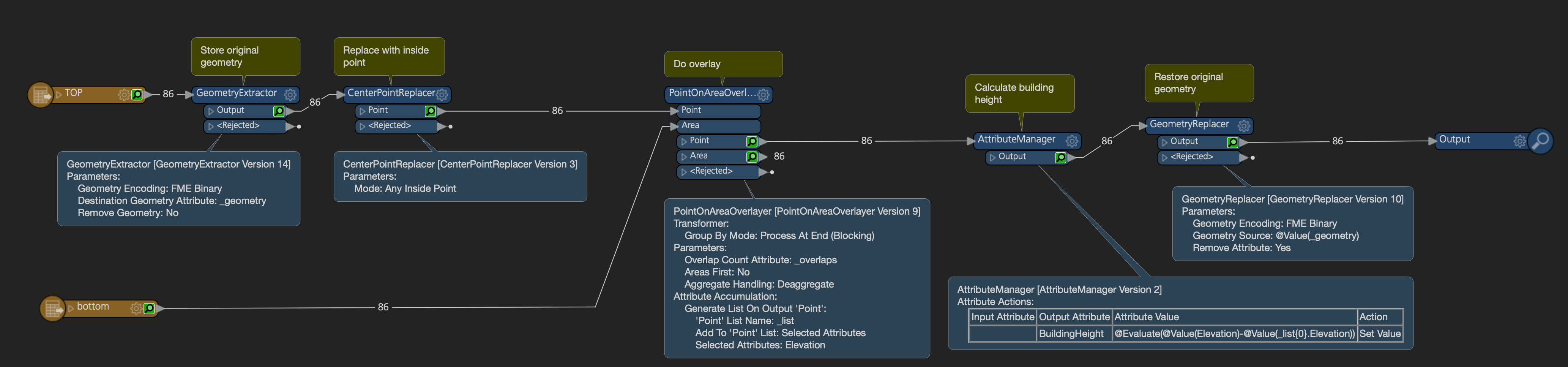
By creating inside points of the roof polygons and overlaying those on the bottom areas we can transfer the bottom elevation and through that calculate the height of the building. Is this what you're looking for?


  • Author
  • August 8, 2019

By creating inside points of the roof polygons and overlaying those on the bottom areas we can transfer the bottom elevation and through that calculate the height of the building. Is this what you're looking for?

Thanks for this,not only this need more Attributes,listed above..


redgeographics
Celebrity
Forum|alt.badge.img+62

Thanks for this,not only this need more Attributes,listed above..

If you know the formula for the percentiles (I don't, didn't pay enough attention in math class...) you could use an AttributeManager to calculate them.

The way I understand it AGL is the max MSL minus the min MSL (although that will go horribly wrong when a building is built on a slope).