Question

Advanced browser in microsation reader

  • August 19, 2015
  • 5 replies
  • 34 views

Forum|alt.badge.img+1
Hi,


I am using microsation(V7) reader to read various microstation DGN files in order to get them migrated in some other file formats, while selecting the source files the advaced browser is not allowing me to add folder name, I had to individually select the files, currently I am using FME 2015.1.0.1 the previous FME versions allowed the user to add the path of a root directory under folder so that one can mention the root directory followd by the filter extension and check the subfolder option so that all the files with specific extension which may reside in diffrent subfolders got selected, this kind of facility is not available in this version. Can anybody help me in getting a solution out of this.


Thanks in advance


IMRAN

This post is closed to further activity.
It may be an old question, an answered question, an implemented idea, or a notification-only post.
Please check post dates before relying on any information in a question or answer.
For follow-up or related questions, please post a new question or idea.
If there is a genuine update to be made, please contact us and request that the post is reopened.

5 replies

takashi
Celebrity
  • August 19, 2015
Hi Imran,


I was not reproduce the same situation as yours with 2015.1.1 build 15515.


Some bug fixes have been done in the last few months...


Takashi

Forum|alt.badge.img+1
  • Author
  • August 19, 2015
Hi Takashi,


I am using Build 15480 have to check with the one you've mentioned, I'll get back after checking. 


Thanks for the fast reply.


IMRAN

Forum|alt.badge.img+1
  • Author
  • September 2, 2015
Hi Takashi,


Tried the new build you've mentioned but the results are still the same, I wonder why this condition is not reproducing at your end.


IMRAN

courtney_m
Contributor
Forum|alt.badge.img+22
  • Contributor
  • June 23, 2016

Hi Imran,

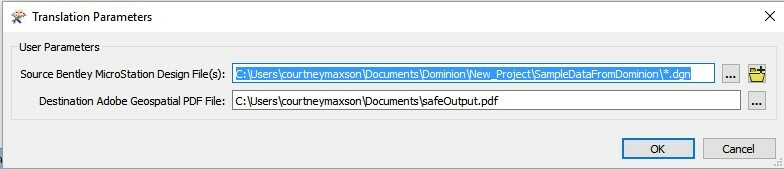
Try using a * in your file name, like this:

The easiest way to do this is to select a single dgn file within the desired directory. Then select the name of the DGN from the parameter value and replace it with *. Make sure you leave .dgn at the end of the path.

-Courtney


Forum|alt.badge.img

Hi @imran

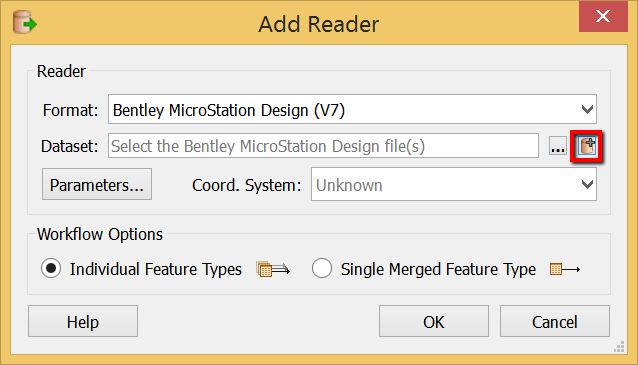
this screenshot is from FME 2015 build 15538:

Do you have Open Advanced Browser button in your Add Reader dialog? It is only get enabled after you select the source format. If you click the Open Advanced Browser button, do you have Add Folder button? Could you please attach screenshots with your Add Reader and Advanced Browser windows?

Thank you!