How can I add the elevation as 3rd dimension to existing segment?
I have the elevation values for the starting and ending points of each segment.
Thanks

This post is closed to further activity.
It may be an old question, an answered question, an implemented idea, or a notification-only post.
Please check post dates before relying on any information in a question or answer.
For follow-up or related questions, please post a new question or idea.
If there is a genuine update to be made, please contact us and request that the post is reopened.
Hi @arthy, take a look at the 3DInterpolator transformer.
@takashi
Let's say I have a segment with boundary A(x1,y1,0) and B(x2,y2,0) and I have the information z1 and z2.
How to proceed to modify the geometry of that segment such that the boundary will be A(x1,y1,z1) and B(x2,y2,z2). For now, I don't rellay want to interpolate the 3rd dimension between A and B.
assign unique IDs to your segments by the Counter,
then chop them to vertices by a Chopper,
assign IDs to every vertex by a Counter and
then adjust height of your vertices accordingly. For example you could obtain Z-position of your control points and transfer them to your segment vertices by a NeighborFinder.
Once the Z-Attribute has been transferred push the vertex into this position by help of 3DForcer and
than use a Sorter to rearrange correct order of your data.
By help of PointConnector and separation attribute of your segmentID you will receive the initial features but now with 3D coordinates.
assign unique IDs to your segments by the Counter,
then chop them to vertices by a Chopper,
assign IDs to every vertex by a Counter and
then adjust height of your vertices accordingly. For example you could obtain Z-position of your control points and transfer them to your segment vertices by a NeighborFinder.
Once the Z-Attribute has been transferred push the vertex into this position by help of 3DForcer and
than use a Sorter to rearrange correct order of your data.
By help of PointConnector and separation attribute of your segmentID you will receive the initial features but now with 3D coordinates.
Hope this helps!
@whkarto
Thanks for your answer.
I finally used a pythoncaller which give the desired solution in a few lines.
Hi @arthy, take a look at the 3DInterpolator transformer.
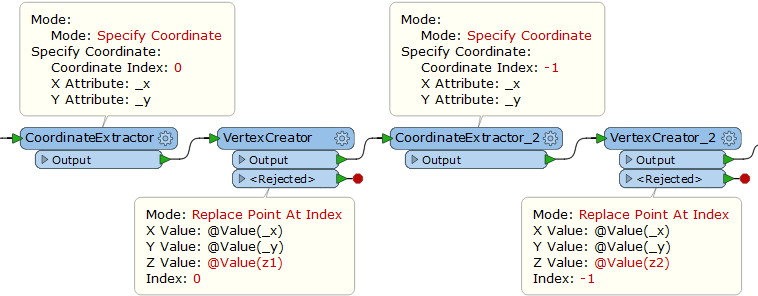
Two pairs of the CoordinateExtractor (Mode: Specify Coordinate) and the VertexCreator (Mode: Replace Point At Index) do the trick, after you merged z1 and z2 to the segment feature.
As I explained to @whkarto above, I used a python caller to do that.