Best Answer

Write multiple files in a directory

  • November 2, 2018
  • 3 replies
  • 155 views

Hi all.


I am trying to read a directory with many TIFF files, select the latest ones and copy or move them to a new directory.


I read the files with a Feature reader using the Directory and File Pathnames format.

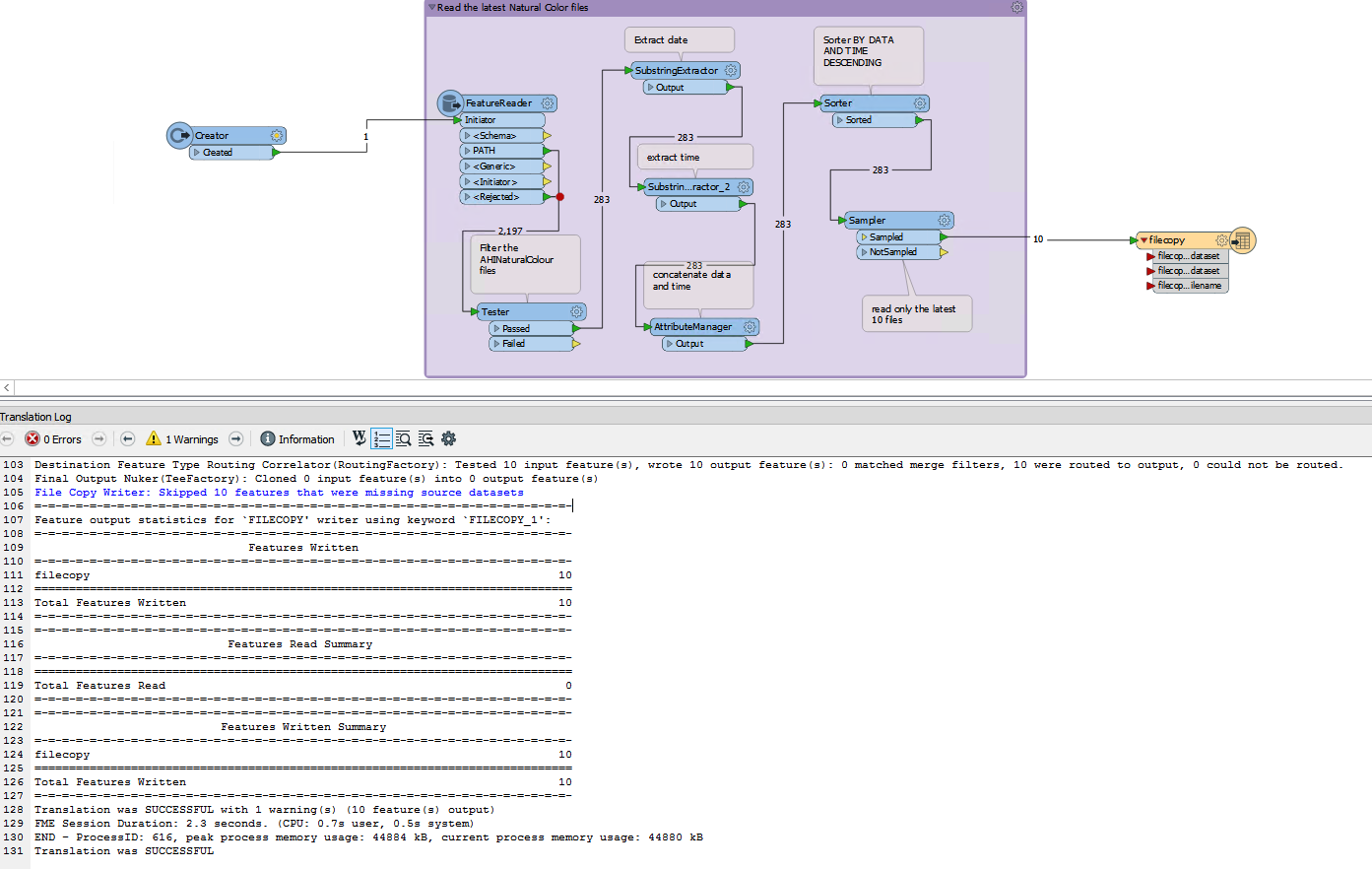
The files got the date-time in the name so I use the Sorter to find the latest one and then I use the Sampler to select a few of them.


Can someone advise me how to write them now in another directory?


Many thanks



Best answer by redgeographics

Try the FileCopy writer.

This post is closed to further activity.
It may be an old question, an answered question, an implemented idea, or a notification-only post.
Please check post dates before relying on any information in a question or answer.
For follow-up or related questions, please post a new question or idea.
If there is a genuine update to be made, please contact us and request that the post is reopened.

3 replies

redgeographics
Celebrity
Forum|alt.badge.img+62
  • Celebrity
  • Best Answer
  • November 2, 2018

Try the FileCopy writer.


Thank you for the quick response.


I did that and the translation was successful but the directory is empty.


this is the situation...


It worked!

:)

Thanks!

This also helps https://blog.safe.com/2013/07/fmeevangelist117/