



Solved

New Files in Folder Not Triggering Automation

  • November 6, 2025
  • 2 replies
  • 90 views

darrylh
Contributor
Forum|alt.badge.img+4

This is the first time I have tried setting up an Automation in Flow by monitoring for a new file.
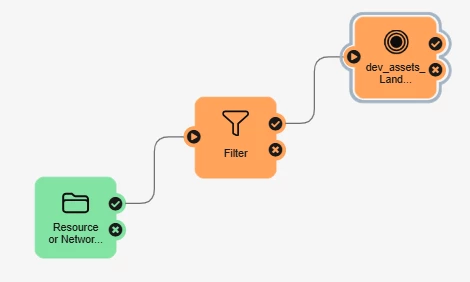


I have a simple workspace that is unzipping a zip file and updating a database with it’s contents. It works in Form and when published to Flow and manually run.


I tries following this article bit nothing seems to happen: https://support.safe.com/hc/en-us/articles/25407764152973-Run-a-Workspace-When-Data-Arrives-in-a-Directory

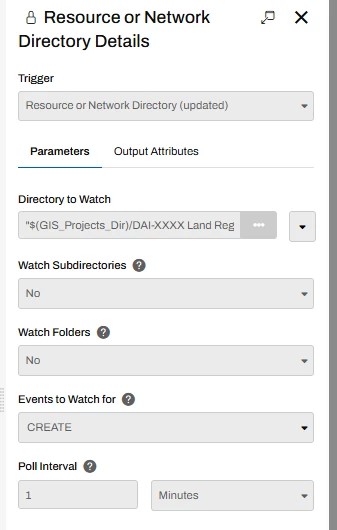
The trigger is set like this:
 

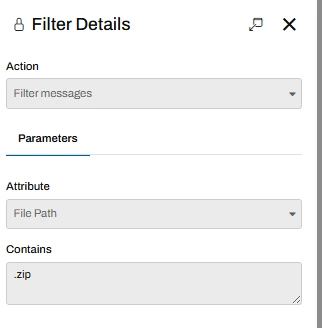
I have a filter checking for zip files:
And then a Workspace:
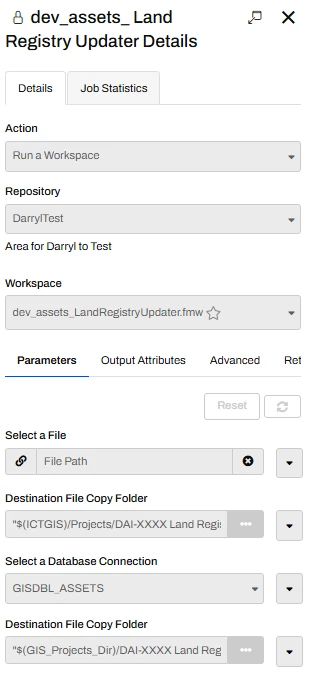


In the log file i gives the line:

2025-11-6 15:24:41 | Performing query against PATH dataset `\\MYNETWORK\ICT_GIS\Projects\DAI-XXXX Land Registry Update\Zipped\TEST.zip\'


It should be looking in \\MYNETWORK\ICT_GIS\Projects\DAI-XXXX Land Registry Update\Zipped\ for a file called *.zip, but the \ at the end makes it look like that is a folder name (maybe I am just misreading that).

Further down it then has a warning:

Path Reader: No files found in folder 'D:\FME Temp\fmeengines\localhost_Engine2\TempFS_1762442681795_3104\dsR_1_0\TEST.zip_0' using glob pattern '*.zip' with glob filter 'FILE'. No features will be read.

The _0 is confusing to me there.

Any pointers would be great
 

Best answer by darrylh

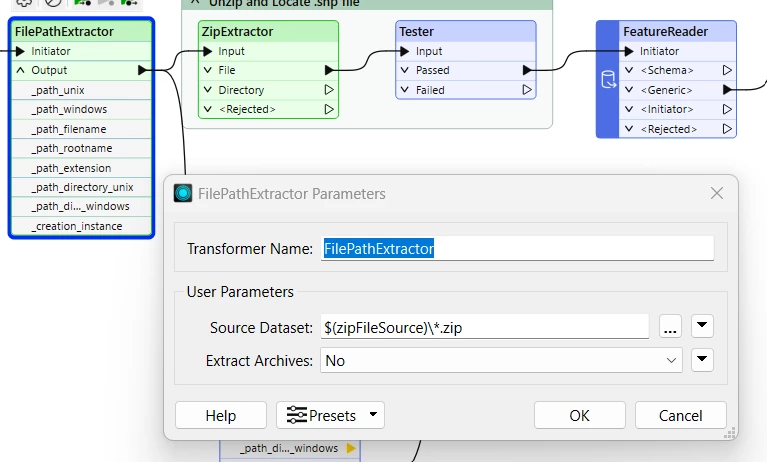
I think I have got this working, it waan’t the filter in tge automation that was causing the problem, it was the file path extractor in my workspace. While this worked in form I couldn’t use the \*zip in the source data to only fine zip files, so removed that and it appears to work.

So I can put the autionation filter back in just to ensure it doesn’t grab anything


This post is closed to further activity.
It may be an old question, an answered question, an implemented idea, or a notification-only post.
Please check post dates before relying on any information in a question or answer.
For follow-up or related questions, please post a new question or idea.
If there is a genuine update to be made, please contact us and request that the post is reopened.

2 replies

aaron.hillier
Safer
Forum|alt.badge.img+6

Hi ​@darrylh,


Sorry to hear you’re experiencing this issue! Based on the error you’re receiving, it seems as if you may have a Path Filter applied to your Folder and File Pathnames reader for a “.zip” file. Because of this, I suspect that the workspace is looking for a ZIP file inside of the ZIP file that you are already providing through the Directory Watch trigger. Since your Automation is already set up to filter for a ZIP file, this additional filter on the reader itself is not necessary.

This is just a hunch based on what the log is saying, so if this is not the case, please let me know!


-  Aaron H.


darrylh
Contributor
Forum|alt.badge.img+4
  • Author
  • Contributor
  • Best Answer
  • November 11, 2025

I think I have got this working, it waan’t the filter in tge automation that was causing the problem, it was the file path extractor in my workspace. While this worked in form I couldn’t use the \*zip in the source data to only fine zip files, so removed that and it appears to work.

So I can put the autionation filter back in just to ensure it doesn’t grab anything