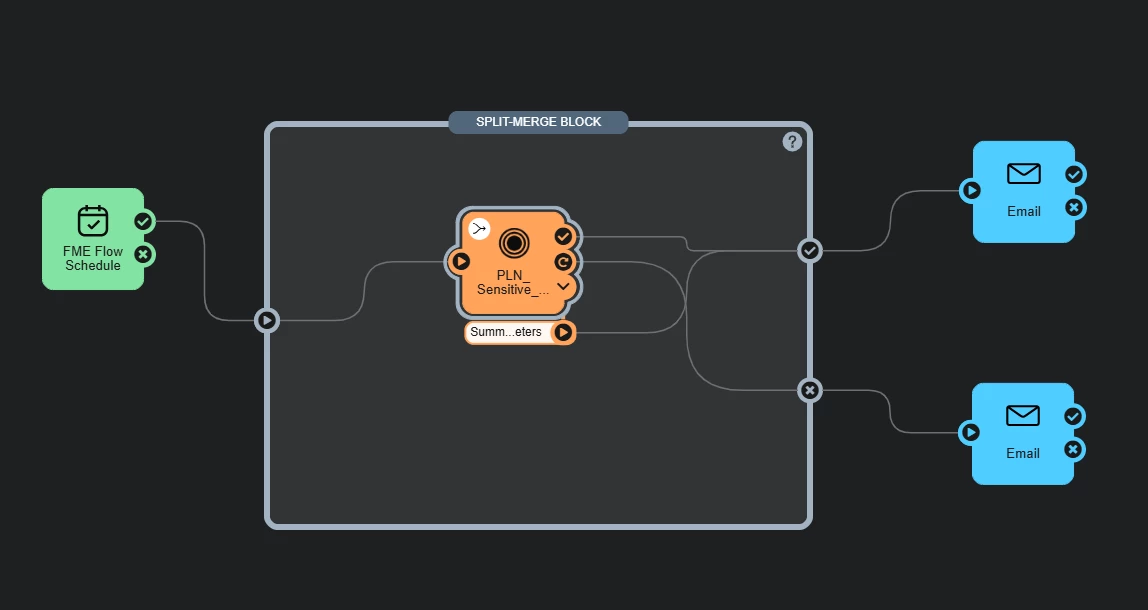
I have some daily automations set up to update feature layers in our GDB from a rest endpoint. There are instances when the workspace cannot connect to the source to read in the features and therefore fails the job. I have retry parameters set on the run workspace action as follows: number of attempts 1, wait between attempts 5 seconds, backoff multiplier none, randomization factor none, max wait 1 minute. Having the retry as been helpful but causes us to recieve multiple emails. Specifically, if the job succeeds we recieve 1 email that it was successful. If the job fails both attempts, we recieve 2 emails that it failed both attempts. If the job fails the first and succeeds the 2nd attempt, we recieve one failure and one succeess email. We have some users who are only set up to recieve failure emails and therefore are not aware that the 2nd attempt was successful.
Is there a way to configure the retry parameters or automation to only send an email on the final attempt?
If needed for reference below is an example of my automation. A split merge block was used to combine the workspace parameters and one parameter exposed from my workflow to identify count, so that it could all be included in the success email.
Best answer by markwatsafe
Hi @montoyar! Thank you for sharing this issue, this is quite a unique workflow and I can understand the use case! Unfortunately there’s a couple of limitations here that are causing the unusual behaviour, but I believe there’s a workaround.
For context, the split merge block is meant more for complex automations where an Automation Writer causes multiple workspaces to run many times and you want to use the split merge block to treat all jobs as a single status. Assuming both the success/failure ports of your workspaces are connected to the corresponding ports of the split merge block, it’s going to release a success only if all jobs succeed but will release a failure if any job fails. Based on that “any” condition, the split merge block won’t work if you’re just trying to track the final attempt of retries. I can totally understand why the SMB seems like the solution to “merge” all the retries down to a single result, but the logic above is why you’re hitting the unusual behaviour. This is also a known limitation with the split merge block, and as of 2025.2 it’s still unplanned to be changed (ticket FMEFLOW-17795).
However, what you’re trying to achieve doesn’t seem to require the split merge block. Retry behaviour of the workspace will release 1 message out the success/failure ports based on the final attempt. But I also realize you want to combine the Success and Automation Writer information into the email (which is where another limitation pops up with the Merge Message action which is incompatible Automation Writer inputs and there’s useful “success” information you want to include the email that’s inaccessible through just the Automation writer 🙃).
In theory, a workaround I can think of is using the Automation Writer to effectively drive the “success” while pulling information via the FME Flow REST API rather than the main workspace’s success port:
First, remove the split merge block.
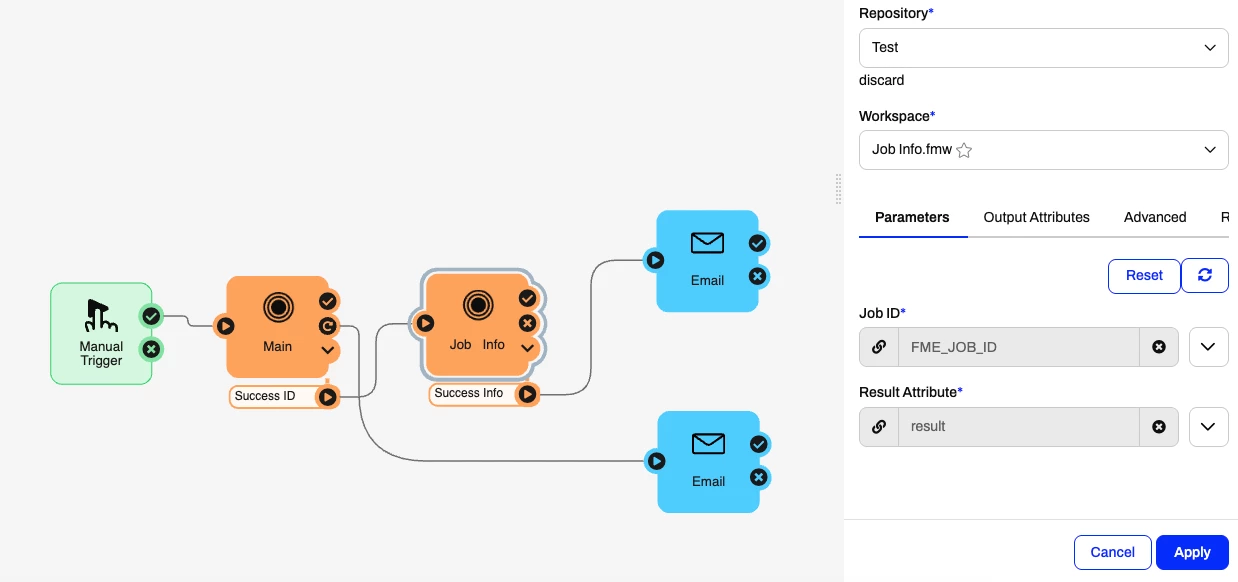
Modify the main workspace with a ParameterFetcher just before the Automation Writer which fetches the $(FME_JOB_ID) parameter. (Assuming your automation writer will only output something for successful jobs)
Create a second workspace that includes a user parameter for the job ID and extra user parameters for any other information you want to receive from the main workspace’s Automation Writer. Using the job ID, make REST API calls to your Flow instance to get the information you need about the successful job based on the input ID. GET /jobs/{id} should be sufficient. This workspace will also need an Automation Writer to output all that information/attributes out which will feed into the success email action.
Publish this workspace to Flow and add it to the Automation.
In the Automation on the main workspace, only connect the Automation Writer to the input of the new workspace. In the job ID parameter of this workspace, expand the key selector menu and select the FME_JOB_ID under the Automation Writer’s attributes.
This effectively creates a success condition and lets the second workspace do the work of getting the original successful job info and feeds that into the email. You can leave the main workspace’s failure port connected to the fail email action which won’t send multiple emails since Retry without a split merge block is all about the final attempt.
It’ll look something like this:
Please give that a try and see if it gets you the results you’re looking for!
This post is closed to further activity.
It may be an old question, an answered question, an implemented idea, or a notification-only post.
Please check post dates before relying on any information in a question or answer.
For follow-up or related questions, please post a new question or idea.
If there is a genuine update to be made, please contact us and request that the post is reopened.
Hi @montoyar! Thank you for sharing this issue, this is quite a unique workflow and I can understand the use case! Unfortunately there’s a couple of limitations here that are causing the unusual behaviour, but I believe there’s a workaround.
For context, the split merge block is meant more for complex automations where an Automation Writer causes multiple workspaces to run many times and you want to use the split merge block to treat all jobs as a single status. Assuming both the success/failure ports of your workspaces are connected to the corresponding ports of the split merge block, it’s going to release a success only if all jobs succeed but will release a failure if any job fails. Based on that “any” condition, the split merge block won’t work if you’re just trying to track the final attempt of retries. I can totally understand why the SMB seems like the solution to “merge” all the retries down to a single result, but the logic above is why you’re hitting the unusual behaviour. This is also a known limitation with the split merge block, and as of 2025.2 it’s still unplanned to be changed (ticket FMEFLOW-17795).
However, what you’re trying to achieve doesn’t seem to require the split merge block. Retry behaviour of the workspace will release 1 message out the success/failure ports based on the final attempt. But I also realize you want to combine the Success and Automation Writer information into the email (which is where another limitation pops up with the Merge Message action which is incompatible Automation Writer inputs and there’s useful “success” information you want to include the email that’s inaccessible through just the Automation writer 🙃).
In theory, a workaround I can think of is using the Automation Writer to effectively drive the “success” while pulling information via the FME Flow REST API rather than the main workspace’s success port:
First, remove the split merge block.
Modify the main workspace with a ParameterFetcher just before the Automation Writer which fetches the $(FME_JOB_ID) parameter. (Assuming your automation writer will only output something for successful jobs)
Create a second workspace that includes a user parameter for the job ID and extra user parameters for any other information you want to receive from the main workspace’s Automation Writer. Using the job ID, make REST API calls to your Flow instance to get the information you need about the successful job based on the input ID. GET /jobs/{id} should be sufficient. This workspace will also need an Automation Writer to output all that information/attributes out which will feed into the success email action.
Publish this workspace to Flow and add it to the Automation.
In the Automation on the main workspace, only connect the Automation Writer to the input of the new workspace. In the job ID parameter of this workspace, expand the key selector menu and select the FME_JOB_ID under the Automation Writer’s attributes.
This effectively creates a success condition and lets the second workspace do the work of getting the original successful job info and feeds that into the email. You can leave the main workspace’s failure port connected to the fail email action which won’t send multiple emails since Retry without a split merge block is all about the final attempt.
It’ll look something like this:
Please give that a try and see if it gets you the results you’re looking for!
Hello @markwatsafe, thank you for your detailed response and suggested workflow.
I have been able to set up the second workspace and to call in the first's job id and set up the automation similar to your image. It seems to be working to remove the duplicate email, I have been able to test when the first workspace fails both attempts and I am now receiving only one email.
The only issue I am still having is displaying all the information I want from the first (main) workspace in the email. The count parameter is showing up fine from the attribute writer to be attached to the email. However, I am having issues exposing job time started and job time finished from the first (main) workspace to the success email. This information is coming through fine in the failure email since it is directly connected. Is there a way to expose this information from the automation into the success email? Or some way to track this and add it to the email message?
Hello @markwatsafe, thank you for your detailed response and suggested workflow.
I have been able to set up the second workspace and to call in the first's job id and set up the automation similar to your image. It seems to be working to remove the duplicate email, I have been able to test when the first workspace fails both attempts and I am now receiving only one email.
The only issue I am still having is displaying all the information I want from the first (main) workspace in the email. The count parameter is showing up fine from the attribute writer to be attached to the email. However, I am having issues exposing job time started and job time finished from the first (main) workspace to the success email. This information is coming through fine in the failure email since it is directly connected. Is there a way to expose this information from the automation into the success email? Or some way to track this and add it to the email message?
-Thanks
Hi @montoyar! In the second workspace when you’re referencing the first job’s ID, I’d suggest using the FME Flow REST API to get the time started/finished information and anything other info before using the Automations Writer routed to the success email.
In my original response I was referencing the V4 API and I see you’re on 2024.2 which is using the V3 API, my apologies for the confusion! (note the v3 API deprecation in future versions) The V3 REST endpoint the getting job info would be: {FME_SERVER_WEB_URL}/fmerest/v3/transformations/jobs/id/{id} (documentation)
The workspace could look something like the following:
Thanks for the providing more details and the documentation. I had been using v3 API. I have also poked around with extracting the JSON, but had had issues as my HTTPCaller is only returning HTML.
I have my request url set up as http://<localhost>:port/fmeserver/fmerest/v3/jobs/{id} to be able to get a previously complete job. (omitting the /fmeserver/ rejects the httpcaller) However, my response body attribute output is in html. I have tried adding a header to point to the json, but it continues to pull the html. I have also tried navigating directly to it in a browser with a recently completed job id, navigating to .../fmerest/v3/jobs/{id} it does return a json format but says "message":"null for uri: ... and navigating to ...fmeserver/fmerest/v3/jobs/{id} gives a 404 error. Not sure if this limitation is due to how our fmeflow is configured or something I am missing in my set up.
Hello @markwatsafe. I see now I was missing a section of the path, I am able to pull in the json and extract the values I wanted and they show up in the email notification.
Thank you very much for assisting me through this workflow.