


Question

Work out what percentage of each object from polygon dataset 1 intersects (overlaps) with objects from polygon dataset 2

  • December 3, 2025
  • 2 replies
  • 39 views

scarter
Contributor
Forum|alt.badge.img+10

Hello Forum,


I have two polygon datasets read into a FME Form workspace:


Dataset 1: Super Output Area (SOAs): This is where the entire authority area is divided into 165 SOAs. No part of our authority area is not covered by a SOA.


Dataset 2: Air Quality Focus Areas (AQFAs): These are specific areas for a particular purpose. Only selected parts of the authority area are covered by an AQFA. 


Datasets 1 and 2 are entirely different and do not share boundaries or nest etc. If that happens anywhere it is entirely coincidental.


I need to know what percentage of each SOA intersects (overlaps) with an AQFA area. Some SOAs are going to be fully outside an AQFA. Some SOAs will be partially within an AQFA. Some SOAs will be fully within an AQFA.


I want to know what percentage of each SOAs is within an AQFA. The results would be added as a new attribute to the SOA dataset as a percentage value (0-100).


I know that using AreaOnAreaOverlayer I can chop up the SOAs where they intersect with AQFAs. But I want to keep the SOAs intact but with a percentage value of the SOA that may fall within an AQFA.


Thanks

2 replies

s.jager
Influencer
Forum|alt.badge.img+23
  • Influencer
  • December 3, 2025

Use the GeometryExtractor and store the original geometry in a temporary attribute. Do the calculations using the AreaOnAreaOverlayer, then use the GeometryReplacer to restore the original geometry once you have your percentage.

I’ve used that scenario a few times, and it works quite well. Only drawback is that it potentially could increase memory usage up to a point where everything slows down, but in general I’ve not had a problem with that. Especially if you use a binary format for your backup geometry.


geofan
Participant
Forum|alt.badge.img+4
  • Participant
  • December 11, 2025

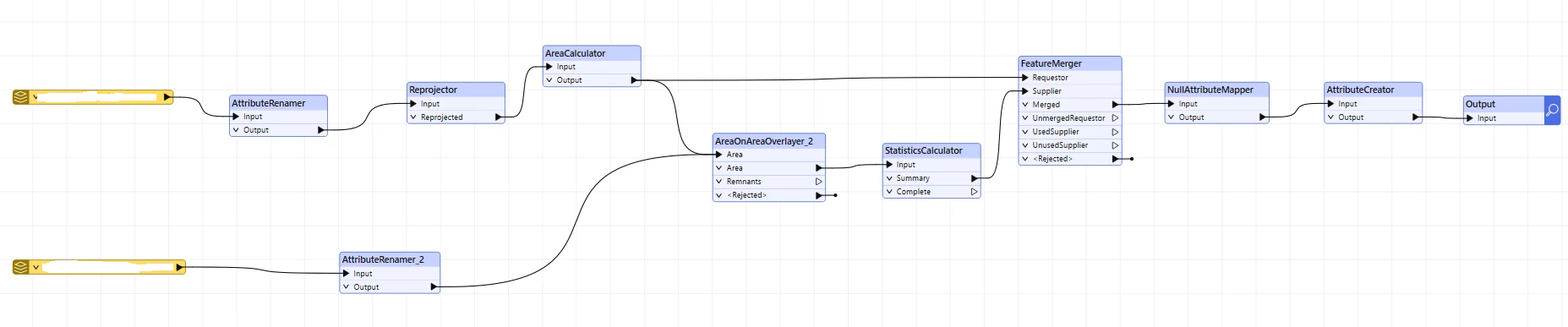
In what is possibly a similar scenario, I calculated the area of the polygons with an AreaCalculator first, used the AreaOnAreaOverlayer for the overlaps, and the StatisticsCalculator so that each polygon had one row with the sum of all intersections; then used a FeatureMerger to join back the original area with the StatisticsCalculator output; I then created a new attribute with value = the percent calculation I needed: