


Best Answer

Terminator performs database rollback ?

  • October 23, 2020
  • 4 replies
  • 53 views

lifalin2016
Supporter
Forum|alt.badge.img+40

Hi list.

I've built a workspace with a loop looking for information, that I don't know the exact end of. So I loop with a margin, and I save an ID of the last found instance, and check whether I've had too many consecutive fails. If too many fails have been found, I redirect to a Terminator transformer.

However, when I ran the workspace, expecting some output to a database, no output was produced.

It seems that the Terminator transformer rollback previous database inserts. When I disabled the Terminator, all worked as expected.

Is there a way of making a peaceful halt of processing of a workspace, not the "pull-the-plug" kind of behaviour that Terminator seems to perform ?

I.e., is there an option to make the Terminator transformer less "Terminator"-like ??

Cheers

Best answer by david_r

Further to what @jdh​ says, since the Terminator only rolls back the currently open transaction block, it is possible to limit how much the Terminator rolls back by setting the writer transaction size to 1. That way you'll only lose the feature that triggered the Terminator, not the preceeding ones.

On the other hand, you'll notice that performance goes down because of the overhead associated with opening and closing that many transactions. But it's a technique that can be useful for debugging purposes.

This post is closed to further activity.
It may be an old question, an answered question, an implemented idea, or a notification-only post.
Please check post dates before relying on any information in a question or answer.
For follow-up or related questions, please post a new question or idea.
If there is a genuine update to be made, please contact us and request that the post is reopened.

4 replies

jdh
Contributor
Forum|alt.badge.img+40
  • Contributor
  • October 23, 2020

How are you writing to the database? What is your features per transaction set to? Are you using bulk insert?


There's no "successful exit early" version of the terminator, but you can probably accomplish what you want by changing some of the writer parameters.


david_r
Celebrity
  • Best Answer
  • October 26, 2020

Further to what @jdh​ says, since the Terminator only rolls back the currently open transaction block, it is possible to limit how much the Terminator rolls back by setting the writer transaction size to 1. That way you'll only lose the feature that triggered the Terminator, not the preceeding ones.

On the other hand, you'll notice that performance goes down because of the overhead associated with opening and closing that many transactions. But it's a technique that can be useful for debugging purposes.


hkingsbury
Celebrity
Forum|alt.badge.img+67
  • Celebrity
  • October 26, 2020

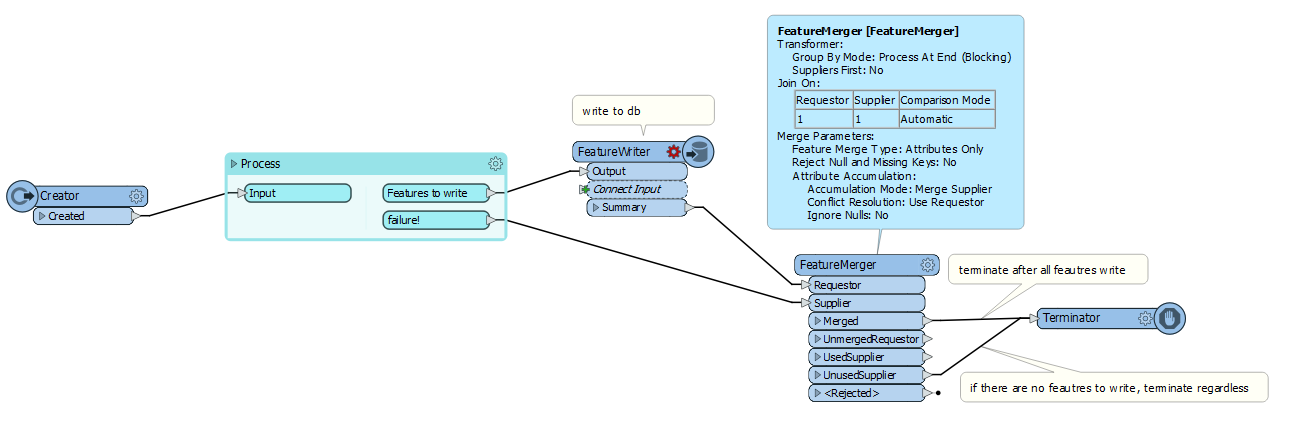
Could you do something like this? The terminator will only fire once the FeatureWriter has written to the database. It will still fire even if the process doesnt produce any features to write


Screenshot 2020-10-27 094711


lifalin2016
Supporter
Forum|alt.badge.img+40
  • Author
  • Supporter
  • October 27, 2020

Further to what @jdh​ says, since the Terminator only rolls back the currently open transaction block, it is possible to limit how much the Terminator rolls back by setting the writer transaction size to 1. That way you'll only lose the feature that triggered the Terminator, not the preceeding ones.

On the other hand, you'll notice that performance goes down because of the overhead associated with opening and closing that many transactions. But it's a technique that can be useful for debugging purposes.

Thanks David.

I hadn't thought about it being bulk, so yes, the transaction was never committed prior to the Terminator reeking havoc. Turning it off did the trick.