Solved

Spatial Definition and Automatic Attribute Definition with FeatureWriter

  • November 19, 2025
  • 5 replies
  • 92 views

pmcpherson
Contributor
Forum|alt.badge.img+10

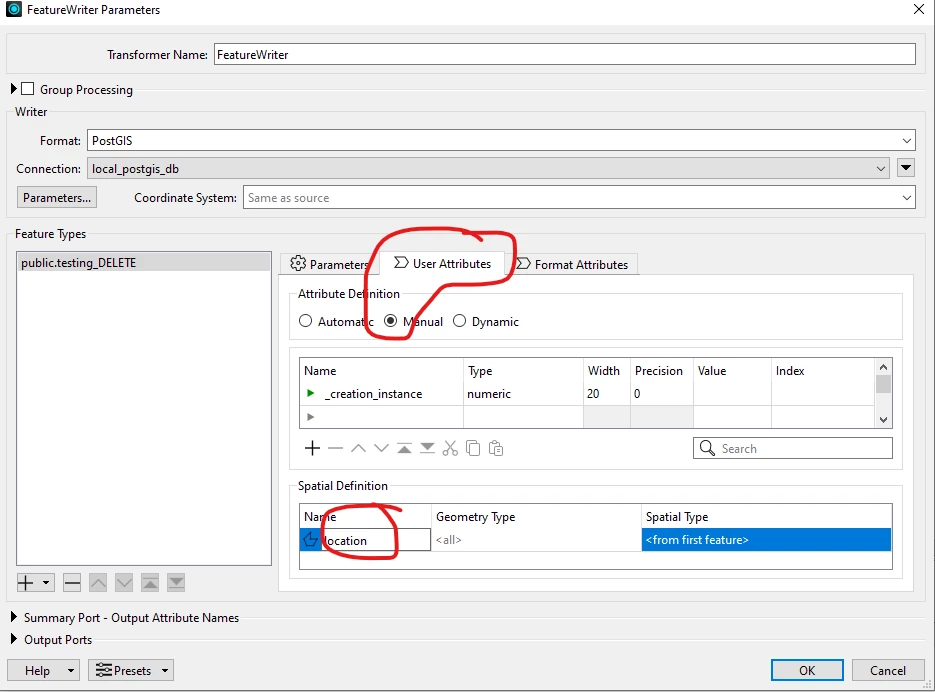
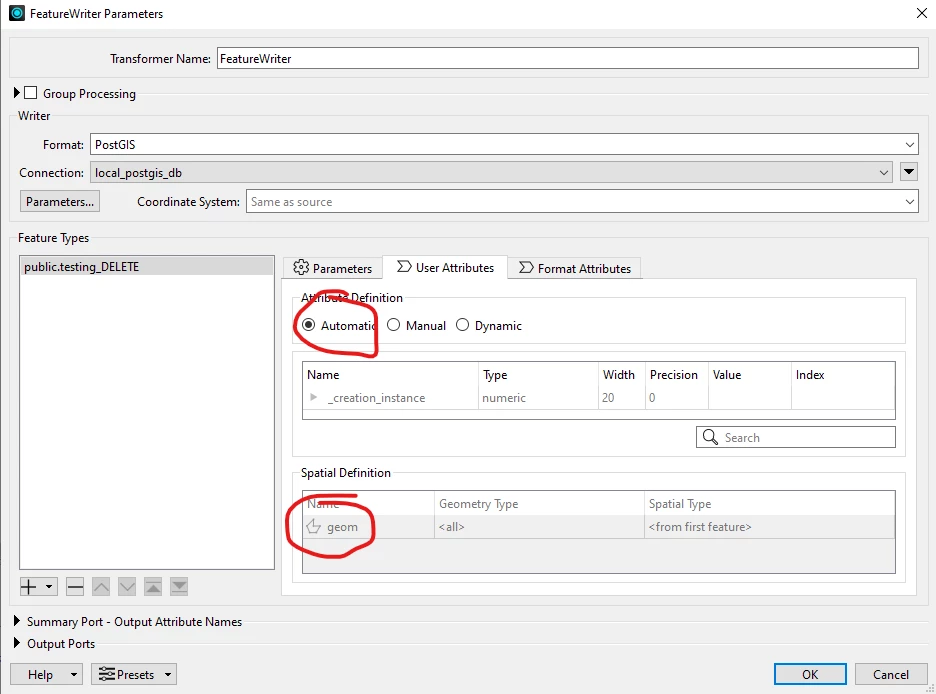
With the new spatial definition option in the FeatureWriter, it appears that Attribute Definition cannot be reverted to Automatic after first setting the Spatial Definition? In my case the format is set to PostGIS. Is this expected behavior? Am currently running FME Form 2025.1.1.0, Build 25623.

Best answer by crystalatsafe

Hi ​@pmcpherson 

I looked into this a bit and this is expected behaviour with FME 2025.1 and the addition of the spatial definition table.

The Spatial Definition table operates similar to the Attribute Definition table in automatic mode where the geometry name is coming from the connected incoming feature. When you switch to manual mode then back to automatic it does not preserve the input - same thing happens here for attributes.

For automatic mode: If the incoming data connection does not have a geometry name then the format's default name is applied - in this case for PostGIS it is geom.

To continue using Automatic mode and ensure your spatial data is written to your table's geometry column (location), I would suggest adding a GeometryNameSetter transformer prior to the FeatureWriter. This will set the name of the geometry to match your output schema.

Please let me know if you would like me to clarify anything or if you have any questions.

5 replies

crystalatsafe
Safer
Forum|alt.badge.img+26

Hi ​@pmcpherson 

I'm sorry that no one has responded to your question yet! 
Could you please send a screenshot of what you are seeing? When you set the spatial definition, are you selecting Dynamic or Manual? Once the spatial definition is set, what do you see when you try to select Automatic? 
Please also send a screenshot showing how you set up the FeatureWriter (Parameters and User Attributes tab). I would be happy to take a look. 


pmcpherson
Contributor
Forum|alt.badge.img+10
  • Author
  • Contributor
  • December 4, 2025

Hi ​@pmcpherson 

I'm sorry that no one has responded to your question yet! 
Could you please send a screenshot of what you are seeing? When you set the spatial definition, are you selecting Dynamic or Manual? Once the spatial definition is set, what do you see when you try to select Automatic? 
Please also send a screenshot showing how you set up the FeatureWriter (Parameters and User Attributes tab). I would be happy to take a look. 

Hi ​@crystalatsafe

I should have mentioned that I’m using the “Manual” option under “Attribute Definition”. After setting to manual, I update the Spatial Definition Name from “geom” to “location”, since for my particular db that is the name used for a point feature. After that, if I change “Manual” back to “Automatic” the Name is changed back to “geom”.


crystalatsafe
Safer
Forum|alt.badge.img+26
  • Safer
  • Best Answer
  • December 4, 2025

Hi ​@pmcpherson 

I looked into this a bit and this is expected behaviour with FME 2025.1 and the addition of the spatial definition table.

The Spatial Definition table operates similar to the Attribute Definition table in automatic mode where the geometry name is coming from the connected incoming feature. When you switch to manual mode then back to automatic it does not preserve the input - same thing happens here for attributes.

For automatic mode: If the incoming data connection does not have a geometry name then the format's default name is applied - in this case for PostGIS it is geom.

To continue using Automatic mode and ensure your spatial data is written to your table's geometry column (location), I would suggest adding a GeometryNameSetter transformer prior to the FeatureWriter. This will set the name of the geometry to match your output schema.

Please let me know if you would like me to clarify anything or if you have any questions.


pmcpherson
Contributor
Forum|alt.badge.img+10
  • Author
  • Contributor
  • December 8, 2025

Hi ​@crystalatsafe,

Much thanks for looking into this. I don’t think I’ve using the GeometryNameSetter transformer before and will definitely try it out.


crystalatsafe
Safer
Forum|alt.badge.img+26

Hi ​@pmcpherson 

No problem, happy to help! 

If you have any questions while trying this out, please let me know.