
Best Answer

Set Python interpreter for a workspace

  • January 3, 2020
  • 2 replies
  • 50 views

Forum|alt.badge.img

Hello, I have the following question: I would like to automate a process that involves running an ArcGIS Python script and then 5 FME workspaces. I thought about doing this with 6 workspaces, which I call using the WorkspaceRunner. For this to work, I would have to use the ArcGIS Python interpreter for the first workspace and after that the FME Python interpreter. Is it possible to set this as an option in each Workspace? I know it is possible to change the standard Python interpreter in the FME Options, but is it also possible to define it separately in different FMW files?

Thanks a lot for your help in advance!
Best answer by chrisatsafe

Hi @tomrosmann,

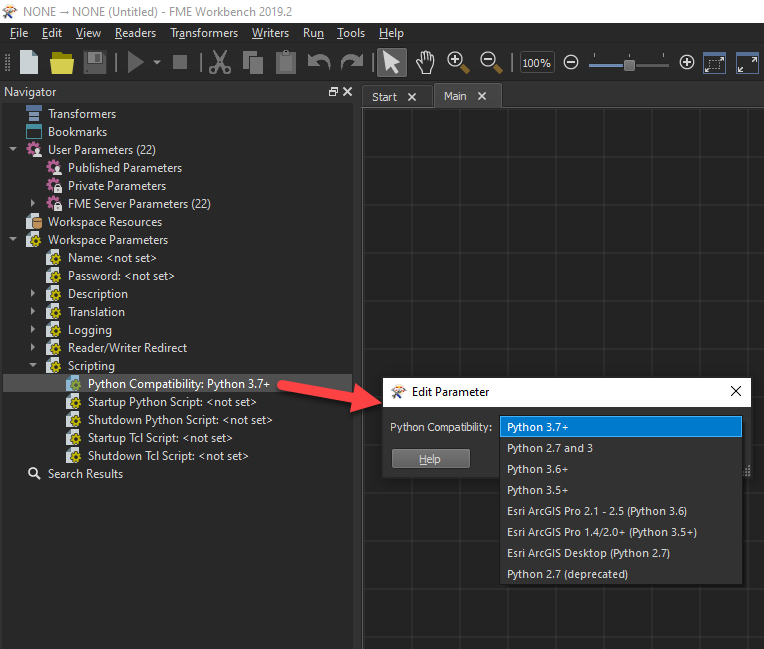
Absolutely, you can set the Python Compatibility for each workspace independently in the Navigator pane under Workspace Parameters > Scripting > Python Compatibility.

Setting the Python Interpreter in FME Options will dictate the default setting of the Python Compatibility Scripting workspace parameter for new workspaces.

For more info, please see the Python Compatibility doc.

This post is closed to further activity.
It may be an old question, an answered question, an implemented idea, or a notification-only post.
Please check post dates before relying on any information in a question or answer.
For follow-up or related questions, please post a new question or idea.
If there is a genuine update to be made, please contact us and request that the post is reopened.

2 replies

chrisatsafe
Contributor
Forum|alt.badge.img+2
  • Contributor
  • Best Answer
  • January 3, 2020

Hi @tomrosmann,

Absolutely, you can set the Python Compatibility for each workspace independently in the Navigator pane under Workspace Parameters > Scripting > Python Compatibility.

Setting the Python Interpreter in FME Options will dictate the default setting of the Python Compatibility Scripting workspace parameter for new workspaces.

For more info, please see the Python Compatibility doc.


Forum|alt.badge.img
  • Author
  • January 8, 2020

Thanks a lot for the answer! I did try this, but FME does not find the ArcGIS installation, although it does when it reads/writes to File Geodatabases... great to know that it is indeed this functionality!