

Question

S3Connector Download rejecting all files

  • July 6, 2020
  • 2 replies
  • 37 views

Forum|alt.badge.img

I am trying to download a set of GZIPPED log files from Amazon S3

The file listing is working but the downloader rejects all files.
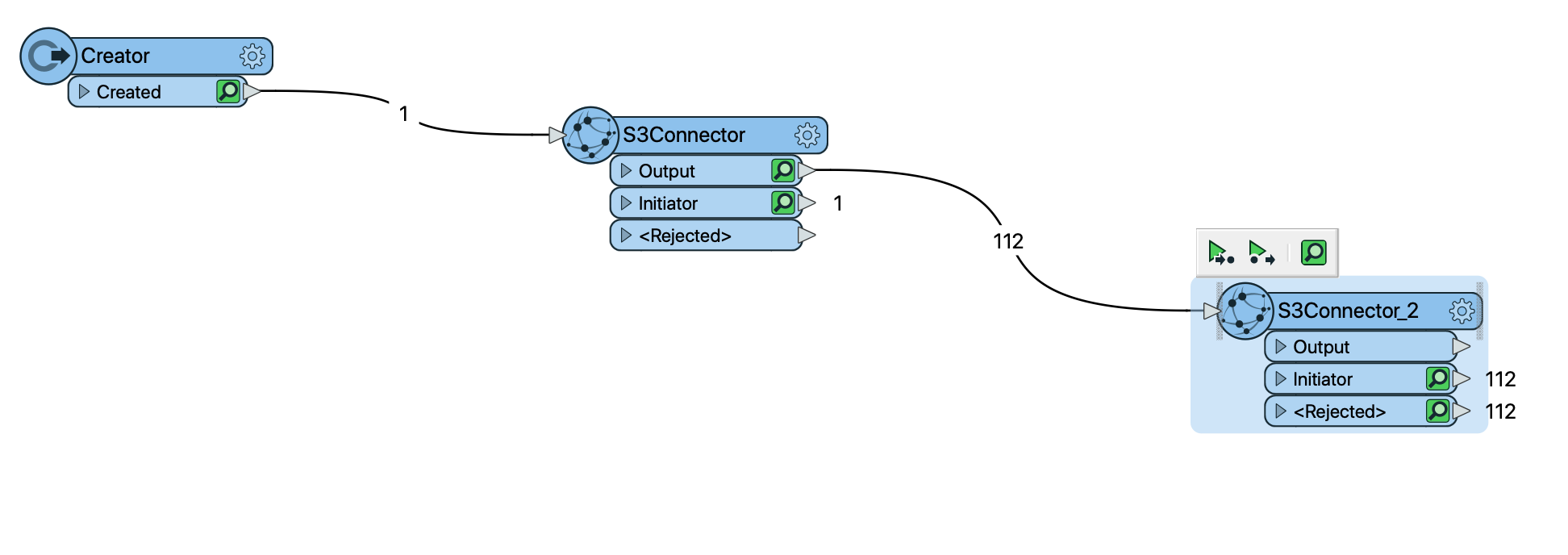
In my logs I see:-

S3Connector_CATCHER (TeeFactory): Cloned 1 input feature(s) into 2 output feature(s)

S3Connector_ROUTER (TestFactory): Tested 112 input feature(s) -- 112 feature(s) passed and 0 feature(s) failed

S3Connector_OUTPUT Feature Counter -1 6 (TeeFactory): Cloned 112 input feature(s) into 112 output feature(s)

S3Connector_INITIATOR Feature Counter -1 2147680258 (TeeFactory): Cloned 1 input feature(s) into 0 output feature(s)

S3Connector_<REJECTED> Feature Counter -1 2147745794 (TeeFactory): Cloned 0 input feature(s) into 0 output feature(s)

S3Connector_2_CATCHER (TeeFactory): Cloned 112 input feature(s) into 224 output feature(s)

S3Connector_2_ROUTER (TestFactory): Tested 112 input feature(s) -- 0 feature(s) passed and 112 feature(s) failed


What am I doing wrong here?

This post is closed to further activity.
It may be an old question, an answered question, an implemented idea, or a notification-only post.
Please check post dates before relying on any information in a question or answer.
For follow-up or related questions, please post a new question or idea.
If there is a genuine update to be made, please contact us and request that the post is reopened.

2 replies

Forum|alt.badge.img
  • Author
  • July 7, 2020

I fixed this and it is down to my misunderstanding as toy the difference between download as FILES or FOLDER

If I select Download As: Folder in the destination parameter box then the files are downloaded.

I'm still confused as I had thought the file listing passed a set of files to the downloader?


jovitaatsafe
Safer
Forum|alt.badge.img+11

I fixed this and it is down to my misunderstanding as toy the difference between download as FILES or FOLDER

If I select Download As: Folder in the destination parameter box then the files are downloaded.

I'm still confused as I had thought the file listing passed a set of files to the downloader?

Hi @davebarter,

Glad to hear that you got it working! From what I understand of the S3Connector, if you are wanting to download multiple files, downloading as a Folder is the way to go. Downloading as File would only allow you to select a single file, which means it reads from a single URL.

Hope that clears things up a bit!


