


Question

Request Administrative Token from ArcGIS Enterprise using ArcGIS REST API "Token" endpoint

  • January 22, 2026
  • 5 replies
  • 65 views

nathanherzog
Contributor
Forum|alt.badge.img+8

This...may be complicated to explain. We are trying to create Feature Service webhooks in ArcGIS Enterprise. ESRI documentation indicates that this can either be accomplished with the admin Portal (which very few users have access to) or via the “administrative API”

https://developers.arcgis.com/rest/enterprise-administration/server/create-webhook/

The only way to access the administrative API is to acquire a session token (SSO, username/password, other authentication types are not accepted).

In ArcGIS Enterprise, the generateToken endpoint is no longer used, the OAUTH2 “Token” endpoint has superseded it. There is a preliminary authorization step that must be completed before accessing the “Token” endpoint.

https://developers.arcgis.com/rest/users-groups-and-items/authorize/

https://developers.arcgis.com/rest/users-groups-and-items/token/

Authentication in our environment is done via OAUTH2/SAML so when trying to access the “Authorize” endpoint via an HTTPCALLER, the response that I’m getting is an HTML response that kind of looks like it’s just the user sign-in page. I’ve tried the “Use Authentication” setting in the HTTPCALLER with both a standard Portal web connection, and an OAUTH Portal web connection with the same results.

I can get the Authorize endpoint, the Token endpoint, and the create webhooks endpoints to work correctly directly via web browser. But my ultimate goal would be to build an FME front-end (web app via FME Flow) with user parameters that would match what is requested by the ArcGIS administrative API. This would be a really cool workflow, but won’t be able to work without being able to generate the token in FME.

Any thoughts?

5 replies

j.botterill
Influencer
Forum|alt.badge.img+57
  • Influencer
  • January 23, 2026

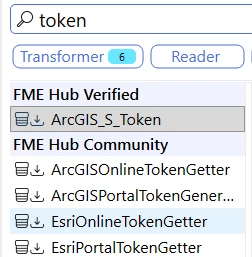
Have you considered utilising any of the custom transformers in the FME Hub?

Then pass the token attribute into your HTTPcaller etc


ebygomm
Influencer
Forum|alt.badge.img+46
  • Influencer
  • January 23, 2026

I’m not sure I full understand what you are trying to do and what issues you have.


Do you have a Connection set up with the Esri ArcGIS Generate Token (safe.esri-agol) web service?


nathanherzog
Contributor
Forum|alt.badge.img+8
  • Author
  • Contributor
  • January 23, 2026

I’m not sure I full understand what you are trying to do and what issues you have.


Do you have a Connection set up with the Esri ArcGIS Generate Token (safe.esri-agol) web service?


That uses the generateToken endpoint (https://[root]/generateToken). Our organization uses SAML for authentication, so there is a different workflow for generating a token. You have to use the Authorize and Token endpoints, not generateToken.

As far as I can tell, FME doesn’t have a web connection that will generate a token using the Token endpoint (https://[root]/oauth2/token)

https://developers.arcgis.com/rest/users-groups-and-items/token/


nathanherzog
Contributor
Forum|alt.badge.img+8
  • Author
  • Contributor
  • January 23, 2026

Have you considered utilising any of the custom transformers in the FME Hub?

Then pass the token attribute into your HTTPcaller etc

I’ve looked into them, but I think they all use the generateToken API endpoint (https://[root]/generateToken). Our organization uses SAML/OAUTH2 for authentication so there is a different workflow that uses the Authorize and Token API endpoints to generate a token (https://[root]/oauth2/token)


ebygomm
Influencer
Forum|alt.badge.img+46
  • Influencer
  • January 23, 2026

Sorry, there are so many different web services now I struggle to get them right

Should have said Esri ArcGIS Enterprise OAuth (Template) (safe.esri-agol)

If you have this set up you can use python to retrieve an access token

import fme
import fmeobjects
import fmewebservices


def processFeature(feature):
ws = fmewebservices.FMENamedConnectionManager().getNamedConnection("Esri ArcGIS Dev Oauth")
tk = ws.getAccessToken()
feature.setAttribute("token",tk)