Question

Read SHP file, split and write into separate XML files

  • June 29, 2016
  • 5 replies
  • 73 views

Forum|alt.badge.img

Hello,

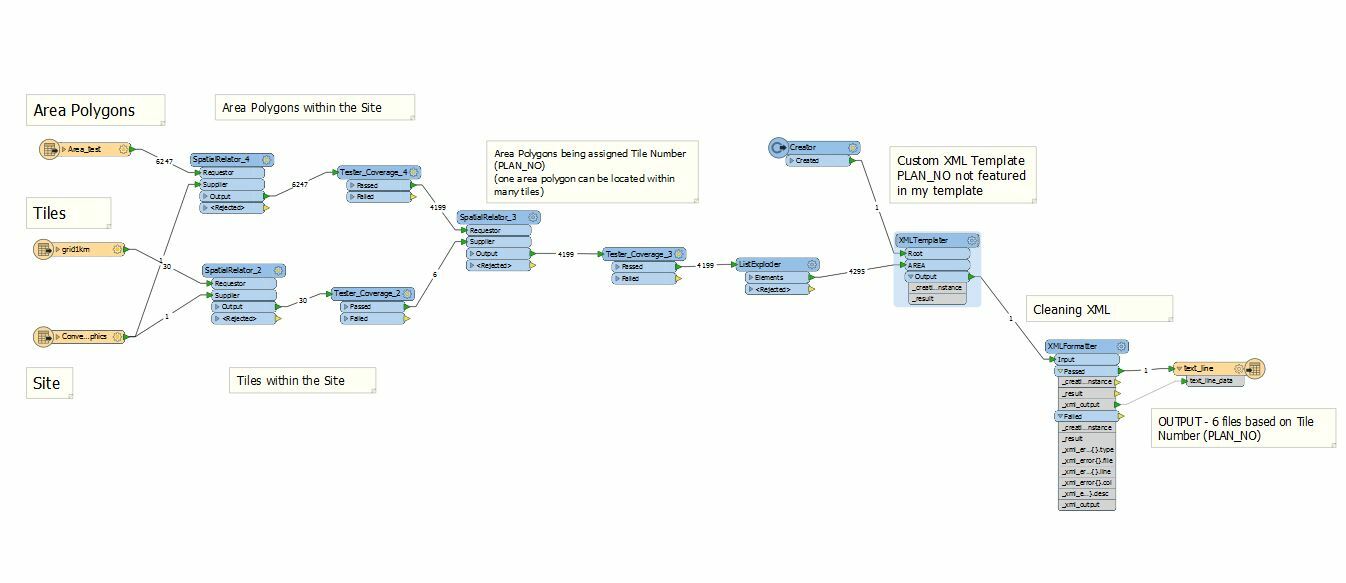
I'm reading a SHP file, splitting it into tiles and I want to write each tile into a separate XML using my own XML template (XML Templater -> XML Formatter -> AttributeFileWriter). Is some kind of fanout possible on AttributeFileWriter?

Thanks for help, Moni

This post is closed to further activity.
It may be an old question, an answered question, an implemented idea, or a notification-only post.
Please check post dates before relying on any information in a question or answer.
For follow-up or related questions, please post a new question or idea.
If there is a genuine update to be made, please contact us and request that the post is reopened.

5 replies

jdh
Contributor
Forum|alt.badge.img+40
  • Contributor
  • June 29, 2016

Yes, you can set the Target Filename to an attribute. However, why not just use a Text File writer? Set the Attribute to contain XML output on the XML formatter to text_line_data, and setup a dataset fanout on the textfile writer.


Forum|alt.badge.img
  • Author
  • June 30, 2016

Hi,

how do I set a dataset fanout on the textfile writer? I'm assigning tile number(s) (PLAN_NO) to every polygon from Area Polygons (some polygons can be within more than one tile). The XML Templater is using a custom schema - PLAN_NO attribute is not needed in the custom schema. In this example, the output is supposed to be 6 Area polygons files XML/GML files - one for each of the 6 tiles which intersect the input Site polygon.

I was able to split the Area polygons into tiles and output to SHP files, but I'm a little bit lost how I achieve the same with XML/GML output.

Any help much appreciated...


takashi
Celebrity
  • June 30, 2016

Hi @honkovam, If you need to create 6 XML documents for each PLAN_NO, you will have to send 6 features which have unique PLAN_NO to the ROOT port of the XMLTemplater, and also set PLAN_NO to the "Group Sub-Features By" parameter.

To create the 6 features for ROOT port, it might be easy to branch the data flow at the output port of the ListExploder and filter unique "PLAN_NO" features with the DuplicateFilter (Key Attributes: PLAN_NO).

Then, in the Navigator window, specify unique file name for each PLAN_NO to the Fanout Expression parameter of the Text File writer. e.g. "plan_@Value(PLAN_NO).xml"

See also this simplified example: fanout-dataset-example.fmw


jdh
Contributor
Forum|alt.badge.img+40
  • Contributor
  • June 30, 2016

Hi,

how do I set a dataset fanout on the textfile writer? I'm assigning tile number(s) (PLAN_NO) to every polygon from Area Polygons (some polygons can be within more than one tile). The XML Templater is using a custom schema - PLAN_NO attribute is not needed in the custom schema. In this example, the output is supposed to be 6 Area polygons files XML/GML files - one for each of the 6 tiles which intersect the input Site polygon.

I was able to split the Area polygons into tiles and output to SHP files, but I'm a little bit lost how I achieve the same with XML/GML output.

Any help much appreciated...

To have 6 features coming out of the XML Templater, you need to have 6 root features with an attribute you can use as a Group-By clause on the XML templater. If you you do not know the PLAN_NO in advance of runtime, instead of using a creator use a Sampler to get the first 1 feature from the list exploder with a group-By on the PLAN_No, Send the not sampled to the AREA port of the XML Templater, and send the sampled to both the Root and AREA ports.


Forum|alt.badge.img
  • Author
  • July 1, 2016

Hi @takashi!

thank you very much for your help!

Moni