

Best Answer

Iterate features in FME ?

  • October 29, 2018
  • 6 replies
  • 233 views

Forum|alt.badge.img+1

Hi, I have a model in ARCGIS model builder that perfectly iterates through features. What i do: I grab a polygone from a dataset make buffer around and than clip over it 3 other shapes - I would like to do this for 30 polygones (each with uniq ID).

In FME workspace i built a complex model with a tester transformer, but it it is too complex, because one of the shapes that overlays and have to be cliped has over 7.5 million of rows.

Any solution? Thanks
Best answer by redgeographics

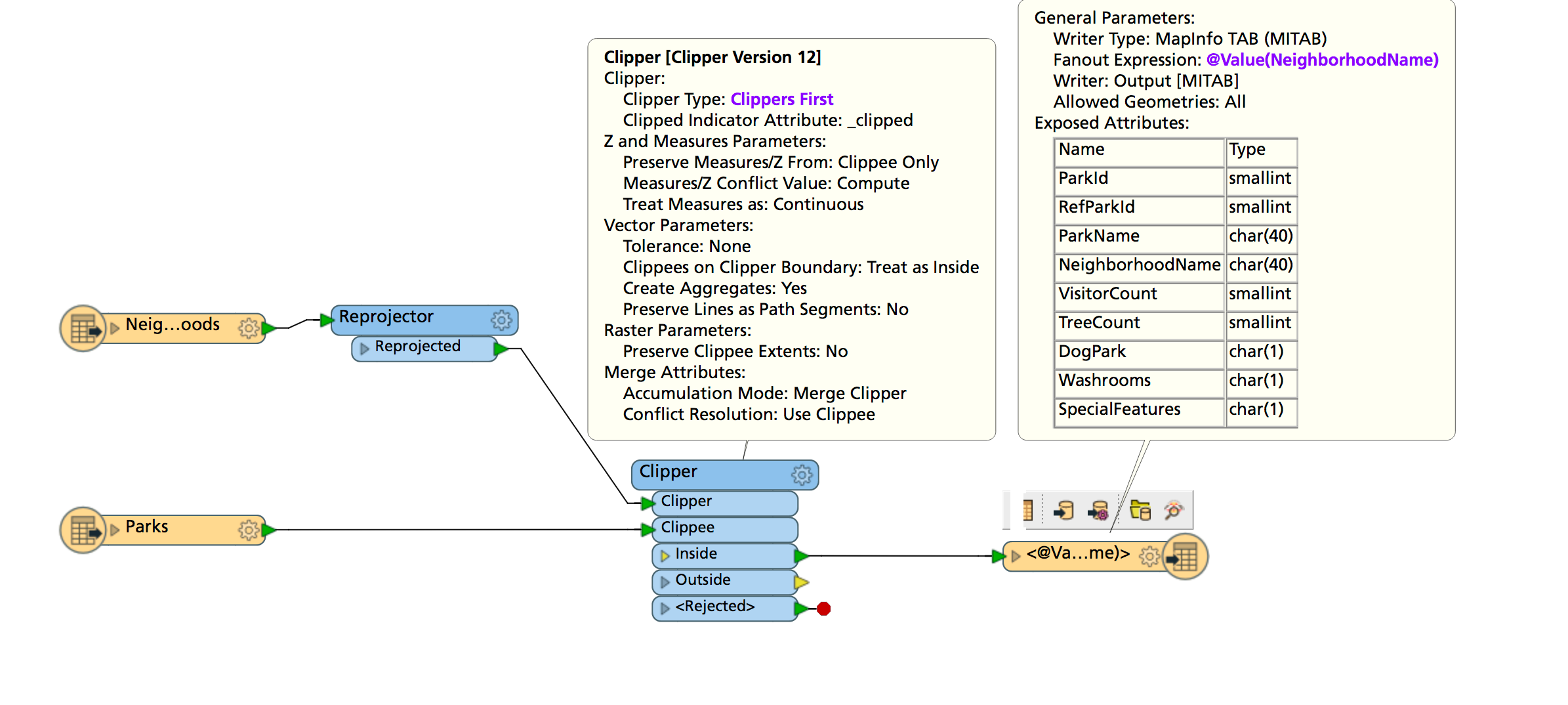
The 7.5 million features might pose a problem, but in general terms you could set up a workspace that takes your clipper features as well as the 3 other inputs. Run them through a Clipper which you've set to Clippers First (and of course make sure the clipper features are being read first by dragging that reader to the top of the Navigator panel)

Then set a fanout on your output feature type name and it will generate separate files with those unique id's.

Key here is to make sure to put the clipper features in first to cut down on memory usage.

This post is closed to further activity.
It may be an old question, an answered question, an implemented idea, or a notification-only post.
Please check post dates before relying on any information in a question or answer.
For follow-up or related questions, please post a new question or idea.
If there is a genuine update to be made, please contact us and request that the post is reopened.

6 replies

redgeographics
Celebrity
Forum|alt.badge.img+62
  • Celebrity
  • Best Answer
  • October 29, 2018

The 7.5 million features might pose a problem, but in general terms you could set up a workspace that takes your clipper features as well as the 3 other inputs. Run them through a Clipper which you've set to Clippers First (and of course make sure the clipper features are being read first by dragging that reader to the top of the Navigator panel)

Then set a fanout on your output feature type name and it will generate separate files with those unique id's.

Key here is to make sure to put the clipper features in first to cut down on memory usage.


Forum|alt.badge.img+1
  • Author
  • October 29, 2018

The 7.5 million features might pose a problem, but in general terms you could set up a workspace that takes your clipper features as well as the 3 other inputs. Run them through a Clipper which you've set to Clippers First (and of course make sure the clipper features are being read first by dragging that reader to the top of the Navigator panel)

Then set a fanout on your output feature type name and it will generate separate files with those unique id's.

Key here is to make sure to put the clipper features in first to cut down on memory usage.


Hi, Can you help me a little bit more with writter settings. I am confused, how to set a writer to make several shapefiles from one database ? What shapefile definition do i use ?

Forum|alt.badge.img+1
  • Author
  • October 29, 2018

The 7.5 million features might pose a problem, but in general terms you could set up a workspace that takes your clipper features as well as the 3 other inputs. Run them through a Clipper which you've set to Clippers First (and of course make sure the clipper features are being read first by dragging that reader to the top of the Navigator panel)

Then set a fanout on your output feature type name and it will generate separate files with those unique id's.

Key here is to make sure to put the clipper features in first to cut down on memory usage.

model-ehis.png


I have set the model in FME like this, using tester transformer, to grab each shape and make intersections and write down dwg files, but it is not working due to memory limitations - i use 32 bit FME.


redgeographics
Celebrity
Forum|alt.badge.img+62
model-ehis.png


I have set the model in FME like this, using tester transformer, to grab each shape and make intersections and write down dwg files, but it is not working due to memory limitations - i use 32 bit FME.


If you have the option to go to 64 bit FME I would highly recommend that. In the meantime, I've put together a small sample for you to look at.


clipping.fmwt


Note that I'm reading in 4 shapefiles, one of which, the ForwardSortationAreas has a different schema than the other 3. I clip all of that with the neighborhood boundaries and use a Shapefile writer with Dynamic Schema Definition. It looks at the original shapefiles for their schema's and applies those, then sets the output filename to be the original feature type plus the neighborhood name.


Hope this helps.


Forum|alt.badge.img+1
  • Author
  • October 29, 2018
If you have the option to go to 64 bit FME I would highly recommend that. In the meantime, I've put together a small sample for you to look at.


clipping.fmwt


Note that I'm reading in 4 shapefiles, one of which, the ForwardSortationAreas has a different schema than the other 3. I clip all of that with the neighborhood boundaries and use a Shapefile writer with Dynamic Schema Definition. It looks at the original shapefiles for their schema's and applies those, then sets the output filename to be the original feature type plus the neighborhood name.


Hope this helps.


Hi,


I have managed to set the writter to export several shapefiles in a file. The problem in reading 7.500.000 features was, that i didnt have spatial indexes of the imported shapefile. As soon as we calculate the spatial indexes, process runed smootly threw the model and it was much faster.


Thanks a lot in your help!

redgeographics
Celebrity
Forum|alt.badge.img+62


Hi,


I have managed to set the writter to export several shapefiles in a file. The problem in reading 7.500.000 features was, that i didnt have spatial indexes of the imported shapefile. As soon as we calculate the spatial indexes, process runed smootly threw the model and it was much faster.


Thanks a lot in your help!
Glad to hear that!



