


Question

How to remove Line Breaks BEFORE (or at the time) that the Text- FeautreReader reads it?

  • December 8, 2025
  • 3 replies
  • 48 views

louielou1234
Contributor
Forum|alt.badge.img+5

Hi There,

I am using a Text-FeatureReader to process .csv for input into a geocoder.  The problem is that these user-created csv contains Line Breaks and the addresses candidates cannot be read into the geocoder or even the Text-FeatureReader (please see attached grapic)...  I have a StringReplacer ready to fix the issue downstream but the problem is that the TextReader can not read and pass along the Line Break data (it goes missing) and I do not see any settings within the Text-FeatureReader itself to handle the string replacement.  --FYI I am using a Text-FeatureReader instead of a CSV-Reader because the data schema is always unknown.  Any help would be super appreciated.  Thank you!.

3 replies

ebygomm
Influencer
Forum|alt.badge.img+46
  • Influencer
  • December 8, 2025

Are the newlines in the address data in the CSV quoted?


louielou1234
Contributor
Forum|alt.badge.img+5
  • Author
  • Contributor
  • December 8, 2025

Hi Ebygomm, oh wow...thanks for pointing that out...so it looks like when you export line breaks from Excel it puts the text on the next line of the .csv file (in addition to adding in quote marks)...gosh so maybe this is really an Excel issue, not an FME issue...perhaps I can move the lines (shown in red underline attached) back up to the previous line?...how can I do that? :)...THANKS!


ebygomm
Influencer
Forum|alt.badge.img+46
  • Influencer
  • December 9, 2025

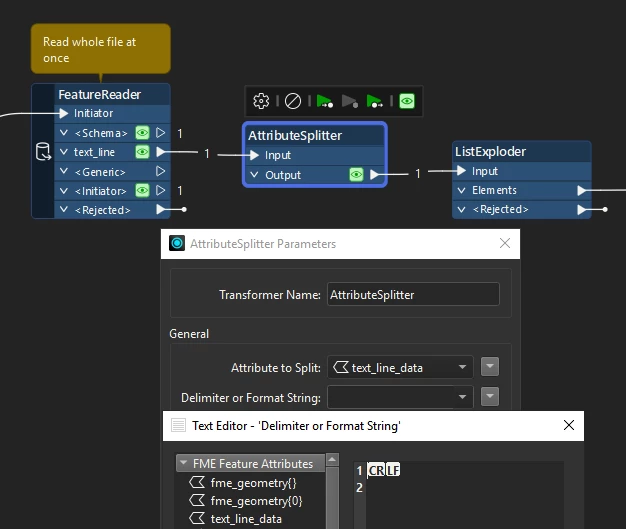
If you turn on show all characters in notepad, I suspect you will find the line breaks in the address are just new lines whilst the end of the lines are a carriage return and a linefeed.


If this is the case and you need to use the text file reader over the csv reader (which will handle this correctly) you can read the text file as a single attribute then split on the CRLF