

Best Answer

How to I link a checkbox writer parameter to a user parameter?

  • October 1, 2019
  • 3 replies
  • 24 views

Forum|alt.badge.img

Hi, I'm trying to optionally switch off the Spatial checkbox in a Writer by linking to a User Parameter. There is no drop list to enable me to control the Spatial box. I've tried unsetting the Spatial Column and setting Create Spatial Index to No (both of which I can link to Parameters), but then my non-spatial data doesn't get written out.
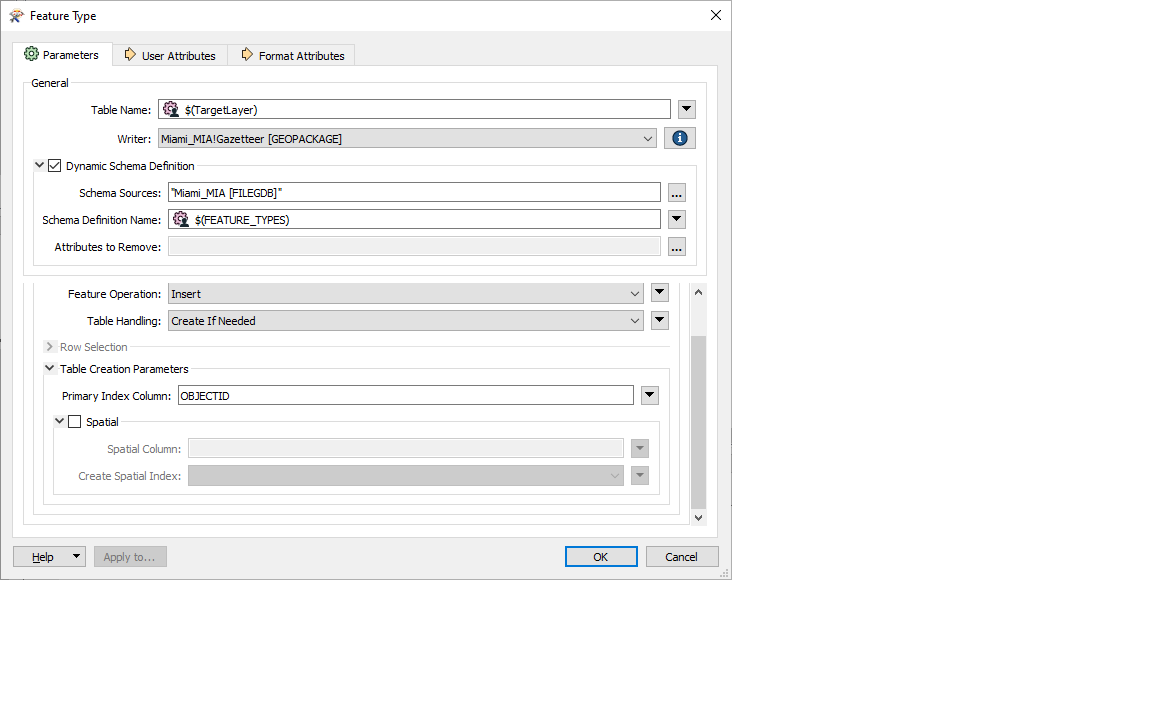
Any clues?

Chris BB

Best answer by chrisatsafe

Hi @chris_bb,

It looks like you can do this from the Navigator > GeoPackage Writer > Feature Types > Feature Type Name ($(TargetLayer) in your case) > Parameters > Format > right click on Spatial and choose create user parameter.

https://www.screencast.com/t/zWXxD7AZ

This post is closed to further activity.
It may be an old question, an answered question, an implemented idea, or a notification-only post.
Please check post dates before relying on any information in a question or answer.
For follow-up or related questions, please post a new question or idea.
If there is a genuine update to be made, please contact us and request that the post is reopened.

3 replies

chrisatsafe
Contributor
Forum|alt.badge.img+2
  • Contributor
  • Best Answer
  • October 1, 2019

Hi @chris_bb,

It looks like you can do this from the Navigator > GeoPackage Writer > Feature Types > Feature Type Name ($(TargetLayer) in your case) > Parameters > Format > right click on Spatial and choose create user parameter.

https://www.screencast.com/t/zWXxD7AZ


Forum|alt.badge.img
  • Author
  • October 1, 2019

Duhh! (Hits fist on head!) Many thanks, I looked under the Writer but not under the Feature Types.

Many thanks.

Chris BB


chrisatsafe
Contributor
Forum|alt.badge.img+2
  • Contributor
  • October 1, 2019

Duhh! (Hits fist on head!) Many thanks, I looked under the Writer but not under the Feature Types.

Many thanks.

Chris BB

Glad I could help!


