
Solved

How to fill Published Parameter with Environment Variable? Startup script or something else?

  • Aug 19, 2016 8:44 AM UTC
  • 4 replies
  • 94 views

arekpierchala
Contributor
Forum|alt.badge.img+1

Hi.

I have to create workspace in FME2015 and I need to fill specified Published Parameter with Environment Variable. How can I do that? Via startup script or something else?

Best answer by david_r

Ah, sorry, I see you wanted it in a parameter.

Try using a scripted parameter. Example returning PATH:
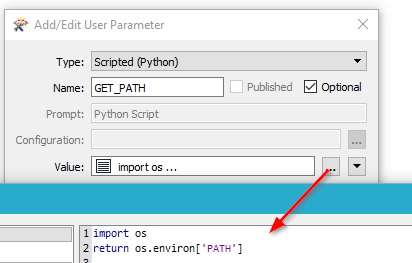
Note that the parameter cannot be published, since it's scripted.


View original
This post is closed to further activity.
It may be an old question, an answered question, an implemented idea, or a notification-only post.
Please check post dates before relying on any information in a question or answer.
For follow-up or related questions, please post a new question or idea.
If there is a genuine update to be made, please contact us and request that the post is reopened.

4 replies

david_r
Celebrity
  • Aug 19, 2016 8:48 AM UTC

Try the EnvironmentVariableFetcher


david_r
Celebrity
  • Best Answer
  • Aug 19, 2016 8:51 AM UTC

Ah, sorry, I see you wanted it in a parameter.

Try using a scripted parameter. Example returning PATH:

Note that the parameter cannot be published, since it's scripted.



mark2atsafe
Safer
Forum|alt.badge.img+59

The other thing you should be able to do is use ${variablename}

For example, on my FME I created a user parameter of type text and in the default value entered ${appdata}

A ParameterFetcher returned the value of that as C:\\Users\\imark\\AppData\\Roaming


arekpierchala
Contributor
Forum|alt.badge.img+1
  • Author
  • Contributor
  • Aug 23, 2016 6:55 AM UTC

The other thing you should be able to do is use ${variablename}

For example, on my FME I created a user parameter of type text and in the default value entered ${appdata}

A ParameterFetcher returned the value of that as C:\\Users\\imark\\AppData\\Roaming

very nice,


thanks, it also works





