Question

How to explode a feature to multiple attribute

  • November 30, 2019
  • 5 replies
  • 270 views

Hello;

I collected all of my data into a single feature how can I separate and put them to put in other attributes?

Thanks

This post is closed to further activity.
It may be an old question, an answered question, an implemented idea, or a notification-only post.
Please check post dates before relying on any information in a question or answer.
For follow-up or related questions, please post a new question or idea.
If there is a genuine update to be made, please contact us and request that the post is reopened.

5 replies

takashi
Celebrity
  • November 30, 2019

The solution would depend on how the feature has the data (multiple values). If the data were stored in a list attribute, for example you could explode the feature with the ListExploder easily.


  • Author
  • November 30, 2019

Hi Takashi;

I attached a sample of excel file that I have and need to separate all comma delimited values between all other attributes

Thanks

sheet1sample.csv


takashi
Celebrity
  • December 1, 2019

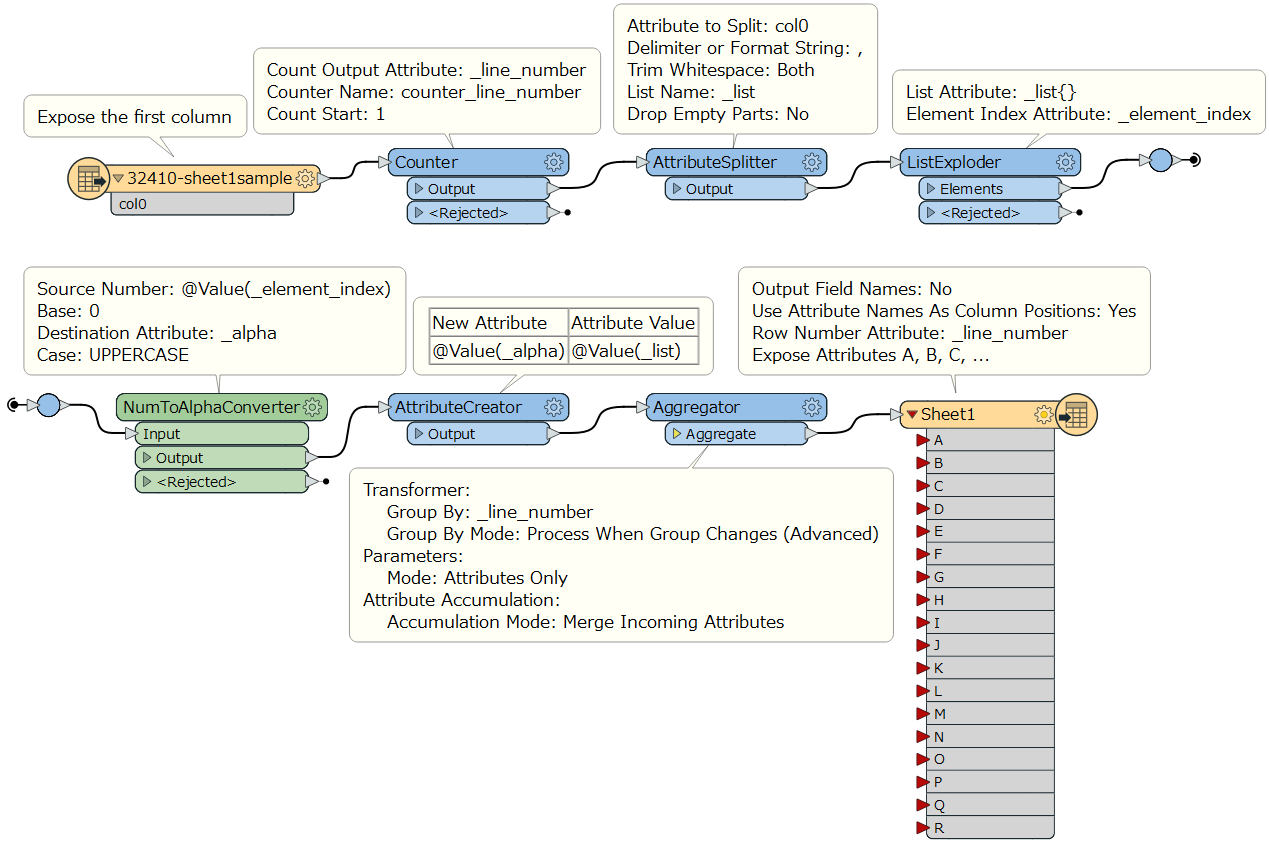
If I understood your requirement correctly, this workflow might help you. The NumToAlphaConverter is a custom transformer from FME Hub. See also the workspace example: csv22none.fmwt (FME 2019.2)


  • Author
  • December 2, 2019

Thanks Takashi

\\Would you mind send me the result that you got?

  • Author
  • December 2, 2019

I got it Everything worked Appreciate Takashi