


Question

Flow Hosted API - HTTPCaller to start up an instance

  • December 10, 2025
  • 3 replies
  • 26 views

stuart_miso
Contributor
Forum|alt.badge.img+10

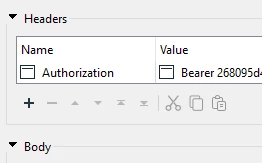
EDIT - Solved, see comment below regarding using the term “Bearer”.

Hi,

I am delving into the world of Flow Hosted. I am undertaking a Proof of Concept to discover the pros and cons. 

Concept: I’ve bult a Flow app (note: Flow, not Flow Hosted) to drop a random file into an Azure BLOb storage. I then have a workbench to monitor the BLOb, and when a new file is detected I want to start my currently “paused” Flow Hosted Instance to fire-up and inspect the newly arrived data and report back to say it has found it!

It seems that my best approach is to use HTTPCaller in my workbench to use the PUT method and the details copied across from here: FME Flow Hosted API (I can launch the instance from the API page so I know it works using PUT/instances/{instance_id}/action/start) but I am struggling to get the HTTPCaller configured so that it will start the paused instance.

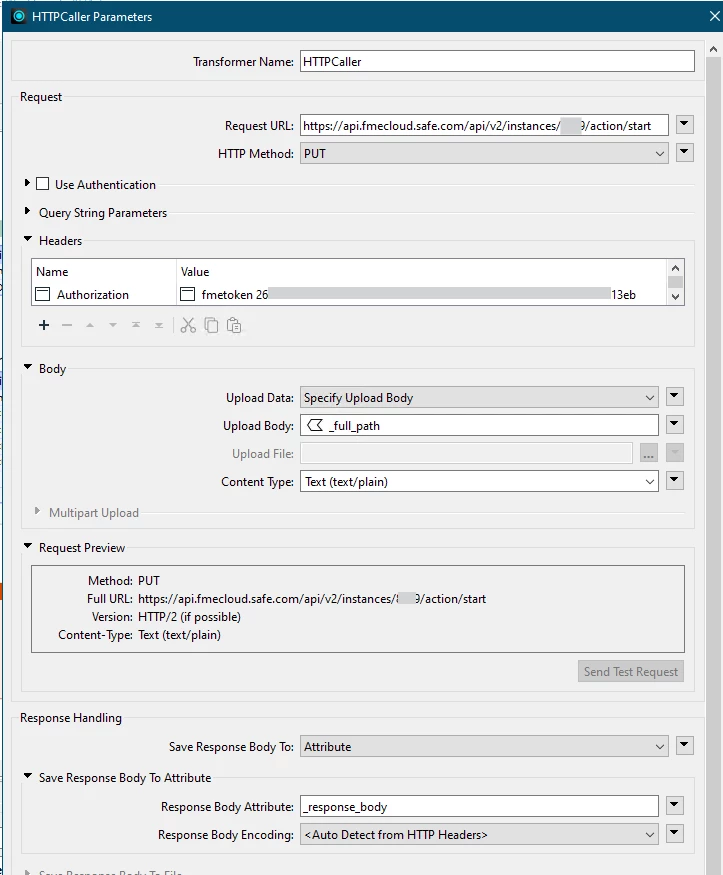
I need some help configuring this transformer please. This is how I have it set up, the Request URL features the api.fmecloud link, I have added the 4 digits for my instance but they are greyed-out in the screen shot.

I have grabbed the Hosted Token and added it to Headers. I understand I need to write “fmetoken 26….” as the value. Is that correct?

The Use Authentication is empty. Is this correct?

The Body section contains the _full_path attribute field from the incoming data in the workbench.

The Send Test Request is greyed-out though, and when I run the transformer nothing happens to the Hosted instance, but the log tells me it was a success...

What am I doing wrong?
 

3 replies

redgeographics
Celebrity
Forum|alt.badge.img+62

I’ve done this last year and I can spot 2 differences between what works for me and what you’re sharing here, neither of them striking me as particulary relevant to be honest.

  1. I’ve used the api key authentication rather than a token
  2. I had no upload body

The “send test request” button is greyed out for me as well but if I run the workspace it does what it’s supposed to do.

So my suggestion is to just give it a try and see what happens 😄


stuart_miso
Contributor
Forum|alt.badge.img+10
  • Author
  • Contributor
  • December 11, 2025

I’ve done this last year and I can spot 2 differences between what works for me and what you’re sharing here, neither of them striking me as particulary relevant to be honest.

  1. I’ve used the api key authentication rather than a token
  2. I had no upload body

The “send test request” button is greyed out for me as well but if I run the workspace it does what it’s supposed to do.

So my suggestion is to just give it a try and see what happens 😄

Thank you so much for your comment.

It turns out what I needed to do was add the text from the API page. This is the response I got on the webpage:
 

curl -X 'PUT' \

  'https://api.fmecloud.safe.com/api/v2/instances/8619/action/start' \

  -H 'accept: application/json' \

  -H 'Authorization: Bearer 268095d
 

So in the Headers box, I used the term “Bearer 268...” and it worked.


redgeographics
Celebrity
Forum|alt.badge.img+62

I’ve done this last year and I can spot 2 differences between what works for me and what you’re sharing here, neither of them striking me as particulary relevant to be honest.

  1. I’ve used the api key authentication rather than a token
  2. I had no upload body

The “send test request” button is greyed out for me as well but if I run the workspace it does what it’s supposed to do.

So my suggestion is to just give it a try and see what happens 😄

Thank you so much for your comment.

It turns out what I needed to do was add the text from the API page. This is the response I got on the webpage:
 

curl -X 'PUT' \

  'https://api.fmecloud.safe.com/api/v2/instances/8619/action/start' \

  -H 'accept: application/json' \

  -H 'Authorization: Bearer 268095d
 

So in the Headers box, I used the term “Bearer 268...” and it worked.


Yeah, that’s the one I have too. It’s been a while since I last looked into this API (well over a year actually) so the details were a bit hazy (and the one example I had was set to reboot a customer’s instance, so obviously I couldn’t do that)