

Best Answer

Filter out or delete list values

  • May 2, 2018
  • 4 replies
  • 400 views

Forum|alt.badge.img

Hi,

I have a polygon layer with x,y,z coordinates.

For each polygon, I would like to calculate the mean z-value. For this I use the ListStatisticsCalculator, which works perfectly.

The problem is, that some polygons consists of one or more useless z-value (-999, -9999 etc.). I would like to filter out these values (or delete them) before running it through the ListStatisticsCalculator.

I have tried the ListElementFilter with Filter Type Numeric Range, but I can't get it to work properly.

Any thoughts?

Thanks,

Stig
Best answer by david_r

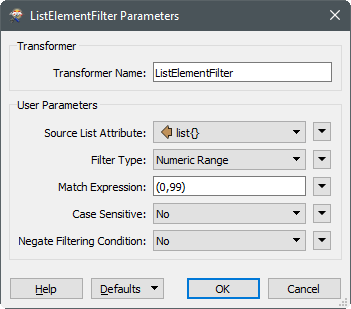
How have you configured the ListElementFilter? This example works for me, removing all list values outside the range 0-99. Notice the paranthesis around the match expression, otherwise it won't work as expected:

This post is closed to further activity.
It may be an old question, an answered question, an implemented idea, or a notification-only post.
Please check post dates before relying on any information in a question or answer.
For follow-up or related questions, please post a new question or idea.
If there is a genuine update to be made, please contact us and request that the post is reopened.

4 replies

redgeographics
Celebrity
Forum|alt.badge.img+62

The easiest and most elegant way (in terms of Best Practices) would be to remove those values before building the list. A Tester or TestFilter can be used for that.


david_r
Celebrity
  • Best Answer
  • May 2, 2018

How have you configured the ListElementFilter? This example works for me, removing all list values outside the range 0-99. Notice the paranthesis around the match expression, otherwise it won't work as expected:


Forum|alt.badge.img
  • Author
  • May 2, 2018

The easiest and most elegant way (in terms of Best Practices) would be to remove those values before building the list. A Tester or TestFilter can be used for that.

Wouldn't I need to extract the coordinates before doing that? The way I do it now, is to create lists with all coordinates in the CoordinateExtractor.


How do I remove z-values with the Tester, if there is no attribute containing all z-values?


Forum|alt.badge.img
  • Author
  • May 2, 2018

How have you configured the ListElementFilter? This example works for me, removing all list values outside the range 0-99. Notice the paranthesis around the match expression, otherwise it won't work as expected:

I thought I had configured it the right way, but I forgot the parenthesis. Doh!


I works perfectly now. Thanks.






