Question

Exporting ArcGIS Metadata using a List

  • May 8, 2013
  • 2 replies
  • 53 views

Forum|alt.badge.img
Hi Everyone,


I just had a question regarding exporting ArcGIS Metadata using a List.


We recently found this wonderful article on how to pass a list of layers to a FME Reader (http://fmepedia.safe.com/articles/How_To/Pass-a-List-of-Tables-or-Layers-to-an-FME-Reader-using-Python-Scripted-Parameters) and it works amazing, the trouble is that the metadata is not brought along with it.


The location where you normally would set metadata to come accross is where this python script needs to go.


Any help would be greatly appreciated


Thanks!



This post is closed to further activity.
It may be an old question, an answered question, an implemented idea, or a notification-only post.
Please check post dates before relying on any information in a question or answer.
For follow-up or related questions, please post a new question or idea.
If there is a genuine update to be made, please contact us and request that the post is reopened.

2 replies

fmelizard
Safer
Forum|alt.badge.img+21
  • Safer
  • May 8, 2013
Hi,


I have never tried the python startup on metadata (xml) since FME has other xml transformers to work with it.


There are plenty of resources about FME and metadata, this webinar can also be useful.


Hope this helps

mark2atsafe
Safer
Forum|alt.badge.img+59
Hi,


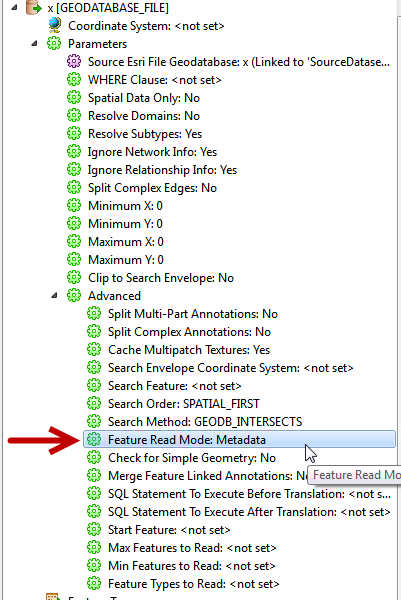
Check the parameters in the Navigator window. Basically there should be a switch for metadata I believe.


You can use this to get either Features OR Metadata from a Geodatabase.


If you want both Features AND Metadata, then I think you may have to add two separate readers - but if you do that then there won't be any conflict with your script I believe.


Hope this helps


Mark