


Question

Dynamically Keep/Remove attribute fields?

  • July 2, 2019
  • 3 replies
  • 97 views

joshuadamron
Contributor
Forum|alt.badge.img+8

Is there a transformer that is a cross between an AttributeKeeper/Remover and a Tester? Meaning that I need to dynamically split my data not on attribute values but on the attribute field names, so all of the fields with the suffix '_alias' are routed one direction and all other fields are routed another.

Any thoughts on how I can achieve this?

This post is closed to further activity.
It may be an old question, an answered question, an implemented idea, or a notification-only post.
Please check post dates before relying on any information in a question or answer.
For follow-up or related questions, please post a new question or idea.
If there is a genuine update to be made, please contact us and request that the post is reopened.

3 replies

Forum|alt.badge.img+2

Hi @joshuadamron,

I'm not aware of a transformer that will allow you to test the Attribute Names rather than there values, as a workaround I would use the steps proposed by Mark in this post where he suggests first using an AttributeExploder. The output of this is attr_name and attr_value pairs so you can then use a Tester with the operation 'Ends With' _alias. Once sorted through the different output ports you can then aggregate the data back together.


Please also consider upvoting this idea: https://knowledge.safe.com/questions/35011/filter-by-attribute-names.html requesting support for a transformer that allows you to filter by attribute name.


ebygomm
Influencer
Forum|alt.badge.img+46
  • Influencer
  • July 3, 2019

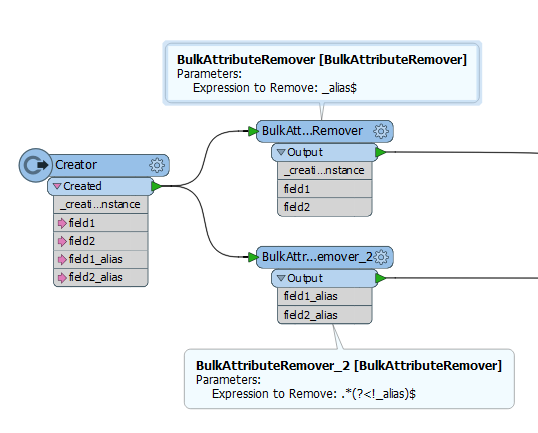
You can use two bulk attribute removers - 1 to keep everything ending in _alias and one to keep everything not ending in _alias


joshuadamron
Contributor
Forum|alt.badge.img+8
  • Author
  • Contributor
  • July 3, 2019

You can use two bulk attribute removers - 1 to keep everything ending in _alias and one to keep everything not ending in _alias

Thank you, exactly what I was looking for!