



Hello,
I have an Excel Spreadsheet that I need outputted in a specific format. I am only working with 175 records, so I could complete the customizations using Excel in a couple hours. But, I wanted to run this by the FME Community first.
Here is a screenshot of the spreadsheet output format I need:
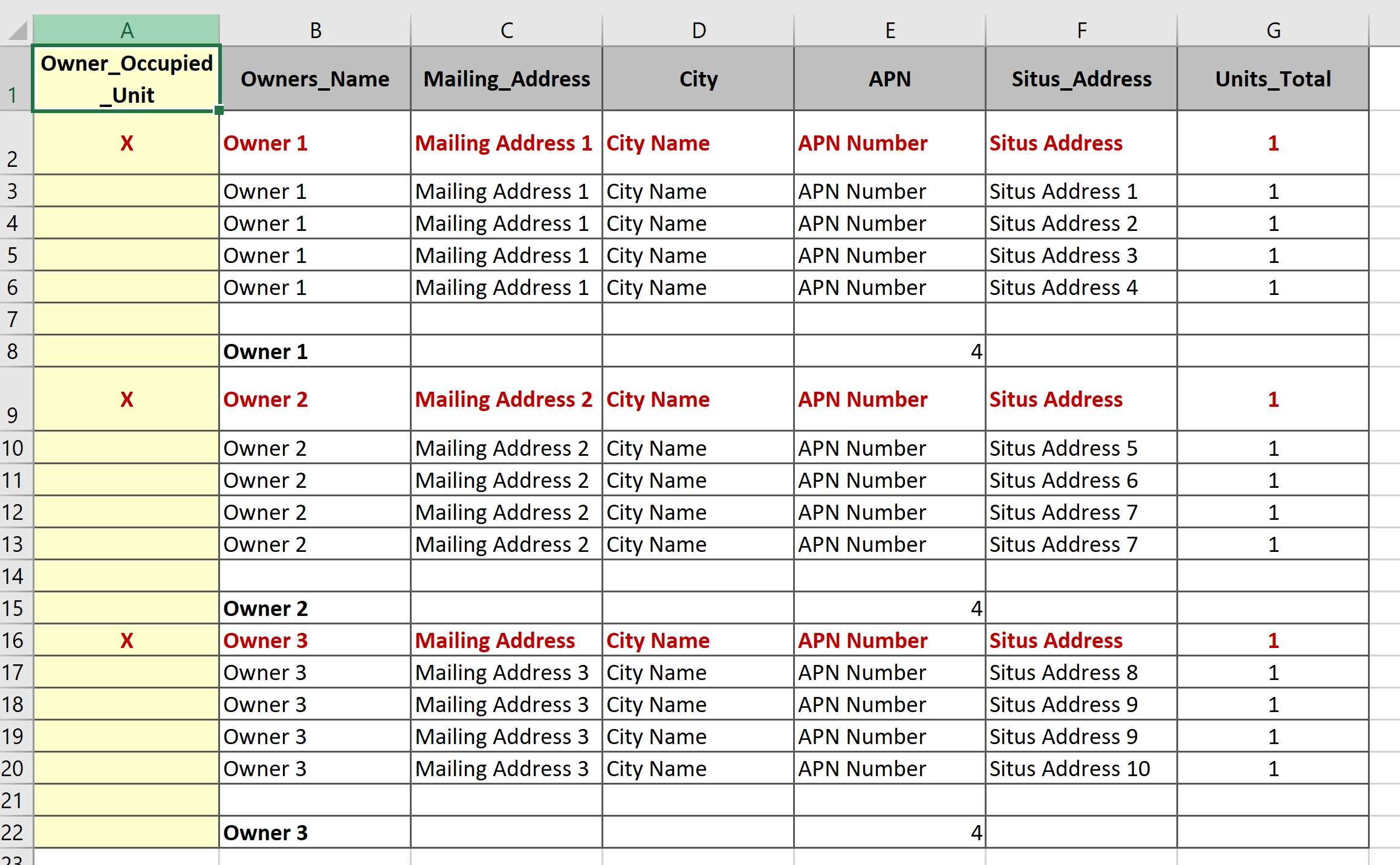
- Column names must be bold.
- Col A cells need to colored yellow.
- Col A cell values need to bold and red.
- Whenever there is an X in Col A then the entire row needs to be bold red
- The APN column needs to counted with the total shown in the row of the above screenshot.
At this point I am not looking for specific instructions on how to set up a spreadsheet like this. If you can provide any that would be helpful. I know I would use the Excel Styler Transformer. Maybe the Aggregator Transformer to sum the APN column, But can someone provide me at least a general idea on how to set up a spreadsheet like this using FME? is it possible? What parameters would I use/set up using the Excel Styler? Given I can do this manually in about 2 hours, is it even worth the time trying to figure this out using FME? Any advice is welcome.