


Question

Create a simple list

  • March 6, 2019
  • 7 replies
  • 69 views

nath
Contributor
Forum|alt.badge.img+7

Hi, 

I want to make a simple list of two attributes. I will try to explain the context. I have a point shapefile who has all an attribute "Factor2019".

First i have to determine which two points belong together, i use the "neighborfinder" and that works perfectly. I also give the two points who belongs together a same attribute (RWZI-NR), with the neighborfinder. I also merge the field "Factor 2019 but i firts give it an other name with the renamer "F2019"

But then a want for each "RWZI_NR" the two values from "Factor2019 and F2019" in the same field named "FACT" in al list so after that i can use de ListConcatenator for determing the max value. 

But it doesnt work, i have tried to generate a list immediately in the neighborfinder, with list builder and with a feature merger but i never get the result i need.

I'm doing something wrong but i don'n know what. 

Help :-)

Nathalie



This post is closed to further activity.
It may be an old question, an answered question, an implemented idea, or a notification-only post.
Please check post dates before relying on any information in a question or answer.
For follow-up or related questions, please post a new question or idea.
If there is a genuine update to be made, please contact us and request that the post is reopened.

7 replies

redgeographics
Celebrity
Forum|alt.badge.img+62

Any chance you can post a small sample of your data and your workspace?


ebygomm
Influencer
Forum|alt.badge.img+46
  • Influencer
  • March 6, 2019

Once you have both points with a common attribute, have you tried using a listbuilder at this stage? Group by RWZI-NR and add the Factor 2019 as the attribute to add to the list.


nath
Contributor
Forum|alt.badge.img+7
  • Author
  • Contributor
  • March 6, 2019

TestFMEpedia.fmw


nath
Contributor
Forum|alt.badge.img+7
  • Author
  • Contributor
  • March 6, 2019

Once you have both points with a common attribute, have you tried using a listbuilder at this stage? Group by RWZI-NR and add the Factor 2019 as the attribute to add to the list.

Yes but it doesn't work. Ik have uploaded an example below.


nath
Contributor
Forum|alt.badge.img+7
  • Author
  • Contributor
  • March 6, 2019

I think i found the problem, i wanted to do it from 1 input in the list builder, but if i serperate the two points and then go to the list builder it seems to work.

Thanks, sometimes is helps to see the problem more clearly when you try to explain is to somebody :-)


arnovananrooij
Contributor
Forum|alt.badge.img+5

TestFMEpedia.fmw

Link is not working for me


Forum|alt.badge.img+2

I think i found the problem, i wanted to do it from 1 input in the list builder, but if i serperate the two points and then go to the list builder it seems to work.

Thanks, sometimes is helps to see the problem more clearly when you try to explain is to somebody :-)

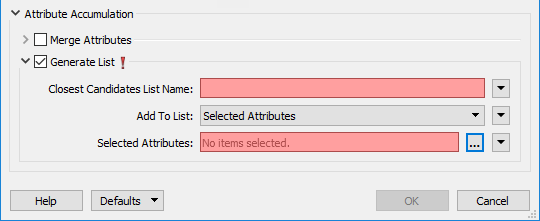
@nath It seems you're doing extra work with the ListBulider. The NeighborFinder has a list builder:

This should give you a one element list of the neighbouring point. You should then be able to use AttributeCreator to concatenate:

FACT = Factor2019, mylist{0}.Factor2019