




Solved

Convert Month text to number

  • Jul 10, 2017 2:14 PM UTC
  • 3 replies
  • 208 views

simonhume
Contributor
Forum|alt.badge.img+7

Hi

I have a simple spreadsheet that has a month column in text ie January, February.

How do i convert this to a number? So for January it would be 01, February 02 etc etc.

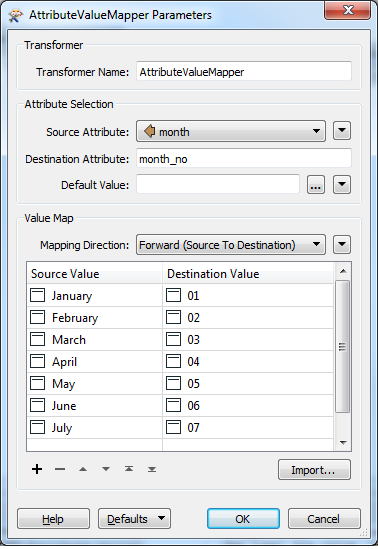
I've tried using AttributeValueMapper with the following source value;

@Value(Month)='January'

and a destination value of 01

but no luck.

Would be grateful if someone could suggest how i can do this

thanks

Simon Hume
Best answer by jdh

The AttributeValueMapper should work. Case matters.

View original
This post is closed to further activity.
It may be an old question, an answered question, an implemented idea, or a notification-only post.
Please check post dates before relying on any information in a question or answer.
For follow-up or related questions, please post a new question or idea.
If there is a genuine update to be made, please contact us and request that the post is reopened.

3 replies

jdh
Contributor
Forum|alt.badge.img+41
  • Contributor
  • Best Answer
  • Jul 10, 2017 2:18 PM UTC

The AttributeValueMapper should work. Case matters.


simonhume
Contributor
Forum|alt.badge.img+7
  • Author
  • Contributor
  • Jul 11, 2017 7:44 AM UTC

Thanks very much for you help, has worked a treat#

regards

Simon Hume


takashi
Celebrity
  • Jul 11, 2017 12:34 PM UTC

Just for your information. The StringPairReplacer could also be uses here. And, I found this expression works fine in FME 2017.1 beta. FME 2017.1 coming soon!

@DateTimeFormat(@DateTimeParse(@Value(month)012017,%B%d%Y),%m)




