
Question

Cannot to make fme list from python list

  • April 18, 2020
  • 6 replies
  • 111 views

Forum|alt.badge.img

During creating fme list I get python error:

Attempts from my side:
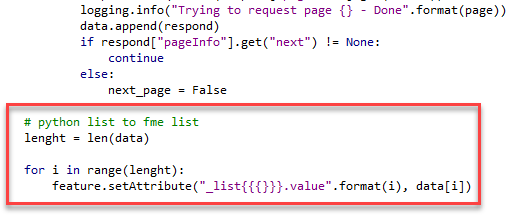
and:

and even this:

maybe the issue with data in my python list (data) ? but it is just array which contain text data.

 

This post is closed to further activity.
It may be an old question, an answered question, an implemented idea, or a notification-only post.
Please check post dates before relying on any information in a question or answer.
For follow-up or related questions, please post a new question or idea.
If there is a genuine update to be made, please contact us and request that the post is reopened.

6 replies

ebygomm
Influencer
Forum|alt.badge.img+46
  • Influencer
  • April 18, 2020

This is how I would create an fme list on a feature from a python list

import fme
import fmeobjects

def processFeature(feature):
    mylist = ["apple","banana","cherry"]
    for i, val in enumerate(mylist):
        feature.setAttribute("list{"+str(i)+"}.fruit", val)

Forum|alt.badge.img

This is how I would create an fme list on a feature from a python list

import fme
import fmeobjects

def processFeature(feature):
    mylist = ["apple","banana","cherry"]
    for i, val in enumerate(mylist):
        feature.setAttribute("list{"+str(i)+"}.fruit", val)

thanks for suggestion, but problem is still the same

0684Q00000ArMgCQAV.png


ebygomm
Influencer
Forum|alt.badge.img+46
  • Influencer
  • April 18, 2020

thanks for suggestion, but problem is still the same

If each item in your list is an array, you will need to convert the array to a string to write it to an attribute value


takashi
Celebrity
  • April 19, 2020

Hi @pavelpostnov, in general, the <TypeError> occurs with the setAttribute method if the data type of the attribute value you have set is not supported in the method. See this document to see what types are supported in the method.

fmeobjects.FMEFeature.setAttribute

According to the code snippets shown in your screenshot, I guess each element of the "data" list is a Python dictionary object, which is not supported as an attribute value to be added to the feature directly. If you intend to store a Python dictionary object as a JSON text into a feature attribute, consider using the dumps method from the json module. See here to learn more.

json — JSON encoder and decoder

Example:

    data = [
        {"A":1, "B":2},
        {"A":3, "B":4}
    ]
    from json import dumps
    feature.setAttribute('_list{}', [dumps(d) for d in data])

Forum|alt.badge.img
  • April 19, 2020

Hi, I think for the list in list, it should be written like this:

feature.setAttribute("_pages{%s}._list_in_list{}" %(int(length)-1), data[length-1])

I wrote an article exactly talking about this, may you take a look and hope it can help you: https://www.linkedin.com/pulse/terminator-fme-trick-can-solve-95-gis-vector-data-scenarios-miles-lee/ 


Forum|alt.badge.img

Hi @pavelpostnov, in general, the <TypeError> occurs with the setAttribute method if the data type of the attribute value you have set is not supported in the method. See this document to see what types are supported in the method.

fmeobjects.FMEFeature.setAttribute

According to the code snippets shown in your screenshot, I guess each element of the "data" list is a Python dictionary object, which is not supported as an attribute value to be added to the feature directly. If you intend to store a Python dictionary object as a JSON text into a feature attribute, consider using the dumps method from the json module. See here to learn more.

json — JSON encoder and decoder

Example:

    data = [
        {"A":1, "B":2},
        {"A":3, "B":4}
    ]
    from json import dumps
    feature.setAttribute('_list{}', [dumps(d) for d in data])

Thanks, a lot. Yes, it was related to my data type in the my python list.







