

Question

transpose data in one recordset to populate another recordset

  • January 12, 2016
  • 7 replies
  • 58 views

Forum|alt.badge.img

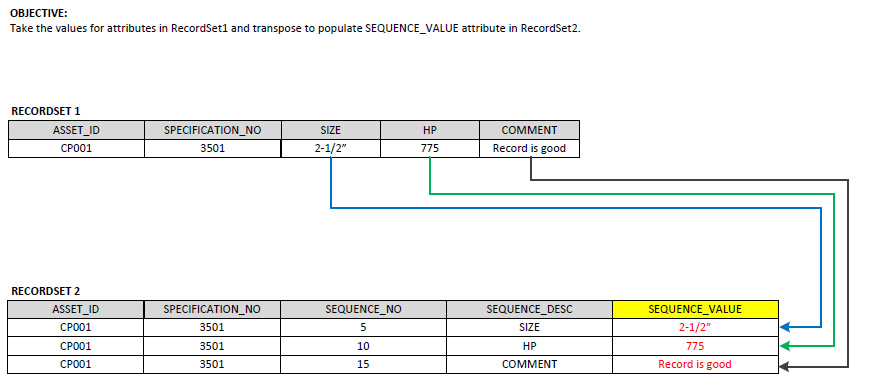
Please see following picture which provides clarification of requirement.

I have two RecordSets (RecordSet1 and RecordSet2) which are derived from same reader. The data will be written to Oracle non-spatial db. I've gotten it to this point with many transformers in between. The final step is to bring in the associated values from RecordSet1 into the SEQUENCE_VALUE attribute in RecordSet2.

I am having challenge with transposing the data and writing it into RecordSet2. Just need some help with an approach (lists, joiner, etc). Whatever is the best approach. Your help is greatly appreciated. Thank you. Zorawar

This post is closed to further activity.
It may be an old question, an answered question, an implemented idea, or a notification-only post.
Please check post dates before relying on any information in a question or answer.
For follow-up or related questions, please post a new question or idea.
If there is a genuine update to be made, please contact us and request that the post is reopened.

7 replies

erik_jan
Contributor
Forum|alt.badge.img+26
  • Contributor
  • January 12, 2016

I would do this:

Read recordset 1.

Use a Cloner to create 3 copies of the records and change the "Copy Number Attribute" to SEQUENCE_NO.

Change SEQUENCE_NO to (SEQUENCE_NO + 1)*5.

Use a TestFilter to test on SEQUENCE_NO = 5 (and 10 and 15).

Use 3 AttributeCreators to create the SEQUENCE_VALUE and SEQUENCE_DESC.

Finally remove all unneeded attributes.

Probably not the fastest solution, but I think this will work.


Forum|alt.badge.img
  • Author
  • January 12, 2016

I would do this:

Read recordset 1.

Use a Cloner to create 3 copies of the records and change the "Copy Number Attribute" to SEQUENCE_NO.

Change SEQUENCE_NO to (SEQUENCE_NO + 1)*5.

Use a TestFilter to test on SEQUENCE_NO = 5 (and 10 and 15).

Use 3 AttributeCreators to create the SEQUENCE_VALUE and SEQUENCE_DESC.

Finally remove all unneeded attributes.

Probably not the fastest solution, but I think this will work.

Thanks erik_jan for your post. I'll try it out.


Forum|alt.badge.img
  • Author
  • January 12, 2016

I would do this:

Read recordset 1.

Use a Cloner to create 3 copies of the records and change the "Copy Number Attribute" to SEQUENCE_NO.

Change SEQUENCE_NO to (SEQUENCE_NO + 1)*5.

Use a TestFilter to test on SEQUENCE_NO = 5 (and 10 and 15).

Use 3 AttributeCreators to create the SEQUENCE_VALUE and SEQUENCE_DESC.

Finally remove all unneeded attributes.

Probably not the fastest solution, but I think this will work.

Erik_jan, you mentioned step 2 to be "Change SEQUENCE_NO to (SEQUENCE_NO+1)*5".... what transformer should be used to accomplish this.

I have just started getting my feet wet with FME. :)


erik_jan
Contributor
Forum|alt.badge.img+26
  • Contributor
  • January 12, 2016

Erik_jan, you mentioned step 2 to be "Change SEQUENCE_NO to (SEQUENCE_NO+1)*5".... what transformer should be used to accomplish this.

I have just started getting my feet wet with FME. :)

ExpressionEvaluator will do.


Forum|alt.badge.img
  • Author
  • January 12, 2016

I would do this:

Read recordset 1.

Use a Cloner to create 3 copies of the records and change the "Copy Number Attribute" to SEQUENCE_NO.

Change SEQUENCE_NO to (SEQUENCE_NO + 1)*5.

Use a TestFilter to test on SEQUENCE_NO = 5 (and 10 and 15).

Use 3 AttributeCreators to create the SEQUENCE_VALUE and SEQUENCE_DESC.

Finally remove all unneeded attributes.

Probably not the fastest solution, but I think this will work.

I just wasn't able to get it working correctly.

Is it possible to compare the RecordSet1 ATTRIBUTE Name with the RecordSet2 SEQUENCE_DESC attribute Value? This would make it a lot easier.

For Example: (Note: This is just for clarification and not correct syntax. )

RecordSet1.SIZE = @value(RecordSet2.SEQUENCE_DESC)

Then populate SEQUENCE_VALUE with the value from RecordSet1.SIZE (@value(RecordSet1.SIZE))

I need it dynamic because it is possible that the ATTRIBUTE will change. This would mean that I have to constantly be modifying my FME workspace.

Your help is VERY much appreciated.


erik_jan
Contributor
Forum|alt.badge.img+26
  • Contributor
  • January 12, 2016

I just wasn't able to get it working correctly.

Is it possible to compare the RecordSet1 ATTRIBUTE Name with the RecordSet2 SEQUENCE_DESC attribute Value? This would make it a lot easier.

For Example: (Note: This is just for clarification and not correct syntax. )

RecordSet1.SIZE = @value(RecordSet2.SEQUENCE_DESC)

Then populate SEQUENCE_VALUE with the value from RecordSet1.SIZE (@value(RecordSet1.SIZE))

I need it dynamic because it is possible that the ATTRIBUTE will change. This would mean that I have to constantly be modifying my FME workspace.

Your help is VERY much appreciated.

I think you want to have a look at the AttributeDereferencer transformer.


takashi
Celebrity
  • January 12, 2016

I just wasn't able to get it working correctly.

Is it possible to compare the RecordSet1 ATTRIBUTE Name with the RecordSet2 SEQUENCE_DESC attribute Value? This would make it a lot easier.

For Example: (Note: This is just for clarification and not correct syntax. )

RecordSet1.SIZE = @value(RecordSet2.SEQUENCE_DESC)

Then populate SEQUENCE_VALUE with the value from RecordSet1.SIZE (@value(RecordSet1.SIZE))

I need it dynamic because it is possible that the ATTRIBUTE will change. This would mean that I have to constantly be modifying my FME workspace.

Your help is VERY much appreciated.

Assuming that the two record sets come from two data flows separately, firstly merge RECORDSET1 to RECORDSET2 with the FeatureMerger (Join On: ASSET_ID and/or SPECIFICATION_NO). Then you can add SEQUENCE_VALUE to the resulting features with the AttributeDereferencer, as @erik_jan suggested.

  • Source Attribute: SEQUENCE_DESC
  • Destination Attribute: SEQUENCE_VALUE

The AttributeDereferencer is equivalent to the AttributeCreator with this setting.

  • Attribute Name: SEQUENCE_VALUE
  • Value: @Value(@Value(SEQUENCE_DESC))





