Question

Installing libraries into FME's Python

  • January 14, 2015
  • 10 replies
  • 300 views

Forum|alt.badge.img
Hi All,


Can anyone advise how to install the python osgeo library into FME's Python. I've inherited a workbench that use these via PythonCaller, but at some point that FME version was removed and a new one installed so whatever was done to the Python install of FME has gone.


Thanks,


Jonathan

This post is closed to further activity.
It may be an old question, an answered question, an implemented idea, or a notification-only post.
Please check post dates before relying on any information in a question or answer.
For follow-up or related questions, please post a new question or idea.
If there is a genuine update to be made, please contact us and request that the post is reopened.

10 replies

david_r
Celebrity
  • January 14, 2015
Hi,


that depends entirely on how the osgeo installer works, as there are several installer types in use with different prerequisites. For a lot of use cases you can follow this:


http://fmepedia.safe.com/articles/How_To/Install-Python-modules-into-FME


For the cases where this isn't possible, I recommend that you download and install a free-standing version of Python (from https://www.python.org/) that matches the one delivered with FME (usually version 2.7). You then configure FME to use this Python interpreter (see: http://fmepedia.safe.com/articles/How_To/Choosing-a-different-Python-Interpreter-installation), where you finally install your 3rd party modules.


David


Forum|alt.badge.img
  • Author
  • January 14, 2015
Hi David,


    Thanks for that. I didn't manage to find the first link during my searches. The downside to this method is - I don't seem to actually be able to find the Python osgeo package downloadable online. :-/ I guess it came with the OSGeo4W installer maybe. Hmmm.


    ----


    I've tried the second method, with a confirmed working install of Python 2.7 (already installed) that has the package installed within it.


    Problem is, FME fails to run when using this method:


    2015-01-14 17:02:15|   1.5|  0.0|ERROR |The User-specified library C:\\Python27\\python27.dll could not be loaded


2015-01-14 17:02:15|   1.5|  0.0|INFORM|Using user-specified Python interpreter from C:\\Python27\\python27.dll


2015-01-14 17:02:15|   1.5|  0.0|FATAL |A Python installation could not be detected. PythonFactory could not initialize


---


Finally, from (http://fmepedia.safe.com/articles/How_To/Python-on-FME-Server#heading_toc_j_1 (I figured I'd give it a try on Desktop)) I've also tried to copy and paste the module directory from the 2.7 install into the FME Python directory. but this just gives me a different error again:


2015-01-14 17:06:19|   2.8|  0.1|ERROR |Python Exception <ImportError>: DLL load failed: %1 is not a valid Win32 application.


So all in all, I'm afraid I remain very confused. :-(


Any thoughts on any of these?


Thanks,


Jonathan

david_r
Celebrity
  • January 14, 2015
Hi,


could it be that your installation of Python 2.7 in C:\\Python27 is a 64-bit version? You will need a 32-bit version of Python for 32-bit FME.


David

Forum|alt.badge.img
  • Author
  • January 14, 2015

Hi David,


Good thought. I don't know the python version, so tested against both FME versions:


FME 32bit error:


2015-01-14 17:25:20|   1.6|  0.0|ERROR |The User-specified library C:\\Python27\\python27.dll could not be loaded


2015-01-14 17:25:20|   1.6|  0.0|INFORM|Using user-specified Python interpreter from C:\\Python27\\python27.dll


2015-01-14 17:25:20|   1.6|  0.0|FATAL |A Python installation could not be detected. PythonFactory could not initialize


=============


FME 64bit result:


2015-01-14 17:26:29|   1.5|  0.0|INFORM|Using user-specified Python interpreter from C:\\Python27\\python27.dll


2015-01-14 17:26:29|   1.5|  0.0|INFORM|Python version 2.7 successfully loaded


2015-01-14 17:26:29|   1.6|  0.1|WARN  |Warning: not all FMESessions that were created were destroyed before shutdown.  This may cause instability


ImportError: No module named site


and then the translation ends with nothing else in the log!


So it may be 64bit, but I'm just getting a different error! :-(


Thoughts still welcome! :-)


Thanks,


Jonathan

david_r
Celebrity
  • January 14, 2015
Hi,


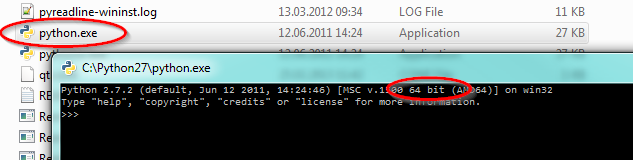
you should check the version by double-clicking on python.exe and see what it says:


David

Forum|alt.badge.img
  • Author
  • January 14, 2015
Yup, 64bit:


Enthought Python Distribution -- www.enthought.com


Version: 7.2-1 (64-bit)


Python 2.7.2 |EPD 7.2-1 (64-bit)| (default, Sep 14 2011, 11:25:00) [MSC v.1500 6


4 bit (AMD64)] on win32


Type "packages", "demo" or "enthought" for more information.

david_r
Celebrity
  • January 15, 2015
There you have the explanation.


32-bit FME needs 32-bit Python.


David

Forum|alt.badge.img
  • Author
  • January 15, 2015
Alas no. Remember that 64bit FME with 64bit python was giving me this; which is arguably even worse because it's failing without saying it's failing.


  FME 64bit result:


2015-01-14 17:26:29|   1.5|  0.0|INFORM|Using user-specified Python interpreter from C:\\Python27\\python27.dll


2015-01-14 17:26:29|   1.5|  0.0|INFORM|Python version 2.7 successfully loaded


2015-01-14 17:26:29|   1.6|  0.1|WARN  |Warning: not all FMESessions that were created were destroyed before shutdown.  This may cause instability


ImportError: No module named site


and then the translation ends with nothing else in the log!

Forum|alt.badge.img
  • Author
  • January 15, 2015

Hi David,


Thanks for the information.


After further testing:


- Issue happens with both 32bit and 64bit.


- Anaconda Python gets the exact same error as Enthought.


- The "site" module is loaded and works fine when I use python.exe in my install and then "import site".


I did manage to find an OSGEO package, but the method from the link - http://fmepedia.safe.com/articles/How_To/Install-Python-modules-into-FME - doesn't work because it seems end up trying to compile the OSGEO thing.


So, I'm afraid I seem to be no closer to finding the solution to this issue than I was when I started this.


Any thoughts welcome!


Thanks,

Jonathan


david_r
Celebrity
  • January 15, 2015
Hi,


you probably need to find a pre-compiled version of osgeo.


If it's GDAL you need, have a look here for a starting point: https://pypi.python.org/pypi/GDAL/


David