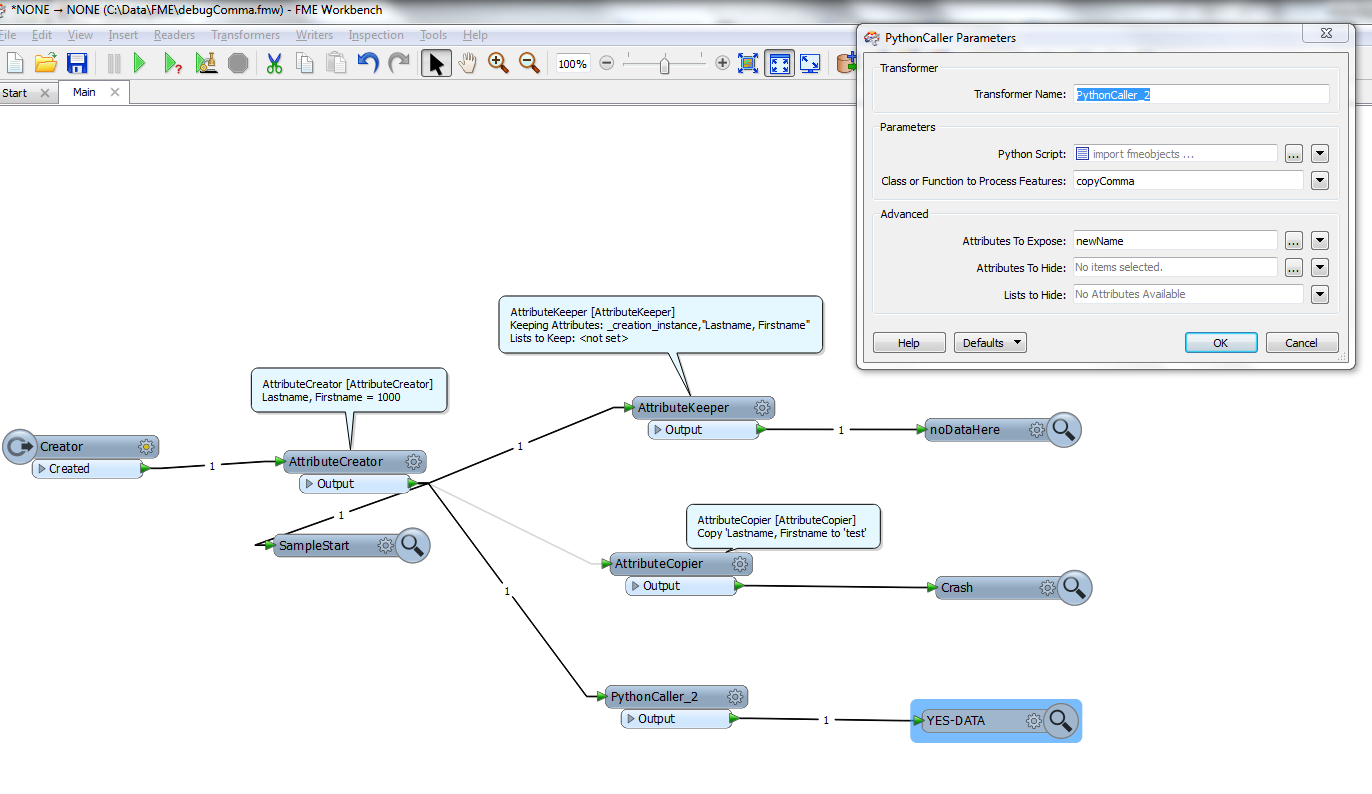
Creator -> attribute creator: Create "Lastname, Firstname"= 1000 -> inspector
Everything OK there. Now add an attributeKeeper to the chain, and tell it to keep "Lastname, Firstname". Guess what? The value 1000 of your attribute "Name, Comma" goes POOF. Its value is now missing.
Now why on earth would anyone want to have comma in attribute names? Well, it is what you get when you fetch data from a variety of sources, including XML.
My guess is that (some) transformer will feed TCL the attribute names as arguments, and since TCL arguments are comma separated it all gets very confusing.
Instead of the attributeKeeper you could add AttributeCopier and copy Lastname, Firstname to whatever attribute you like. AttributeCopier crashes with this error message:
AttributeCopier: CopyAttributes function syntax is: @CopyAttributes([ENCODED,] ATTR_LIST_DEF_VAL, [<oldAttrName>,<newAttrName>, <default value>]+)
Now how on earth can you deal with it? Can't use the name as is (with commas), you'd get totally unpredictable results. Cant change the name...
Python to the resque! You can use python to copy the attribute, preferably to a name without a comma.
Insert this python snippet into the python caller below
8< - -----
import fmeobjects
# Template Function interface
def copyComma(feature):
commaName = feature.getAttribute('Lastname, Firstname')
if commaName:
feature.setAttribute("newName", commaName)
8<---
That's it!