Question

Extrude TIN surface

  • May 1, 2020
  • 4 replies
  • 139 views

nielsgerrits
VIP
Forum|alt.badge.img+64

Forgive my probably dumb question as I am still learning the volume type data.

My end goal is to create a volume object from a pointcloud and export it as a solid for cad. I suspected this had to be easy but it might be harder than I anticipated.

What I did was feed the pointcloud to a TinGenerator and I got an acceptable surface, which I can apparently not symply extrude. This is all I want, an extruded surface with a thickness of 1 meter.

I found the BRepSolidBoundaryCreator.Beta on the hub but it needs python 2.7 which I didn't install last time apparently.

Do I want something impossible or am I missing the obvious?

Thanks for looking :-)

This post is closed to further activity.
It may be an old question, an answered question, an implemented idea, or a notification-only post.
Please check post dates before relying on any information in a question or answer.
For follow-up or related questions, please post a new question or idea.
If there is a genuine update to be made, please contact us and request that the post is reopened.

4 replies

redgeographics
Celebrity
Forum|alt.badge.img+62

You should be able to extrude the TIN Triangles coming out of the TINGenerator though.


owen
Forum|alt.badge.img+1
  • May 1, 2020

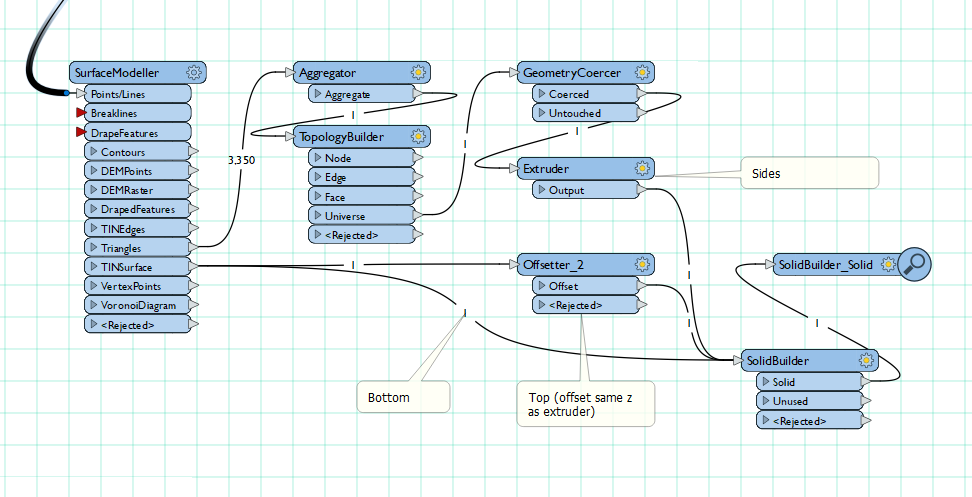
Hello, you can do it by extruding the surface edge, offsetting the surface and sandwiching together like this. Owen


nielsgerrits
VIP
Forum|alt.badge.img+64

You should be able to extrude the TIN Triangles coming out of the TINGenerator though.

Thanks for the suggestion Hans, it works great when writing to multipatch but I can't get it to cad, yet. :-)


nielsgerrits
VIP
Forum|alt.badge.img+64

Hello, you can do it by extruding the surface edge, offsetting the surface and sandwiching together like this. Owen

Ha this sounds like the solution I was looking for @owen, thanks! Will try this next possibility but it looks promising.