Question

Read dinamically any Excel file without header

  • September 3, 2024
  • 3 replies
  • 49 views

david_
Contributor
Forum|alt.badge.img+8

Is there any way to read dynamically any excel file and that the header are simply the column name A, B, C, D...

Through a Reader I can read any Excel file but the problem is that it always takes the first row as the header.

Thank you!

3 replies

hkingsbury
Celebrity
Forum|alt.badge.img+67
  • Celebrity
  • September 3, 2024

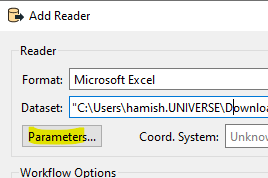
When you add your reader, click ‘parameters...’
 

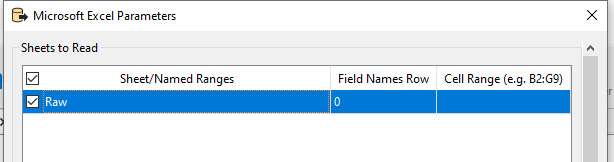
then set ‘Field Names Row’ to ‘0’


david_
Contributor
Forum|alt.badge.img+8
  • Author
  • Contributor
  • September 4, 2024

Hi @hkingsbury , thank you for your answer.

However, as I explained, I need to read dinamically any Excel file so I can't select a sheet in the parameters view and set ‘Field Names Row’ to ‘0’.

I manage to read any file and get the features through the generic port. However, FME always interprets the first row as header and this is what I don't want.


nielsgerrits
VIP
Forum|alt.badge.img+64

The way I do this is to use the Generic Reader. This results in columns like col0, col1, col2, etc...