Question

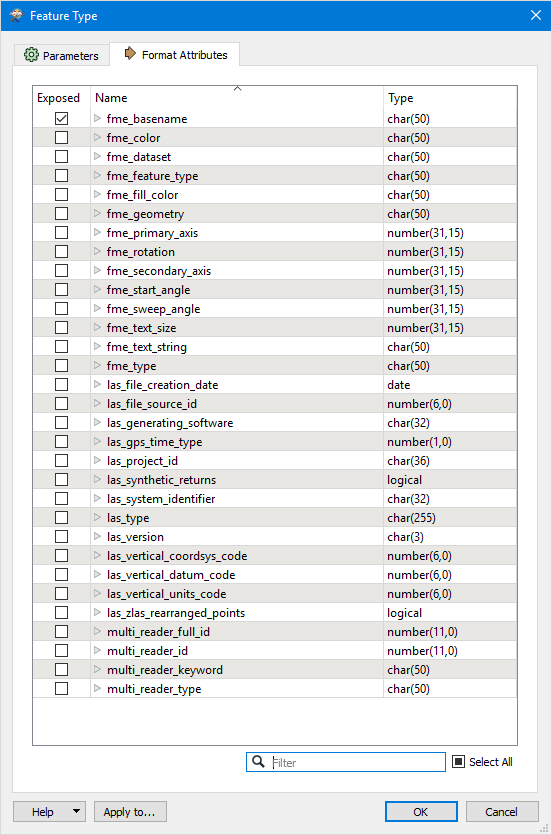
LAS data attributes does not have x, y and z. But I can see x,y,z in data inspector.

  • February 7, 2019
  • 4 replies
  • 51 views

I have LAS files that do not have any x,y,z fields to hold such values (seen in the image). Any way to fix it? I want to then export the x,y, z values to a csv file if possible or use it for further analysis.

 

This post is closed to further activity.
It may be an old question, an answered question, an implemented idea, or a notification-only post.
Please check post dates before relying on any information in a question or answer.
For follow-up or related questions, please post a new question or idea.
If there is a genuine update to be made, please contact us and request that the post is reopened.

4 replies

danilo_fme
Celebrity
Forum|alt.badge.img+52
  • Celebrity
  • February 7, 2019

Hello

Please check this link.

I believe is the same question.

https://knowledge.safe.com/questions/84363/store-all-components-to-a-pointcloud.html


Thanks,

Danilo


lars_de_vries
Forum|alt.badge.img+10

Hello

Please check this link.

I believe is the same question.

https://knowledge.safe.com/questions/84363/store-all-components-to-a-pointcloud.html


Thanks,

Danilo

@danilo_fme link doesn't seem to work, although it seems tot be the right link. Correct link


virtualcitymatt
Celebrity
Forum|alt.badge.img+47

Hi @danishukani - You wont be able to see point cloud components in the list of attributes.


If you want to export the point cloud to a CSV can I suggest that you try and use the PointCloudXYZ Writer: https://docs.safe.com/fme/html/FME_Desktop_Documentation/FME_ReadersWriters/pointcloudxyz/pointcloudxyz.htm


This can output an ASCII file and should be a pretty quick transformation.


danilo_fme
Celebrity
Forum|alt.badge.img+52
  • Celebrity
  • February 7, 2019

@danilo_fme link doesn't seem to work, although it seems tot be the right link. Correct link

Thanks @lars_de_vries

I sent it by mobile :)