Question

How can I Convert an esri feature class to a KML and assign colors based on the attributes in the feature class

  • March 26, 2018
  • 3 replies
  • 36 views

How can I Convert an esri feature class to a KML and assign colors based on the attributes in the feature class


I have some line feature classes (roads) which have a condition rating and a color based on that rating.

i would like to convert these feature classes to KML and assign them colors based on the condition rating.


 

This post is closed to further activity.
It may be an old question, an answered question, an implemented idea, or a notification-only post.
Please check post dates before relying on any information in a question or answer.
For follow-up or related questions, please post a new question or idea.
If there is a genuine update to be made, please contact us and request that the post is reopened.

3 replies

jdh
Contributor
Forum|alt.badge.img+40
  • Contributor
  • March 26, 2018

You can use the KMLStyler to assign colours to features, the colour can come from an attribute, so you can use a conditional attributeCreator or an AttributeValueMapper to assign the colour code based on the condition rating.
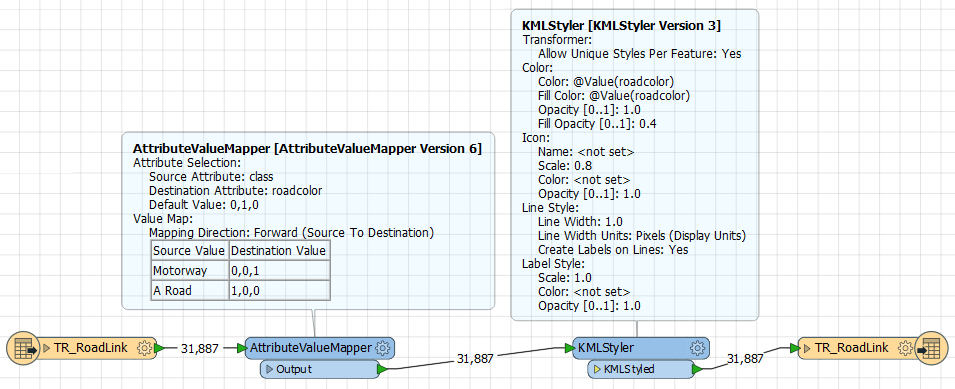


Then just send the features to a Google KML writer.

arnold_bijlsma
Enthusiast
Forum|alt.badge.img+15

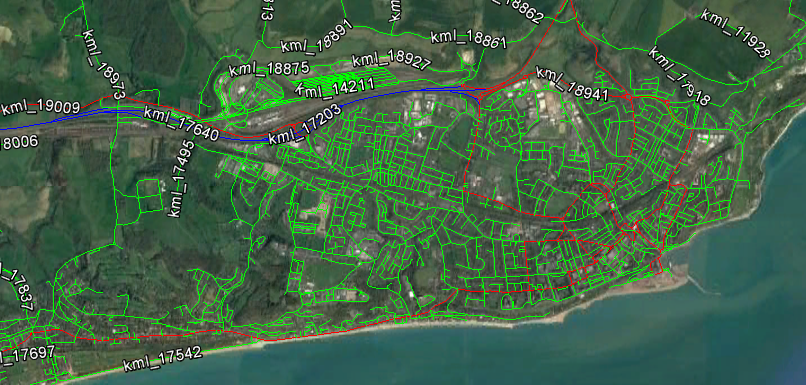
As explained by @jdh using UK's OS Open Roads data:

Use a KMLPropertySetter to change the labels and the balloon text (= pop-up).


jdh
Contributor
Forum|alt.badge.img+40
  • Contributor
  • April 3, 2018

As explained by @jdh using UK's OS Open Roads data:

Use a KMLPropertySetter to change the labels and the balloon text (= pop-up).

Then use the KMLPropertySetter to give your features a kml name, so that the labels are more interesting (like Road Names).