

Solved

Fetch PDF/ TIF files from one server, Copy to another using common reference numbers in SQL database and Excel source file

  • February 25, 2019
  • 3 replies
  • 42 views

Forum|alt.badge.img

Hi there,

Probably a fairly simple one for you, but I'm a total novice!

I have hundreds of thousands of files in PDF and TIF formats hosted on a server - lets call it Server 1.

In a SQL2008 database on another server called Server 2, I have over 100000 records which contain a specific reference number which links these files individually (so that one reference number might be linked to several PDFs or TIFs using the same reference number, e.g. Ref number 19994321 on Server 2 will be related to PDFs/ TIFs with the Ref number 19994321 on Server 1).

In an Excel spreadsheet, I have a list of the reference numbers on Server 2 that I want to retrieve files for from Server 1 and I need to call them using two field names in the SQL database which defines the PDF/ TIF- under either 'Subject_Name' or 'doc_Type' and containing certain words as a parameter to narrow the search: 'Site Location Map' and/ or 'Location'.

I want to then copy those files (once identified from Server 1) to another location - call it Server 3.

Would really value any help setting up the workbench for this..

Thanks all
Best answer by markatsafe

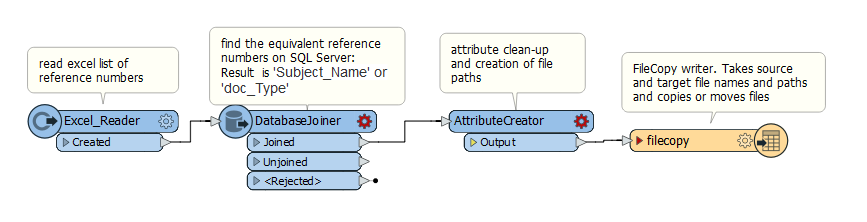
I've created a mock-up workspace that should illustrate the major steps. The key is the FileCopy writer which can take a source file name/path and copy or move a file to a target location.

This post is closed to further activity.
It may be an old question, an answered question, an implemented idea, or a notification-only post.
Please check post dates before relying on any information in a question or answer.
For follow-up or related questions, please post a new question or idea.
If there is a genuine update to be made, please contact us and request that the post is reopened.

3 replies

Forum|alt.badge.img+2
  • Best Answer
  • February 26, 2019

I've created a mock-up workspace that should illustrate the major steps. The key is the FileCopy writer which can take a source file name/path and copy or move a file to a target location.


Forum|alt.badge.img
  • Author
  • February 26, 2019

That's great Mark - I'll give it a go - thank you so much!


Forum|alt.badge.img
  • Author
  • May 16, 2019

I've created a mock-up workspace that should illustrate the major steps. The key is the FileCopy writer which can take a source file name/path and copy or move a file to a target location.

Hi Mark, thanks again for your help - I can't source the excel reader transformer,, would you be able to help me please?

many thanks, Irene
