


Solved

Can FME output curly brackets instead of square brackets in JSON output? Can I insert text between the first and second open brackets in the JSON output?

  • March 29, 2021
  • 5 replies
  • 110 views

Forum|alt.badge.img

I am converting geodatabase data to JSON and using the HTTPCALLER to upload to an API. The JSON output from FME is adding square brackets[] as the first set of brackets but the API is looking for curly brackets{}. Is there a way for FME to output curly brackets instead of square brackets?

The API is also looking for some additional text between the first and second open brackets. Can I insert additional text between the brackets in the JSON output?

For example the FME JSON Writer is writing [{json text}] but the API is looking for {site:{json text}}


Thanks, David

Best answer by hollyatsafe

Hi @dkirouac​ ,


The JSON writer will always output features as an array of JSON objects, that is, enclose them in square brackets. If you'd like the JSON to be formatted another way I'd suggest using the JSONTemplater Transformer to create the JSON string as you require and then write this out to TEXT so it does not get altered in any way.


Check out the article Writing JSON with JSONTemplater to learn more and see an example.

This post is closed to further activity.
It may be an old question, an answered question, an implemented idea, or a notification-only post.
Please check post dates before relying on any information in a question or answer.
For follow-up or related questions, please post a new question or idea.
If there is a genuine update to be made, please contact us and request that the post is reopened.

5 replies

Forum|alt.badge.img+2
  • Best Answer
  • March 29, 2021

Hi @dkirouac​ ,


The JSON writer will always output features as an array of JSON objects, that is, enclose them in square brackets. If you'd like the JSON to be formatted another way I'd suggest using the JSONTemplater Transformer to create the JSON string as you require and then write this out to TEXT so it does not get altered in any way.


Check out the article Writing JSON with JSONTemplater to learn more and see an example.


Forum|alt.badge.img
  • Author
  • March 30, 2021

Hi @dkirouac​ ,


The JSON writer will always output features as an array of JSON objects, that is, enclose them in square brackets. If you'd like the JSON to be formatted another way I'd suggest using the JSONTemplater Transformer to create the JSON string as you require and then write this out to TEXT so it does not get altered in any way.


Check out the article Writing JSON with JSONTemplater to learn more and see an example.

Thanks Holly. I will check out the JSON Templater.


Forum|alt.badge.img
  • Author
  • April 2, 2021

Hi @dkirouac​ ,


The JSON writer will always output features as an array of JSON objects, that is, enclose them in square brackets. If you'd like the JSON to be formatted another way I'd suggest using the JSONTemplater Transformer to create the JSON string as you require and then write this out to TEXT so it does not get altered in any way.


Check out the article Writing JSON with JSONTemplater to learn more and see an example.

I am able to use the JSON Templater to format the JSON as needed. I need to upload the JSON to an API using the HTTPCALLER. Is it possible to upload the JSON directly from the JSON Templater to the HTTPCALLER or do I need to physically create a JSON file and then upload the JSON file?


Thanks, David


takashi
Celebrity
  • April 4, 2021

Hi @dkirouac​ ,

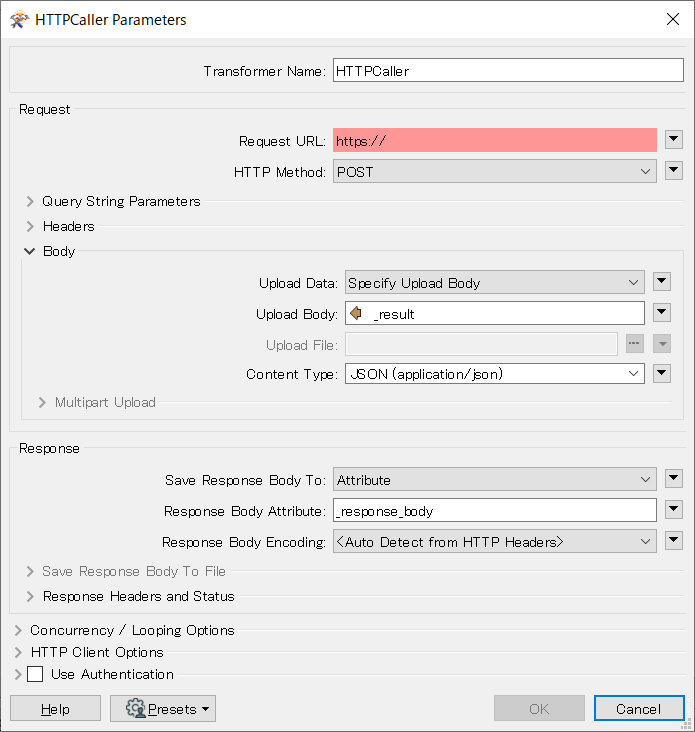
If you would like to upload a JSON document stored in a feature attribute (e.g. called "_result") as the body of a POST request, you can set the attribute to the Upload Body parameter in the HTTPCaller.


httpcaller-parameters-example 


Forum|alt.badge.img
  • Author
  • April 5, 2021

Hi @dkirouac​ ,

If you would like to upload a JSON document stored in a feature attribute (e.g. called "_result") as the body of a POST request, you can set the attribute to the Upload Body parameter in the HTTPCaller.


httpcaller-parameters-example 

That works. Thank you Takashi.