
Best Answer

Why does FME Desktop create duplicate Readers for the same data source with the same connection & parameters?

  • October 8, 2021
  • 1 reply
  • 103 views

I am new to FME and going through the unit "Quickly Create a Conversion Workflow " of "Integrate Your Data with the FME Platform". In that unit, we create a reader to a PostGIS database.


My understanding is that what we see on the canvas is just the "feature types" of that database, aka individual tables. I thought that they would all connect to the same "reader" in the background.


But when I added two new readers to the canvas (marked 2 and 3 in the image), they created brand-new readers in the navigator. Even in the case of reader 3, which has the exact same parameters as reader 1!
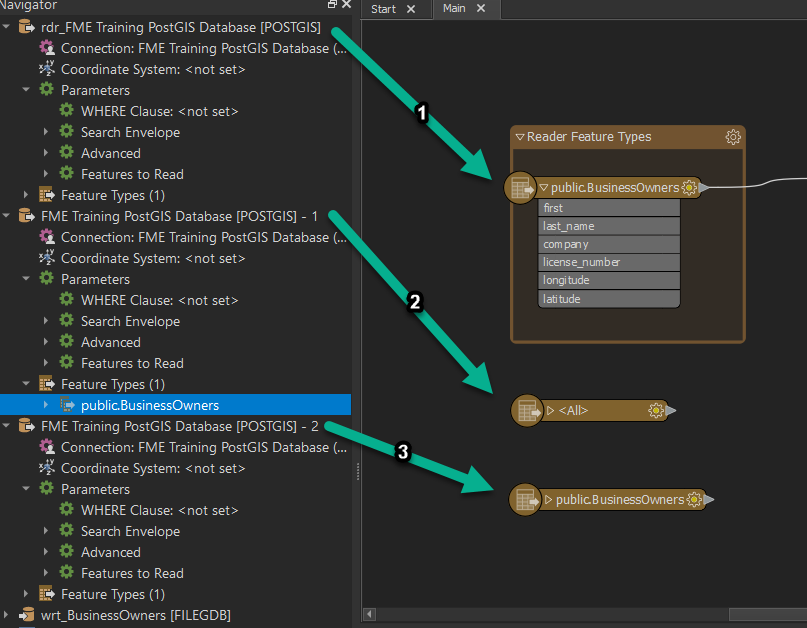
DuplicateReadersCan you please suggest if there's any way to modify the feature type marked 3, to make it use the reader marked 1? When I open the feature type's properties, they are greyed out.
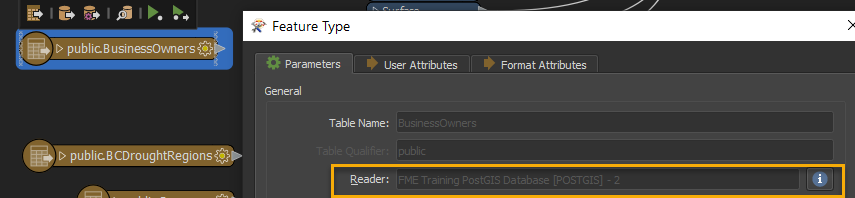
ReaderOptionGreyed 

The only options I see right now are:

  • keep both readers and maintain "connection parameters" in both, or
  • recreate that feature type from reader 1 and manually configure it as per the original feature type


Best answer by virtualcitymatt

The benefit of being able to have multiple readers for the same dataset is so you can configure the settings differently.

But in your case the best option is to use the Import Feature types which can be found if you right click on the reader in the Navigatior. I think you'll still need to reconfigure the feature type though.​

This post is closed to further activity.
It may be an old question, an answered question, an implemented idea, or a notification-only post.
Please check post dates before relying on any information in a question or answer.
For follow-up or related questions, please post a new question or idea.
If there is a genuine update to be made, please contact us and request that the post is reopened.

1 reply

virtualcitymatt
Celebrity
Forum|alt.badge.img+47
  • Celebrity
  • Best Answer
  • October 9, 2021

The benefit of being able to have multiple readers for the same dataset is so you can configure the settings differently.

But in your case the best option is to use the Import Feature types which can be found if you right click on the reader in the Navigatior. I think you'll still need to reconfigure the feature type though.​

