




Best Answer

ExcelWriter not using ExcelStyler formatting

  • February 18, 2021
  • 1 reply
  • 47 views

jwarren
Contributor
Forum|alt.badge.img+5

I cannot get the ExcelWriter to use the ExcelStyler's formatting. I have found a demo worksheet in another question which works fine. I have deleted the writer and replaced it with my own (I think identical) writer, but it's not working and I have no idea why!


I have attached both worksheets. If someone could point out the difference between the two I would be very grateful. I've tried a diff checker against the XML code in the files, but nothing is jumping out at me.
Best answer by ebygomm

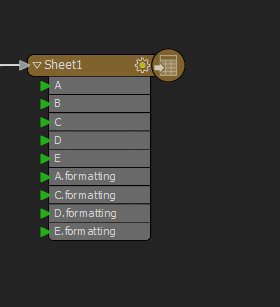
I would expect to have to expose the format attributes for excel styling to be working, e.g.

CaptureFor some reason it seems not to be required in your working workspace which is using a 2018.0 (Build 18244) writer



This post is closed to further activity.
It may be an old question, an answered question, an implemented idea, or a notification-only post.
Please check post dates before relying on any information in a question or answer.
For follow-up or related questions, please post a new question or idea.
If there is a genuine update to be made, please contact us and request that the post is reopened.

1 reply

ebygomm
Influencer
Forum|alt.badge.img+46
  • Influencer
  • Best Answer
  • February 19, 2021

I would expect to have to expose the format attributes for excel styling to be working, e.g.

CaptureFor some reason it seems not to be required in your working workspace which is using a 2018.0 (Build 18244) writer
