Question

How to get Batch Deploy to output multiple files

  • January 30, 2020
  • 2 replies
  • 31 views

FME(R) 2019.2.1.0 (20191202 - Build 19813 - WIN64)

Hi,

Int the following reference - https://docs.safe.com/fme/html/FME_Desktop_Documentation/FME_Workbench/Workbench/Running_a_Batch_Translation.htm

Under the heading - Running a batch translation

The following is stated;

For example, you can apply an existing workspace transformation to a large number of input files, and produce separate outputs for each.

How do you implement this, ie output to sepate output files?

I have set up Batch Deploy to use a folder as its source.

I have Run my workspace using the Batch Deploy method, but it continually overwrites the single file.

Ben

 

This post is closed to further activity.
It may be an old question, an answered question, an implemented idea, or a notification-only post.
Please check post dates before relying on any information in a question or answer.
For follow-up or related questions, please post a new question or idea.
If there is a genuine update to be made, please contact us and request that the post is reopened.

2 replies

nielsgerrits
VIP
Forum|alt.badge.img+64

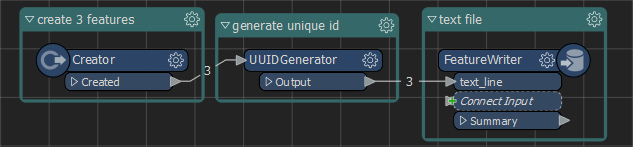
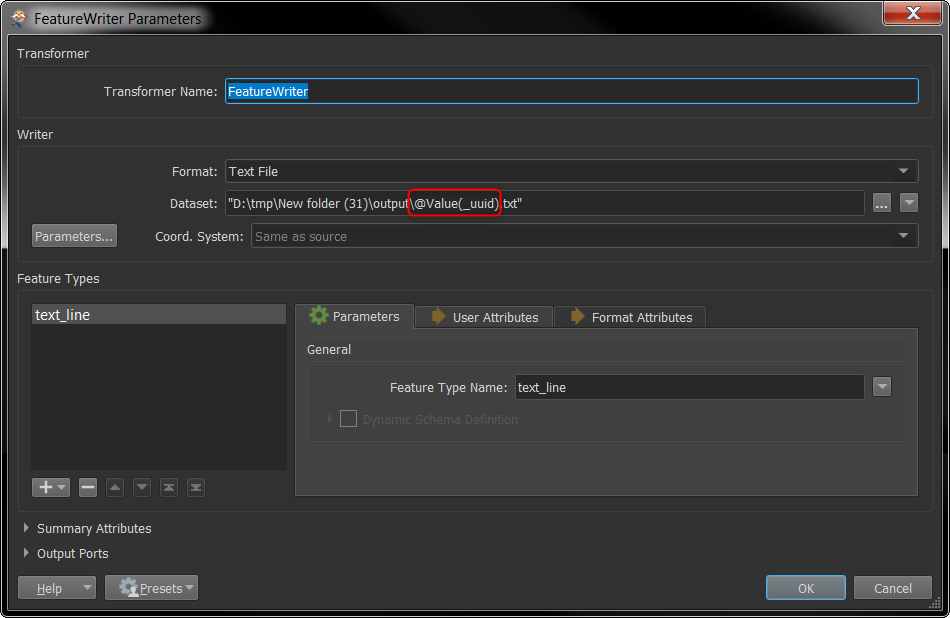
You need to configure the (Feature)Writer to write to a filename based on a unique attribute.

WriteDynamic(2019_1_2).fmwt


  • Author
  • January 31, 2020

You need to configure the (Feature)Writer to write to a filename based on a unique attribute.

WriteDynamic(2019_1_2).fmwt

@nielsgerrits Thank You.

Ben