Question

Datadownload service fanout directory

  • July 11, 2017
  • 6 replies
  • 22 views

jdh
Contributor
Forum|alt.badge.img+40

When using a fanout on a writer and the fme server datadownload service, is it possible to get a zipfile that does not include the top level directory "dataset"?

ex.

Destination Fanout Directory : $(FME_SERVER_DEST_DIR)


Fanout Expression: A\\file


will produce a zipfile containing


dataset\\A\\file


and what I would like is just


A\\file

 

This post is closed to further activity.
It may be an old question, an answered question, an implemented idea, or a notification-only post.
Please check post dates before relying on any information in a question or answer.
For follow-up or related questions, please post a new question or idea.
If there is a genuine update to be made, please contact us and request that the post is reopened.

6 replies

Forum|alt.badge.img+2
Hi @jdh


Is this using FME Server 2017?

erik_jan
Contributor
Forum|alt.badge.img+26
  • Contributor
  • July 13, 2017

I have had the same issue using the $(FME_SERVER_SHAREDRESOURCE_DATA) as a destination folder.

That too adds the folder to the ZIP download.


jdh
Contributor
Forum|alt.badge.img+40
  • Author
  • Contributor
  • July 13, 2017
Hi @jdh


Is this using FME Server 2017?
At the moment, I'm using 2016, but I will be upgrading to 2017.1 in August (assuming it's released).


erik_jan
Contributor
Forum|alt.badge.img+26
  • Contributor
  • July 13, 2017

I have had the same issue using the $(FME_SERVER_SHAREDRESOURCE_DATA) as a destination folder.

That too adds the folder to the ZIP download.

And I noticed this in FME Server 2016 and 2017.


Forum|alt.badge.img+2

Hi @erik_jan and @jdh

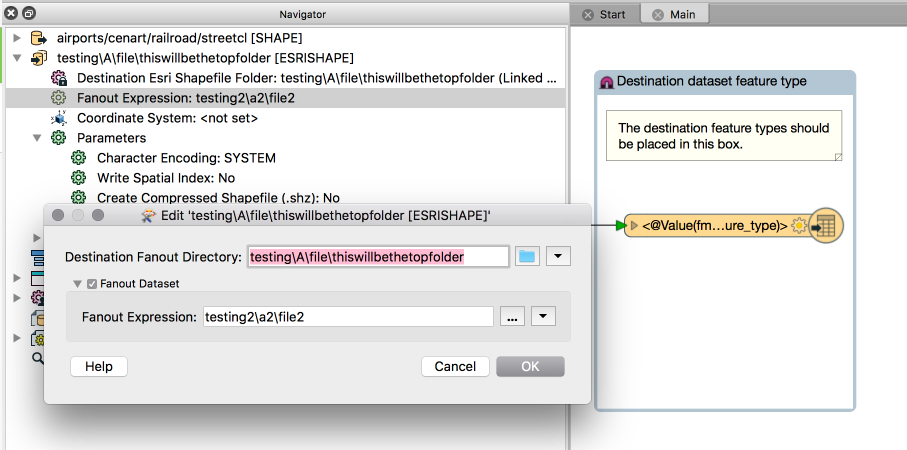
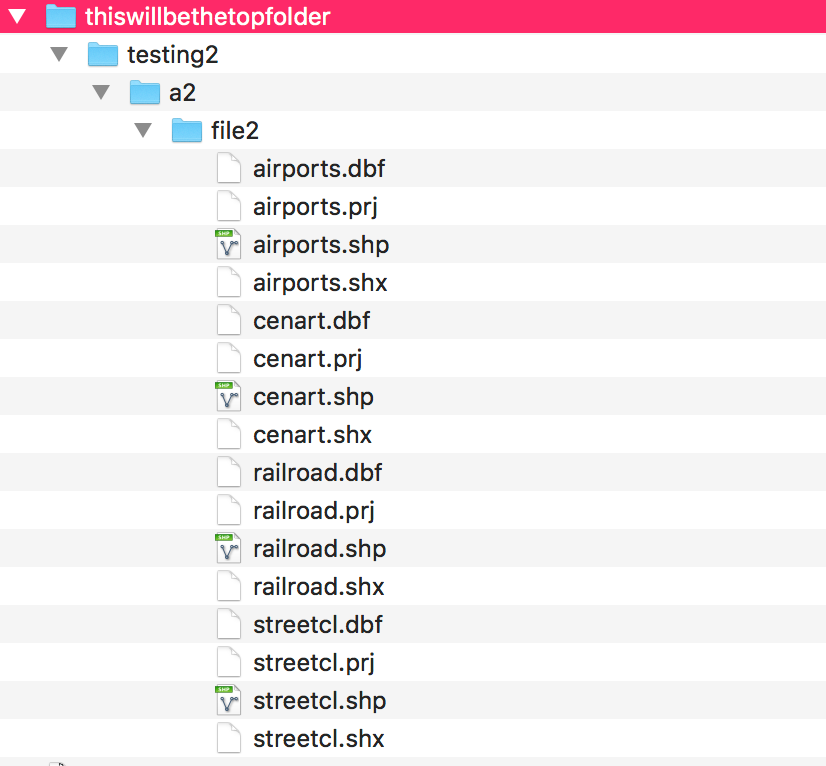
I think I may have an answer, shown as images:


In workbench:


Result of the download (unzipped):


Some more findings:


If I leave dest destination folder empty, or assigned to a parameter it gives me the folder called 'dataset' within the zip folder and then all of the data.


If in workbench I set the destination directory to Desktop (for example) it goes zip > Desktop > data (instead of zip > dataset > data). It always seems to pick up the last folder in the path to use as the top level folder.


If I set the output director in workbench to just be a . (working directory) it goes zip > folder (named the same as zip file) > data


jdh
Contributor
Forum|alt.badge.img+40
  • Author
  • Contributor
  • July 19, 2017

Hi @erik_jan and @jdh

I think I may have an answer, shown as images:


In workbench:


Result of the download (unzipped):


Some more findings:


If I leave dest destination folder empty, or assigned to a parameter it gives me the folder called 'dataset' within the zip folder and then all of the data.


If in workbench I set the destination directory to Desktop (for example) it goes zip > Desktop > data (instead of zip > dataset > data). It always seems to pick up the last folder in the path to use as the top level folder.


If I set the output director in workbench to just be a . (working directory) it goes zip > folder (named the same as zip file) > data


For some reason I had to recreate the workspace from scratch, but putting " ." in the fanout dir is now producing a zip file with the desired folder structure.