


Question

How to change NaN to NoData?

  • November 17, 2014
  • 19 replies
  • 439 views

makt
Contributor
Forum|alt.badge.img+1
I have a workflow where I am creating a raster using SurfaceModeler. As documented, this transformer may output some NaN values when using PLANAR interpolation. I indeed have a few cells that come out with a NaN value.

Β 

Β 

I am not certain what transformer can change my NaN values to NoData values (or any other values)?

Β 

Β 

I read through this article:Β http://blog.safe.com/2013/11/fmeevangelist119/

Β 

and thought the NullAttributeMapper would be the answer, but it does not seem so.

Β 

Β 

Β 
This post is closed to further activity.
It may be an old question, an answered question, an implemented idea, or a notification-only post.
Please check post dates before relying on any information in a question or answer.
For follow-up or related questions, please post a new question or idea.
If there is a genuine update to be made, please contact us and request that the post is reopened.

19 replies

fmelizard
Safer
Forum|alt.badge.img+22
  • Safer
  • November 17, 2014
try the nodatasetter.

takashi
Celebrity
  • November 18, 2014

Β 

Hi,

Β 

Β 

Have you tried setting a preferable Nodata value to the "Output DEM Raster Nodata Value" parameter of the SurfaceModeller?

Β 

Β 

Takashi

fmelizard
Safer
Forum|alt.badge.img+22
  • Safer
  • November 18, 2014
Your error suggest that the value nan is not acceptable for a raster , try a numeric value such as 9999 or 0 for your nodata value.

makt
Contributor
Forum|alt.badge.img+1
  • Author
  • Contributor
  • November 18, 2014
Hey Talashi - I already have a NoData value that is working, which is -32767.0, then I also have NaN cells as well so I don't think this setting is what I am looking for.

Β 

Β 

Itay - I think you are getting at the NoData value? My understanding of NaN is that is is not a number so it would not be 9999 or 0.

Β 

Β 

To simply my question: given that you have a 32 bit raster that has normal double values, has a NoData value set as -32767.0, and also has NaN values, what is the simplest way to make the NaN values into NoData values?

Β 

Β 

I have managed to do this but I'm not sure how efficient the process would be with larger datasets:

Β 

I first convert the raster to points, then do a AttributeClassifier (passing only points that are "double") and then using NumericRasterizer to arrive back at a raster. This does the trick but is there a more efficient method?

Β 

Β 

Β 

fmelizard
Safer
Forum|alt.badge.img+22
  • Safer
  • November 18, 2014
I would try the RasterCellValueReplacer, but I have my doubts about it....

makt
Contributor
Forum|alt.badge.img+1
  • Author
  • Contributor
  • November 18, 2014
Just tried RasterCellValueReplacer, if I input 'nan' into the parameters, the output is a blank raster, so I don't think it is meant to replace a nan value.Β 

takashi
Celebrity
  • November 18, 2014

It seems that "nan" is treated internally as a numeric value smaller than any valid value when comparing values.

Try the RasterCellValueReplacer with this setting:

Replace Values <=: -32767

New Value: -32767


makt
Contributor
Forum|alt.badge.img+1
  • Author
  • Contributor
  • November 19, 2014
much more efficient !

Β 

thanks to you both

takashi
Celebrity
  • June 16, 2019

It seems that "nan" is treated internally as a numeric value smaller than any valid value when comparing values.

Try the RasterCellValueReplacer with this setting:

Replace Values <=: -32767

New Value: -32767

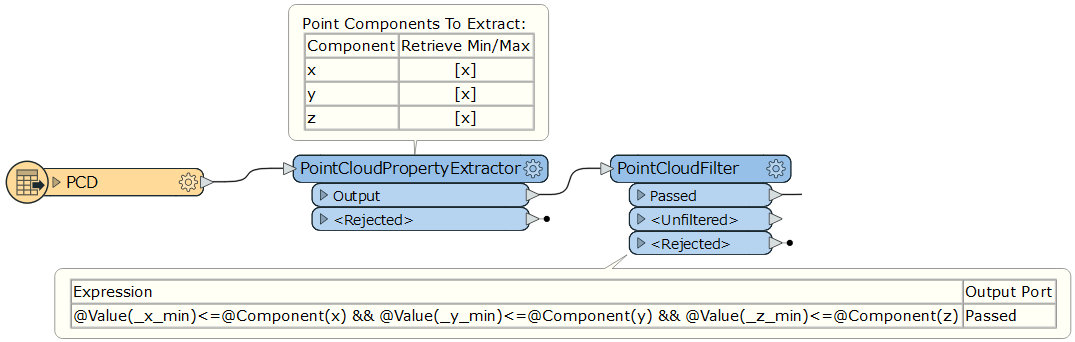
An application. This workflow removes every "nan" point from the source point cloud feature.


pdorio
Contributor
Forum|alt.badge.img+8
  • Contributor
  • September 17, 2024

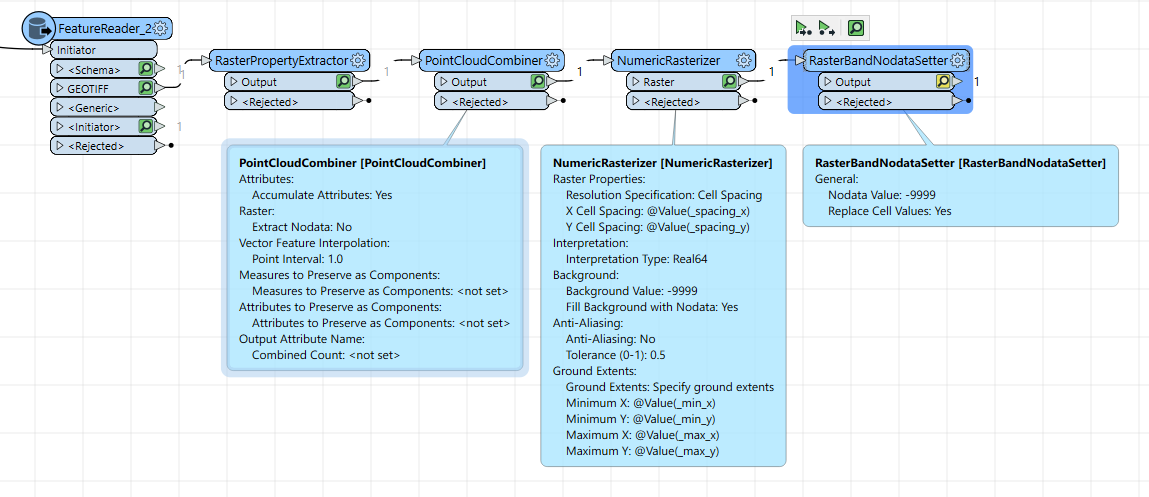
By me works well with raster with NaN nan or -nan Nodata value:

  1. RasterPropertyExtractor
  2. PointCloudCombiner with options: Extract NoData = No

  3. NumericRasterizer, set Cell Spacing and extent with the value extracted with RasterPropertyExtractor. Set your nodata value, example -9999

    Β 


ekkischeffler
Contributor
Forum|alt.badge.img+7

I’ve just tried this in FME 2025.1 but there doesn’t seem to be a real solution to this. I tried (various combinations of):

  • RasterCellValueReplacer (using the <= approach)
  • RasterBandNodataRemover
  • RasterExpressionEvaluator:Β @if(A[0]==nan,999,A[0])
  • RasterExpressionEvaluator:Β @if(A[0]<=-99,999,A[0])
  • RasterExpressionEvaluator:Β @if(@isnodata(A[0]),999,A[0])
  • RasterExpressionEvaluator:Β @if(@isnodata(A[0])==1,999,A[0])
  • RasterBandNodataSetter: Replace Cell Values - Yes

None of the above seems to handle the nan values. As a workaround I’ve tried:

  • RasterCellCoercer: Extract Nodata Values - No: this still extracts nan-cells! Need to combine this with a Tester afterwards to remove band values < -9999 (or similar)
  • PointCloudCombiner: Extract Nodata - No: this works

Both workarounds add a lot of unnecessary processing, especially with large raster files, and they would require rebuilding a raster if required.

Β 

The only other option I can see is manipulating the raster geometry via a PythonCaller.

Β 

Have I missed something - any other suggestions?


jkr_wrk
Influencer
Forum|alt.badge.img+37
  • July 25, 2025

But what are the real values of the rastercell in binary? This could give a hint in the solution.


ekkischeffler
Contributor
Forum|alt.badge.img+7

​@jkr_wrkΒ the IMG raster was created with -999 as nodata value and defined as such.


jkr_wrk
Influencer
Forum|alt.badge.img+37
  • July 28, 2025

And where does the NaN come from?

The cell values are numeric/floating. Setting a value to -999 is done on the cell value and calling -999 NoData is done in the 'metadata’.

If you convert your service to a raster and click on a location that had a nan value does it appear as -999 or NoData or does it appear as some other value?

I probably just don’t understand the problem fully, so could be dumb questions.


ekkischeffler
Contributor
Forum|alt.badge.img+7

​@jkr_wrkΒ thanks, I probably should have been clearer. No dumb questions!

The raster is being read directly via the ERDAS IMG reader. When I read the raster, the values in question come through as nan and do display as nan in the data inspector. I will need to manage the nodata values, ideally without conversion to vectors.

I do know that the original nodata value was -999 when the raster was written as IMG, plus the nodata value shows as -999 in the ArcPro raster metadata as well.

I was hoping the IMG reader would allow controlling the way nodata is being reproduced but I can’t see a relevant parameter there.


jkr_wrk
Influencer
Forum|alt.badge.img+37
  • July 30, 2025

Did you try the nodata remover?


ekkischeffler
Contributor
Forum|alt.badge.img+7

Yes, as per my post above.Β 


jkr_wrk
Influencer
Forum|alt.badge.img+37
  • July 31, 2025

I can’t think of any other solutions at this moment. Could you supply a small sample data? And your current not working transformers? Maybe someone else has an revelation when looking at the not working sample.


itsmatt
Celebrity
Forum|alt.badge.img+47
  • Celebrity
  • July 31, 2025

Are you able to extract all cells which are >=0 ORΒ <=0? I would expectΒ this should not include NaN?